
What Time
WhatTime.dev provides real-time global time zone conversion, meeting planning, and local time details for teams and travelers worldwide.
Visit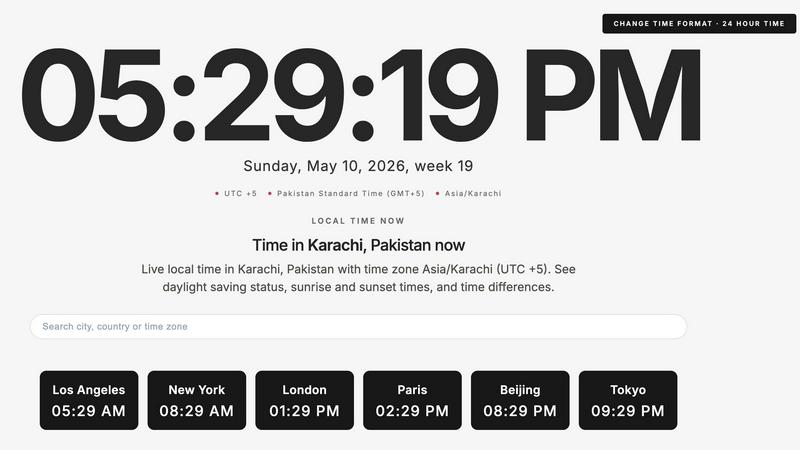
About What Time
What Time is a comprehensive, modern time zone platform designed for remote teams, freelancers, developers, businesses, and anyone working across multiple countries. The platform provides an authoritative and research-backed solution for comparing time zones, checking UTC and GMT offsets, viewing local times around the world, and planning meetings across different regions without the confusion of daylight saving changes or manual calculations. What Time includes a powerful meeting planner that helps users quickly identify overlapping working hours between cities and countries, making scheduling international calls and remote collaboration significantly more efficient. The platform covers major global cities including Abu Dhabi, Amsterdam, Beijing, Berlin, Dubai, London, New York, Paris, Tokyo, and Sydney, along with comprehensive time zone standards such as UTC, GMT, CET, Pacific Time, Mountain Time, Central Time, Eastern Time, China Standard Time, and India Standard Time. Each city page provides detailed information including current local time, time zone details, daylight saving status, IANA time zone identifiers, sunrise and sunset times, day length, and solar noon. Additionally, What Time offers integrated environmental data including temperature, weather conditions, wind speed, and air quality index (AQI) with PM2.5 measurements. The platform features a clean, distraction-free interface optimized for speed and usability, with no clutter and no unnecessary setup required. What Time serves as a reliable reference tool for coordinating with clients, booking meetings, managing distributed teams, trading global markets, or simply checking world times across different regions.
Features of What Time
Time Zone Comparison
The time zone comparison feature allows users to instantly view and compare current times across multiple cities and countries simultaneously. What Time displays a live dashboard showing the current time in major global financial and business centers including Los Angeles, New York, London, Paris, Beijing, and Tokyo. Each comparison includes the exact time difference relative to the user's local time, providing immediate clarity for scheduling purposes. The platform calculates precise offsets such as London being +6 hours from Lima, Paris +7 hours, Tokyo +14 hours, and Sydney +15 hours, enabling users to make informed decisions about meeting times across international boundaries.
Meeting Planner for Remote Teams
The dedicated meeting planner tool is specifically designed for remote teams and global collaboration, helping users quickly find overlapping working hours between selected cities and countries. This feature eliminates the common confusion caused by daylight saving time changes and manual calculations, allowing teams to schedule international calls and virtual meetings with confidence. The meeting planner supports multiple time zones simultaneously and provides visual representations of compatible scheduling windows, making it an essential tool for distributed teams coordinating across different continents and time zones.
Comprehensive Time Zone Database
What Time maintains an extensive database of IANA time zone identifiers for cities worldwide, providing authoritative and accurate time zone information. For example, the platform identifies America/Lima as the IANA time zone for Lima, Peru, which operates on Peru Standard Time (GMT-5) without daylight saving time. The database covers all major global time zones including UTC, GMT, CET, Pacific Time, Mountain Time, Central Time, Eastern Time, China Standard Time, and India Standard Time. Each entry includes detailed information about daylight saving observance, historical changes, and current offset from UTC.
Integrated Environmental and Astronomical Data
Beyond basic time keeping, What Time provides valuable supplementary data including current weather conditions, temperature readings, wind speed, and air quality index (AQI) with PM2.5 measurements. The platform also calculates and displays astronomical data such as sunrise time, sunset time, day length, and solar noon for each location. For example, Lima shows sunrise at 6:16 AM, sunset at 5:57 PM, day length of 11 hours 41 minutes, and solar noon at 12:06 PM. This integration makes What Time a comprehensive reference tool for professionals who need both time and environmental context.
Use Cases of What Time
International Business Meeting Coordination
Global business professionals use What Time to coordinate meetings across multiple international offices and time zones. The platform enables quick identification of overlapping business hours between cities such as New York, London, and Tokyo, ensuring that scheduled calls occur during reasonable working hours for all participants. The meeting planner feature eliminates the need for manual calculations and reduces scheduling errors that can occur when coordinating across different daylight saving time schedules. This use case is particularly valuable for multinational corporations, consulting firms, and professional services organizations with global client bases.
Remote Team Management
Remote team leaders and project managers rely on What Time to manage distributed teams spread across different countries and continents. The platform provides real-time visibility into team members' local times, enabling managers to set appropriate deadlines, schedule stand-up meetings, and plan collaborative work sessions that respect everyone's working hours. The time zone comparison feature helps prevent communication delays and ensures that urgent matters are addressed during overlapping work periods. This use case supports the growing trend of remote and hybrid work arrangements.
Freelance and Client Scheduling
Freelancers and independent contractors use What Time to schedule calls and meetings with clients located in different time zones around the world. The platform helps freelancers avoid scheduling conflicts and missed appointments by providing accurate time comparisons and daylight saving adjustments. Freelancers can quickly check the current time in their client's location before sending meeting invitations or committing to delivery deadlines. This use case is essential for professionals in fields such as consulting, software development, design, and content creation who work with international clients.
Global Market and Financial Trading
Financial traders and market analysts use What Time to track trading hours across major global financial exchanges including New York, London, Tokyo, and Sydney. The platform provides precise time zone information that is critical for executing trades during market openings and closings, coordinating with international brokers, and monitoring global economic events. The accurate UTC and GMT offset information ensures that traders can synchronize their activities with exchange schedules and avoid costly timing errors. This use case supports professionals in banking, investment management, and financial services.
Frequently Asked Questions
How does What Time handle daylight saving time changes?
What Time automatically accounts for daylight saving time changes by using authoritative IANA time zone databases that track historical and current daylight saving policies for each region. The platform displays whether a location observes daylight saving time and indicates when changes occur. For example, Lima, Peru is listed as not observing daylight saving time with no changes expected. This automated handling eliminates the need for users to manually calculate or remember when clocks change in different countries, reducing scheduling errors during transition periods.
What cities and time zones does What Time support?
What Time supports an extensive list of over 80 major global cities including Abu Dhabi, Amsterdam, Bangkok, Beijing, Berlin, Dubai, Hong Kong, Istanbul, London, Los Angeles, Moscow, New York, Paris, Seoul, Singapore, Sydney, Tokyo, and many more. The platform also covers all major time zone standards including UTC, GMT, CET, Pacific Time, Mountain Time, Central Time, Eastern Time, China Standard Time, and India Standard Time. Each city entry includes the specific IANA time zone identifier, current offset from UTC, and daylight saving status.
Can I use What Time for planning meetings with multiple participants?
Yes, What Time includes a dedicated Meeting Planner tool specifically designed for scheduling meetings with participants in different time zones. The meeting planner helps users quickly identify overlapping working hours between multiple cities and countries, making it easy to find times that work for all participants. This feature is particularly valuable for remote teams, international businesses, and anyone coordinating group calls across different regions and time zones.
Is What Time free to use and does it require registration?
What Time is designed as a free, accessible platform that requires no registration or account creation. Users can access all features including time zone comparison, meeting planning, UTC and GMT offset lookup, and city-specific information without any sign-up process. The platform prioritizes speed and usability with a clean, distraction-free interface that allows immediate access to time zone information. This approach makes What Time ideal for quick reference needs without unnecessary barriers to entry.
Similar to What Time

Open User Map lets you create a WordPress map with visitor submissions, approval workflows, and powerful customization without coding or a Google.

Supadrop lets you instantly create a live link from a ZIP, HTML, or PDF file, with no coding or setup required.

Webleadr instantly finds and contacts businesses without websites, helping you effortlessly generate web design leads from anywhere.

Wafler provides advanced DDoS protection with customizable firewall controls and real-time mitigation to keep your services secure and running.

Idearium crafts impactful websites and marketing strategies that drive growth and enhance your online presence.

Effortlessly host and share files with instant URLs using FilexHost's simple drag-and-drop interface.

CrawlKit is an API-first platform for effortless data extraction from any website, streamlining your data collection.

Best Boilerplates is a comprehensive directory to compare SaaS starter kits by features, tech stacks, and pricing.