
QuickSigner
QuickSigner enables secure, fast electronic signatures for documents online, ensuring a legally binding process with seamless integration and.
Visit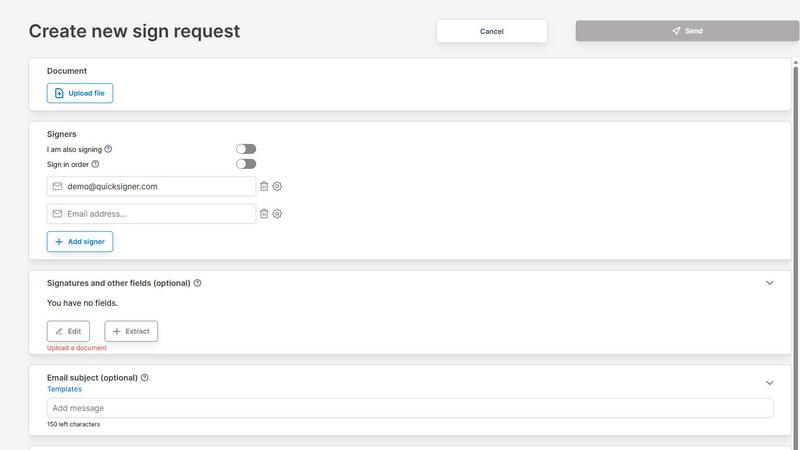
About QuickSigner
QuickSigner is a cutting-edge electronic signature platform designed to revolutionize the way individuals and businesses sign, send, and finalize documents. It effectively transforms traditional processes that often take days into streamlined workflows that can be completed in mere minutes. With QuickSigner, users can enjoy the benefits of Adobe Approved Trust List (AATL) electronic signatures, ensuring that signatures are legally binding and secure. The platform is ISO 27001 certified, which underscores its commitment to data security and privacy. Ideal for small teams, startups, and businesses of all sizes, QuickSigner facilitates a hassle-free signing experience without the need for complicated setups or installations. Its intuitive interface allows users to upload documents, add signature fields, and track the signing process in real time. This not only saves time but also reduces operational costs significantly, making it a smart choice for organizations looking to enhance their document management efficiency.
Features of QuickSigner
User-Friendly Document Upload
QuickSigner offers a straightforward document upload feature that supports various formats, including PDF and Word documents. Users can simply drag and drop their files into the platform, making it accessible for individuals with varying levels of technical expertise.
Customizable Fields for Signatures
The platform allows users to customize their documents by adding signature, date, and text fields in the exact locations needed. This flexibility ensures that all necessary information is captured accurately, streamlining the signing process further.
Real-Time Tracking and Notifications
With QuickSigner, users can monitor the signing progress in real time. The platform sends notifications when documents are signed, allowing for immediate access to completed, legally binding agreements, which enhances overall efficiency.
Secure Access and Compliance
QuickSigner prioritizes security by providing signers with a secure link to access documents without requiring an account. This not only simplifies the process but also adheres to stringent compliance standards, ensuring that all signatures are legitimate and protected.
Use Cases of QuickSigner
Streamlining Contract Management
Businesses can utilize QuickSigner to streamline their contract management processes, reducing the time spent on administrative tasks. By centralizing document signing, teams can focus on core functions while ensuring all agreements are executed promptly.
Enhancing Client Onboarding
For service-oriented industries, QuickSigner simplifies the client onboarding process by allowing new clients to sign contracts and agreements quickly. This leads to faster project initiation and improved customer satisfaction.
Facilitating Remote Work Collaboration
QuickSigner is ideal for remote teams that require a reliable method for signing documents. Team members can send and receive signatures from anywhere, thus maintaining productivity without the need for physical meetings.
Improving Real Estate Transactions
In the real estate sector, QuickSigner expedites the signing of purchase agreements and lease contracts. Real estate agents can close deals faster, enhancing client relations and reducing the likelihood of losing potential sales.
Frequently Asked Questions
How secure is QuickSigner?
QuickSigner employs advanced security measures, including ISO 27001 certification and AATL electronic signatures, to protect users' data and ensure that all signatures are legally binding.
Can I use QuickSigner on mobile devices?
Yes, QuickSigner is designed to be mobile-friendly, allowing users to sign documents from any device, including smartphones and tablets, ensuring flexibility and convenience.
Is there a limit to the number of documents I can sign?
QuickSigner offers various pricing plans, including a free plan that allows up to three documents per month. Paid plans provide unlimited document signing for more frequent users.
What types of documents can I upload?
QuickSigner supports a range of document formats, including PDF and Word files, providing users with the flexibility to work with their preferred document types.
Explore more in this category:
Similar to QuickSigner

Private email. Pure. Secure. Exclusive. No ads, no tracking, no data selling. GDPR compliant, EU-hosted.


Verla is an AI academic assistant for university and college students, combining AI essay writing, academic research, AI detection, AI humanization

Apps and files on an infinite canvas where people and AI agents work together.

Jev turns text or JSON into Choice, Score and Noul answers with probabilities. Build decision flows and call the API.

Native macOS disk analysis, careful cleanup, file organization, and developer-workspace storage. Includes a 7-day full-feature trial.

A notepad calculator that reads plain text and gives instant answers as you type, free on Mac, iOS, Windows, Linux, Android and Web.

AI Email Filter sorts incoming mail into folders using plain-language prompts you write. Works with any IMAP mailbox; bring your own LLM if you want.