
AI Email Filter
AI Email Filter sorts incoming mail into folders using plain-language prompts you write. Works with any IMAP mailbox; bring your own LLM if you want.
Visit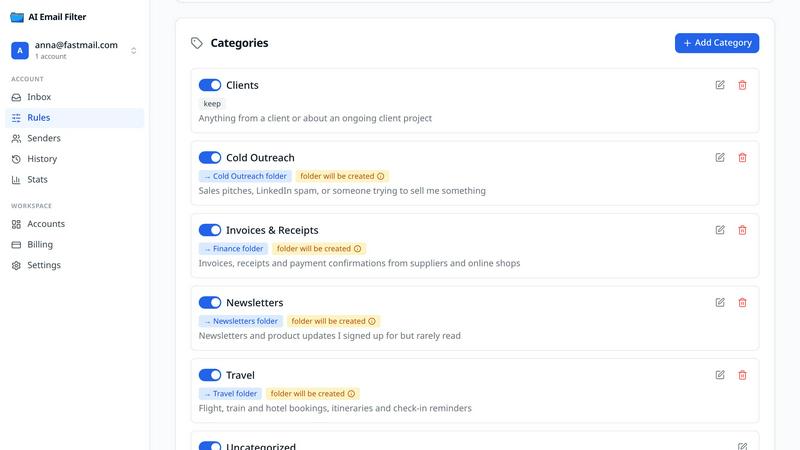
About AI Email Filter
AI Email Filter connects to your existing mailbox over IMAP and sorts incoming mail into folders based on prompts you write in plain language, such as "invoices and receipts go to Finance". There is no new mail client to learn: the sorted folders show up in whatever app you already use. It is a SaneBox alternative that works with any IMAP provider.
Rules are yours to read and change. Each sender gets a category you can correct, every automatic move can be undone with one click, and a rule can trigger several actions at once. If you would rather not send mail to a third-party model, you can point the service at your own LLM endpoint.
It works with Gmail, Fastmail, iCloud, Mailcow and any other IMAP mailbox. The first 200 classifications are free; after that it costs $6 per month or $60 per year for two mailboxes.
Explore more in this category:
Similar to AI Email Filter

Paste a FlipHTML5 link and get a clean, watermark-free PDF in seconds. Free and open-source, no registration - everything runs in your browser.

Timers and hourly checks to figure how out long until a certain time or how many days away.


Send files straight between two browsers with a 6-digit key. No signup, no install, nothing stored on a server.

Free email tools for signatures, subject lines, HTML previews, word counts, and email headers. Browser-based, simple to use, and no signup required.

Chrome extension for Todoist that shows nested sub-tasks inline in Today, Upcoming, Filter and Label views. Free, with a $19.99 lifetime unlock.

See every app and what it's using in plain English, and end or slow down the one that's hogging your Mac.

Every key you press lights up on an on-screen keyboard, and each shortcut is named. For screen recordings, demos and learning shortcuts.