
Opal
Opal is a visual workspace that centralizes your projects and notes, enabling instant access and seamless organization without searching.
Visit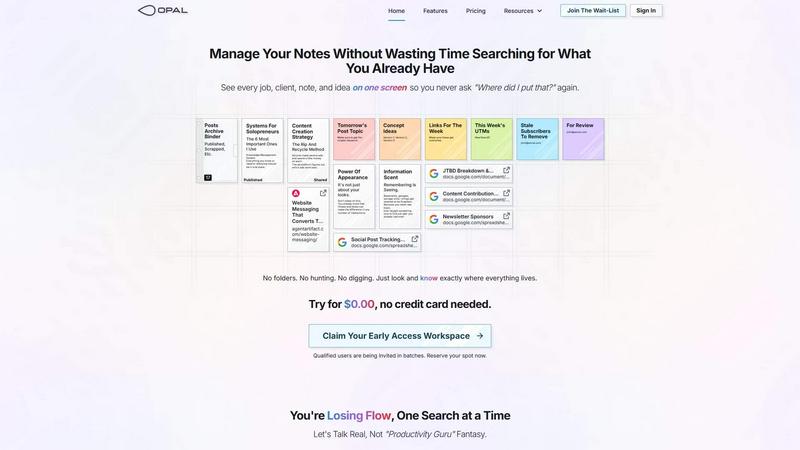
About Opal
Opal is an innovative visual knowledge and project management workspace tailored for individuals who think spatially. Designed to combat the frustrations of traditional note-taking and project management tools, Opal provides an infinite digital canvas that allows users to visually organize notes, documents, files, and links. This intuitive platform enables users to arrange their work as they would on a physical desk, fostering a sense of clarity and control over projects. Opal is ideal for solopreneurs, consultants, agency owners, writers, and anyone whose success hinges on managing conversations, details, and commitments. By leveraging a spatial memory approach, users can easily recall the locations of their information, enhancing productivity and reducing the time spent searching for lost notes or ideas. Opal transforms chaotic workflows into streamlined processes, ensuring that everything needed for active projects is readily accessible, allowing users to maintain their focus and creativity.
Features of Opal
Infinite Digital Canvas
Opal features an infinite digital canvas that allows users to drag and drop notes, documents, and files freely. This unique layout mimics a physical desk where users can visualize all their information in one place, making it easier to manage complex projects and ideas.
Spatial Memory Organization
The platform utilizes a spatial memory approach, enabling users to remember where their information is located rather than simply what it is. This intuitive organization method drastically reduces the time spent searching for materials, allowing users to retrieve information quickly and efficiently.
Multi-Window Functionality
Opal supports multi-window functionality, enabling users to open multiple documents side by side. This feature allows for a richer, more collaborative workspace experience, as users can interact with various pieces of information simultaneously, enhancing focus and productivity.
Comprehensive Overview
With Opal, users can see every job, client, note, and idea on one screen. This all-in-one overview reduces the mental clutter that often accompanies project management, empowering users to keep track of their responsibilities without losing sight of any important details.
Use Cases of Opal
Freelance Project Management
Freelancers can leverage Opal to manage multiple client projects seamlessly. By visually organizing client information, deadlines, and deliverables on a single canvas, freelancers can ensure they stay on top of their commitments and maintain a professional workflow.
Content Creation and Organization
Content creators can utilize Opal to brainstorm, draft, and organize their ideas in a visually appealing manner. The ability to map out concepts and related resources helps streamline the creative process, making it easier to produce high-quality content.
Consulting Services
Consultants can benefit from Opal by keeping their client notes, project details, and strategies in a single, easily navigable space. This comprehensive view enables consultants to provide better service and maintain clarity in their engagements.
Team Collaboration
Opal can serve as a collaboration tool for small teams working on shared projects. By visually organizing tasks, documents, and discussions, team members can enhance communication and ensure that everyone is aligned on project goals.
Frequently Asked Questions
What makes Opal different from traditional note-taking apps?
Opal distinguishes itself by providing a visual workspace that fosters a spatial memory approach to organization, allowing users to remember where information is located instead of just relying on search functions.
Is Opal suitable for team collaboration?
Yes, Opal is designed to enhance team collaboration by enabling multiple users to view and interact with projects on a shared digital canvas, facilitating better communication and project alignment.
Can I use Opal for personal projects?
Absolutely! Opal is versatile and can be used for personal projects, allowing users to organize their ideas, plans, and tasks visually, which can help in planning and executing personal goals effectively.
How does Opal enhance productivity?
By reducing the time spent searching for information and enabling users to visualize their tasks and projects, Opal helps maintain focus and flow, allowing users to work more efficiently and effectively.
Similar to Opal

Apps and files on an infinite canvas where people and AI agents work together.

Jev turns text or JSON into Choice, Score and Noul answers with probabilities. Build decision flows and call the API.

Native macOS disk analysis, careful cleanup, file organization, and developer-workspace storage. Includes a 7-day full-feature trial.

A notepad calculator that reads plain text and gives instant answers as you type, free on Mac, iOS, Windows, Linux, Android and Web.

AI Email Filter sorts incoming mail into folders using plain-language prompts you write. Works with any IMAP mailbox; bring your own LLM if you want.

No-code 2D game editor: visual node logic, drag-and-drop scenes, live preview. Exports to Windows, macOS, Linux, Android, iOS, Web.

A free launch checklist for SaaS, apps, AI tools and more. Every step says why it matters and when you can skip it.

Free collection of online developer utilities, code formatters, and digital converters designed to streamline your daily workflow.