
Subclip
Subclip uses AI to edit videos, add subtitles, and dub content with voice cloning, saving creators 80% of their editing time.
Visit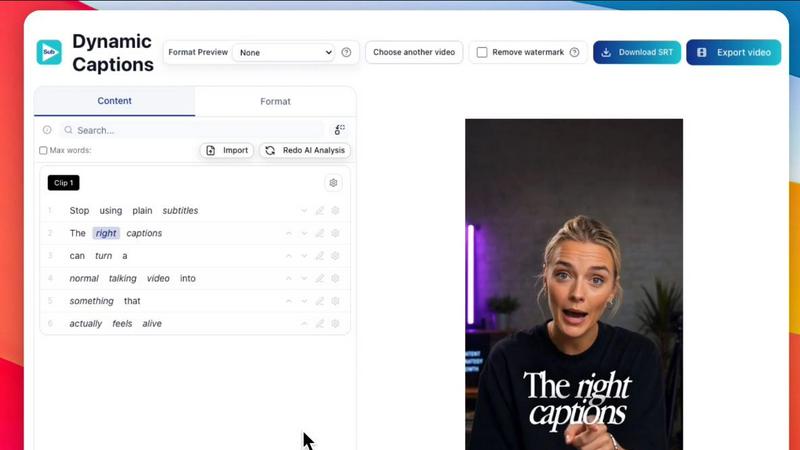
About Subclip
Subclip is an AI-powered video editor designed to fundamentally change how creators, marketers, educators, and content teams approach video production. Its core innovation lies in treating video editing like editing a document: users simply drag in a transcript and begin making cuts, trims, and adjustments by manipulating the text itself. This eliminates the need for scrubbing through hours of raw footage on a traditional timeline, a process that Subclip claims can reclaim up to 80% of a creator's time. The platform is a comprehensive, browser-based suite that consolidates multiple high-value tasks into a single workflow. Beyond text-based editing, Subclip offers advanced AI features including voice cloning, which allows users to re-record parts of their video using a synthetic version of their own voice, maintaining natural tone and emotion. It also provides one-click removal of silences and filler words, auto-generation of accurate subtitles in 48+ languages, and multi-language dubbing that preserves background music. Subclip is built for speed and simplicity, targeting YouTubers, podcasters, course creators, vloggers, coaches, and agencies who need to increase output without increasing editing hours. The platform supports direct export to professional NLEs like DaVinci Resolve, Final Cut Pro, and Adobe Premiere Pro, and includes built-in scheduling for platforms like YouTube and X (Twitter). With a freemium pricing model that includes a free tier, Subclip positions itself as a powerful, time-saving alternative to traditional, complex video editing software.
Features of Subclip
Text-Based Video Editing (Rough Cut)
Edit your video by manipulating its transcript, much like editing a document in Google Docs. You can trim mistakes, remove entire sections, and reorder clips by simply deleting or moving text. This non-linear approach eliminates the need for manual timeline scrubbing and rework, and the resulting edit can be exported as a timeline for DaVinci Resolve, Final Cut Pro, and Adobe Premiere Pro, providing a seamless bridge to professional post-production.
AI-Powered Voice Cloning and Dubbing
Subclip allows you to clone your own voice and use it to re-record parts of your video or dub the entire project into 21+ languages. The AI preserves your original tone, emotion, and pacing, ensuring the dubbed version sounds natural and authentic. This feature is critical for creators looking to expand their global audience without the cost and time of hiring human voice actors or re-recording audio for each language.
One-Click Audio Cleanup
Instantly enhance the audio quality of your videos with a suite of AI tools. Subclip can remove background noise, clean up room echo, and polish podcast audio with a single click. It also offers dedicated features to automatically remove silences and filler words (like "um" and "uh"), producing a tighter, more professional final cut without any manual editing.
Auto-Generated Subtitles and Captions
Generate highly accurate, timestamped subtitles for your videos in over 48 languages. The process is unlimited and occurs locally for faster processing. You can then customize the text, font, and formatting of the captions to match your brand or style before exporting. This feature is essential for accessibility, audience retention, and optimizing content for social media platforms where silent viewing is common.
Use Cases of Subclip
Content Creators and Podcasters
Long-form podcasters and YouTubers can use Subclip to dramatically speed up their workflow. They can upload raw footage, use the text transcript to instantly remove mistakes and dead air, and have the AI automatically identify high-energy segments for short-form clips. With one-click captioning and noise removal, they can repurpose a single long-form episode into multiple platform-optimized videos in a fraction of the time.
Online Coaches and Course Creators
Coaches and educators who have a library of recorded courses can use Subclip to dub their entire catalog into 20+ languages using their own cloned voice. This allows them to reach a global student base without re-recording each lesson. The text-based editing also makes it simple to update or correct a specific segment of a course video without re-rendering the entire file.
Marketing Agencies and Freelancers
Agencies can dramatically increase their output and reduce costs by using Subclip for client work. The platform allows for rapid editing of client testimonials, social media ads, and promotional content. Unlimited transcription and export capabilities, combined with team collaboration features, enable multiple team members to work on projects simultaneously, streamlining the entire production pipeline from raw footage to final delivery.
Vloggers and Social Media Managers
Vloggers can leverage Subclip to add dynamic captions, B-roll, and audio enhancements in a single click without any limits. The built-in scheduling feature allows them to plan and post content directly to YouTube and X from a single calendar. This consolidates the creation, editing, and distribution process, making it easier to maintain a consistent posting schedule across multiple platforms.
Frequently Asked Questions
How does text-based video editing work in Subclip?
Subclip transcribes your uploaded video into text. You can then edit the video by deleting, cutting, or rearranging words and sentences in the transcript. The video timeline automatically updates to reflect these text changes, removing the need to manually scrub and cut clips. You can also export the resulting timeline as a .fcpxml file for further editing in professional software like DaVinci Resolve or Final Cut Pro.
Can I use my own voice for dubbing in other languages?
Yes. Subclip's AI dubbing feature allows you to clone your voice. Once cloned, the AI will use your voice to narrate the translated version of your video, preserving your original tone, emotion, and speaking style. This provides a much more natural and personal result compared to generic text-to-speech voices, making it ideal for creators and brands.
What languages are supported for subtitles and dubbing?
Subclip supports local transcription and subtitle generation in over 48 languages. For AI dubbing with voice cloning, the platform currently supports translation into 21+ languages, including major languages like English, Spanish, French, German, and many more. The list of supported languages for both features is continuously expanding.
Is Subclip compatible with other video editing software?
Yes. Subclip is designed to integrate with professional editing workflows. You can export your edited timeline directly to DaVinci Resolve, Final Cut Pro, and Adobe Premiere Pro using a .fcpxml file. This allows you to use Subclip for the rapid, AI-assisted rough cut and then move the project into your preferred NLE for advanced color grading, effects, and final polish.
Pricing of Subclip
Subclip operates on a freemium pricing model. A free tier is available, which allows users to test the core features of the platform. For users who need more output, Subclip offers affordable paid plans that provide access to unlimited features, higher export quality, and advanced tools like dubbing and team collaboration. Specific pricing for the paid tiers is available on the Subclip website.
Similar to Subclip

Turn podcasts, narration, voice recordings, or music into visual content with AudioVideo AI.


Oravaa's Voice AI automates 24/7 inbound support, lead qualification, and daily outreach with human-like conversations across 30+ languages.

Hush Touch is an offline voice-to-text app for macOS that learns your vocabulary and improves accuracy every use.

Glossa offers real-time AI translation of sermons into 100+ languages, empowering your church to engage diverse.

ATOZAITOOLS helps you discover and compare top AI tools to boost productivity and streamline your daily tasks.

Bantr is a private, unlimited text-to-speech app for Mac that runs fully offline with no subscriptions.

KaiCalls is your 24/7 AI voice agent that answers calls and qualifies leads, ensuring instant customer engagement.