
JustPDF
JustPDF is a privacy-first, browser-based PDF toolkit offering 17 free tools for seamless document management without leaving your device.
Visit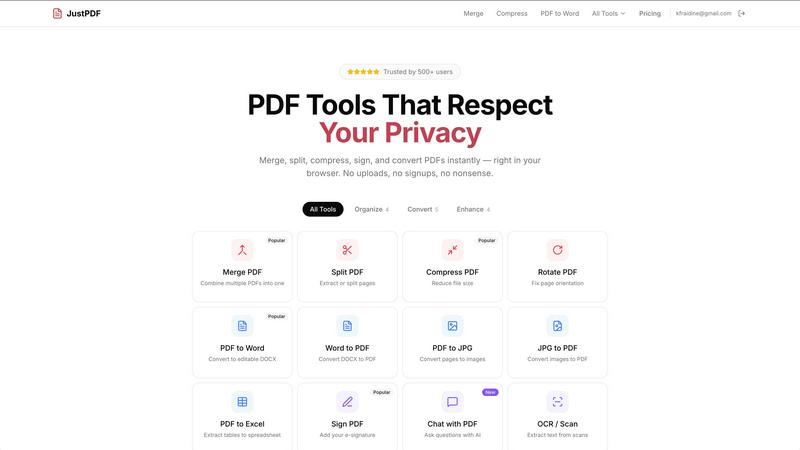
About JustPDF
JustPDF is an innovative online platform designed to provide users with a comprehensive suite of 17 professional-grade PDF tools that operate entirely within the user's browser. Unlike many competitor services such as Smallpdf and iLovePDF, which require files to be uploaded to remote servers, JustPDF processes everything locally using JavaScript and WebAssembly. This means that users can enjoy enhanced privacy and security as their files never leave their device. The platform is ideal for individuals and organizations that require reliable PDF management without compromising on data security. JustPDF caters to a wide audience, including students, educators, and professionals, and offers a free tier that allows users to perform three operations per day without the need for an account. For those seeking unlimited access, the Pro plan starts at just $4 per month. With FERPA compliance, JustPDF is particularly valuable for educational institutions, ensuring secure handling of student information.
Features of JustPDF
Merge PDF
The Merge PDF feature allows users to seamlessly combine multiple PDF documents into a single file. This tool is particularly useful for creating comprehensive reports or consolidating various documents into one cohesive package, enhancing document management efficiency.
Compress PDF
JustPDF offers a fast and efficient way to compress PDF files without sacrificing quality. Users can reduce file sizes in seconds by simply dragging and dropping their files. This feature is essential for anyone looking to optimize files for easier sharing or storage, particularly in professional settings.
PDF to Word
The PDF to Word feature converts PDF documents into editable DOCX files, allowing users to modify text and images easily. This tool is invaluable for professionals who need to edit existing documents or extract information for further use, ensuring a smooth transition from PDF to a more flexible format.
Chat with PDF (AI)
This innovative feature enables users to interact with their PDF documents using artificial intelligence. Users can ask questions and receive instant answers based on the content of the PDF, making it easier to extract relevant information quickly, which is particularly beneficial for research and study purposes.
Use Cases of JustPDF
Educational Institutions
Educational institutions can leverage JustPDF's features to manage course materials, syllabi, and student submissions effectively. With tools like Merge PDF and PDF to Word, educators can create comprehensive documents and facilitate easier editing and sharing among faculty and students.
Business Professionals
Business professionals can utilize JustPDF for document management tasks such as contract preparation, report generation, and client communications. The ability to compress PDFs and add e-signatures streamlines workflows, making it easier to handle essential documents on the go.
Researchers
Researchers can benefit from JustPDF's Chat with PDF feature, which allows them to navigate through extensive documents quickly. This capability enables researchers to find specific information without manually sifting through pages, saving valuable time during the research process.
General Users
General users looking for a simple and secure way to manage their PDF files can take advantage of JustPDF's user-friendly interface. Whether converting images to PDFs or unlocking secured documents, JustPDF provides a reliable solution for everyday PDF needs without the hassle of account creation.
Frequently Asked Questions
How does JustPDF ensure data privacy?
JustPDF processes all files locally in the user's browser using JavaScript and WebAssembly, ensuring that files never leave the device. Users can verify this by checking the Network tab in their browser's DevTools.
Is there a limit to the number of operations I can perform for free?
Yes, users can perform up to three operations per day for free without needing to create an account. This allows individuals to test out the service before committing to a Pro plan.
What types of files can I convert using JustPDF?
JustPDF supports a variety of file conversions, including PDF to Word, Word to PDF, PDF to JPG, JPG to PDF, PDF to Excel, WebP to PDF, and HEIC to PDF, making it a versatile tool for handling different file formats.
What is the cost of the Pro plan?
The Pro plan starts at just $4 per month and offers unlimited access to all of JustPDF's tools. This plan is ideal for users who require extensive PDF management capabilities without any daily limits.
Explore more in this category:
Similar to JustPDF

Apps and files on an infinite canvas where people and AI agents work together.

Jev turns text or JSON into Choice, Score and Noul answers with probabilities. Build decision flows and call the API.

Native macOS disk analysis, careful cleanup, file organization, and developer-workspace storage. Includes a 7-day full-feature trial.

A notepad calculator that reads plain text and gives instant answers as you type, free on Mac, iOS, Windows, Linux, Android and Web.

AI Email Filter sorts incoming mail into folders using plain-language prompts you write. Works with any IMAP mailbox; bring your own LLM if you want.

No-code 2D game editor: visual node logic, drag-and-drop scenes, live preview. Exports to Windows, macOS, Linux, Android, iOS, Web.

A free launch checklist for SaaS, apps, AI tools and more. Every step says why it matters and when you can skip it.

Free collection of online developer utilities, code formatters, and digital converters designed to streamline your daily workflow.