
retroshelf
Retroshelf automatically logs retro handheld gaming sessions using a plugin, creating a browsable timeline to track playtime, discover trends, and.
Visit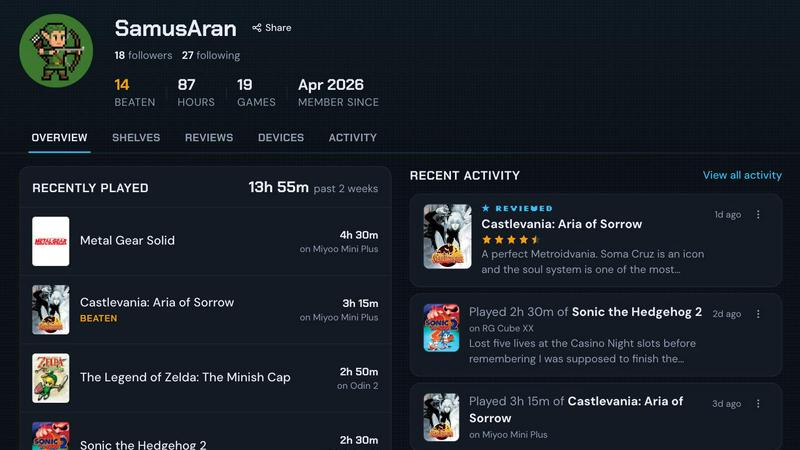
About retroshelf
retroshelf is a specialized play-tracking and discovery application designed exclusively for the retro handheld gaming community. Unlike general game tracking platforms, retroshelf addresses the unique challenge faced by enthusiasts who play across multiple retro handheld devices such as the Miyoo Mini, Anbernic RG series, and Odin handhelds. These users often struggle to maintain coherent logs of their gaming sessions, resorting to fragmented notes across spreadsheets, text files, and memory. retroshelf solves this problem through an innovative automated logging system that captures every gaming session with minimal user intervention. At its core, the platform provides each user with a public shelf that displays their current gaming activity, including games they are actively playing, have completed, are reviewing, or are replaying. This shelf maintains critical device context, meaning every entry is tagged with the specific handheld used. The system operates through a lightweight plugin installed on the device's SD card, which automatically records game titles, playtime duration, and device identification. This creates a comprehensive, browsable history that transforms scattered gaming sessions into a coherent timeline. For the community, retroshelf serves as a discovery engine where users can see what other players are picking up, finishing, and replaying in real time. The platform is currently in closed beta, targeting early adopters who want to shape the community from its inception. By eliminating the friction of manual tracking and providing social discovery features, retroshelf positions itself as the definitive tool for retro handheld enthusiasts who value both personal game history and community engagement.
Features of retroshelf
Automatic Session Logging
The core technology behind retroshelf is a tiny plugin that runs directly on your retro handheld device. Once installed on the SD card and linked to your account, this plugin automatically captures every gaming session without requiring any manual input. It records the exact game title, precise playtime in minutes, and the specific handheld device used. This eliminates the need for players to maintain separate notes or rely on memory, ensuring that no gaming session is ever lost. The plugin is currently supported on muOS and OnionOS, with ongoing development for additional firmware platforms.
Public Shelf with Device Context
Every retroshelf user has a public shelf that serves as their gaming portfolio. This shelf displays games organized by status: currently playing, finished, reviewing, and replaying. The distinguishing feature is the inclusion of device context for every entry. Instead of a generic game log, each entry shows which specific handheld was used, allowing other community members to understand the hardware context of a player's experience. This device-aware approach provides richer insights into how games perform and feel on different retro handhelds.
Community Discovery Engine
retroshelf transforms individual play data into a community discovery tool. Users can browse a curated feed of what other players are picking up, finishing, and replaying right now. The platform organizes this data into categories such as "Popular this week," highlighting trending games within the retro handheld community. This social layer enables players to discover hidden gems and see which titles are gaining traction across different devices, creating a dynamic recommendation system based on real play behavior rather than algorithms.
Device-Specific Browsing and Filtering
The platform allows users to filter shelves and game activity by specific handheld devices. Whether you own a Miyoo, Anbernic, Odin, or other retro handheld, you can narrow your browsing to see what other players are doing on the same hardware. This feature is particularly valuable for understanding which games perform well on specific devices and for discovering device-optimized titles. Additionally, star ratings on retroshelf come with the handheld context, meaning reviews are tied to the specific device used, providing more meaningful feedback than generic ratings.
Use Cases of retroshelf
Personal Game History Preservation
Retro handheld enthusiasts often play dozens of games across multiple devices over months or years. retroshelf automatically preserves this history by logging every session with timestamps, game titles, and device information. Users can browse their personal timeline to see what they played during specific periods, track their completion rates, and identify patterns in their gaming habits. This turns fragmented play sessions into a coherent, searchable archive that users can reflect on and share.
Community-Driven Game Discovery
When looking for new games to play on a retro handheld, users can browse the retroshelf community feed to see what other players are currently enjoying. The "Popular this week" section highlights trending titles, while device-specific filters allow users to see games that are popular on their particular handheld model. This real-time social discovery replaces generic recommendation algorithms with authentic player behavior, helping users find games that are actually being played and enjoyed by the community.
Hardware Performance Evaluation
For players deciding which retro handheld to purchase or which games to play on a specific device, retroshelf provides valuable data. By viewing how other players rate games on particular handhelds, users can assess performance, compatibility, and overall experience before investing time or money. The device-contextualized reviews offer practical insights that generic game ratings cannot provide, such as whether a game runs smoothly on the Miyoo Mini versus the Anbernic RG35XX.
Social Accountability and Motivation
retroshelf's public shelf feature creates a social accountability mechanism for completing games. When a player's shelf publicly shows games in the "currently playing" or "replaying" categories, there is gentle social pressure to finish titles and update their status. This gamification of game completion encourages players to follow through on their gaming commitments, reduce their backlog, and share their achievements with the community. The automatic logging further supports this by ensuring that all playtime is accurately represented.
Frequently Asked Questions
How does the automatic session logging work on my handheld device?
The automatic logging system operates through a lightweight plugin that you install on your handheld's SD card. After downloading the plugin from the retroshelf website, you place it in the appropriate directory on your SD card and link your device to your retroshelf account. Once configured, the plugin runs silently in the background, detecting when you launch a game and recording the title, playtime, and device information. Currently, this feature is supported on muOS and OnionOS firmware, with support for additional systems in development.
Is my gaming data private or visible to others?
Your retroshelf shelf is public by design, as the platform is built around community discovery and sharing. This means that the games you are currently playing, have finished, are reviewing, and are replaying are visible to other users. However, the platform does not share any personal identifying information beyond your username. If you prefer to keep certain sessions private, you can manage your shelf visibility settings from your account dashboard. The automatic logging data is stored securely and used only to populate your public shelf and community statistics.
Which handheld devices and firmware are currently supported?
retroshelf currently supports devices running muOS and OnionOS firmware. This includes popular retro handhelds such as the Miyoo Mini, Miyoo Mini Plus, and various Anbernic models that are compatible with these firmware systems. The development team is actively working to expand support to additional firmware platforms and devices. For the most up-to-date compatibility list, check the Plugins section on the retroshelf website. Even without automatic logging, you can manually add sessions to your shelf from any device.
How can I participate in the closed beta?
The retroshelf closed beta is currently open for sign-ups. To participate, visit the retroshelf website and click the "Join beta" button. The team is opening access in small waves, prioritizing retro handheld players who want to help shape the community from the beginning. After signing up, you will receive an email invitation when a spot becomes available. During the beta, you will have early access to all features, including the automatic logging plugin, and you can provide feedback that directly influences the platform's development.
Explore more in this category:
Similar to retroshelf

Snapkin is a calorie tracker you use by photographing your plate.

Adopt a virtual baby who grows, learns, and remembers you.

Anonymous Instagram viewer. Browse profiles, stories, and posts without an account or leaving a trace.

GeoRank combines satellite-calibrated climate data with tax, visa, and cost metrics to rank every place on earth for relocation research.

Caesura is a macOS menu-bar app that reminds you to drink water, stretch, rest your eyes, and breathe on research-backed intervals.

PrettyScale offers nine free AI facial analysis tools that run entirely in your browser for private, instant results with no account required.

Burge Coffee provides authoritative field guides and private browser-based tools for home roasters to master the craft and track every batch.

On Music AI turns your words into complete songs with vocals, beats, and instrumentals in minutes.