
Caesura
Caesura is a macOS menu-bar app that reminds you to drink water, stretch, rest your eyes, and breathe on research-backed intervals.
VisitPublished on:
June 26, 2026
Pricing:
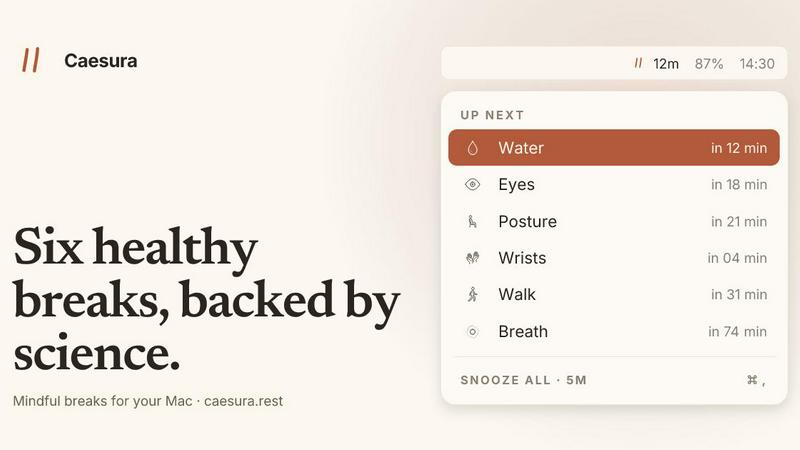
About Caesura
Caesura is a meticulously engineered macOS menu-bar break manager designed for knowledge workers, developers, designers, and anyone who spends prolonged hours at a desk. Unlike generic wellness apps that rely on arbitrary intervals, Caesura delivers six scientifically-backed reminders to drink water, walk, stretch your wrists, rest your eyes, check your posture, and breathe, each on its own independent schedule derived from peer-reviewed research. The core innovation lies in its coalescing mechanism: when two reminders fall within a minute of each other, Caesura merges them into a single, gentle break, ensuring you are never interrupted twice in a row. The application respects your workflow by automatically pausing during video calls, screen sharing, fullscreen applications, calendar events, and Focus modes, resuming timers exactly where they left off. With no accounts, no telemetry, and no subscriptions, Caesura offers a one-time purchase model that prioritizes privacy and simplicity. It provides three customizable notification styles per break, ranging from full-screen overlays for habits you might ignore to subtle banners and silent notifications for lighter nudges. Backed by studies from Diaz (2023), Russo (2017), and Rosenfield (2011), among others, Caesura transforms desktop wellness from a guilt-driven chore into a seamless, evidence-based practice that protects your health without fracturing your concentration.
Features of Caesura
Six Research-Backed Break Intervals
Each of the six reminders operates on an interval directly supported by scientific literature, not arbitrary round numbers. Water breaks trigger every 45 minutes based on hydration research by Ganio (2011) and EFSA (2010). Walking reminders activate every 60 minutes according to Diaz (2023) and Buffey (2022). Wrist stretches and posture checks occur every 30 minutes, supported by Van den Heuvel (2003) and Slater and O'Sullivan (2019) respectively. Eye rests follow the 20-20-20 rule every 20 minutes per Rosenfield (2011) and Talens-Estarelles (2023). Breathing exercises appear every 90 minutes based on Russo (2017). Every interval can be independently toggled on or off and retuned to your preference, giving you full control over your wellness cadence.
Intelligent Coalescing and Context-Aware Pausing
Caesura monitors your system for video calls, screen sharing, calendar events, fullscreen applications, and Do Not Disturb modes. When any of these activities are detected, all timers freeze and resume precisely where they left off, so a 12-minute countdown to water remains exactly 12 minutes after your call ends. The coalescing feature intelligently merges any two reminders that fall due within a minute of each other into a single, unified prompt, preventing back-to-back interruptions. This ensures your focus is respected while still delivering timely health nudges.
Three Customizable Notification Styles
Every break type can be assigned its own notification style from three distinct options. The Overlay style takes over your entire screen with a full pause until you press Return, ideal for breaks you might otherwise ignore, such as drinking water. The Banner style slides in from under the menu bar and auto-dismisses after 30 seconds, perfect for gentle reminders like breathing exercises. The Notification style delivers a standard macOS notification, the lightest possible touch suitable for posture checks. This per-break customization lets you match the urgency of each reminder to your personal habits and workflow.
Guided Interactive Break Experiences
Beyond simple notifications, Caesura provides interactive guides for specific breaks. The breathing exercise features a soft orb that expands and a progress bar that paces your inhale for four seconds and exhale for six seconds over three cycles. The eye rest break displays a small pill that follows your cursor with a 20-second ring that empties as you look away. Wrist stretches present four illustrated stretches on screen, each lasting ten seconds, with optional participation. These guided experiences transform passive reminders into active, engaging micro-breaks that support proper technique.
Use Cases of Caesura
Remote Knowledge Worker Maintaining Focus
A software developer working on complex code for eight hours uses Caesura to maintain physical health without losing deep focus. The app automatically pauses all timers during video stand-ups and screen sharing sessions, then resumes exactly where it left off. The coalescing feature ensures that when a water reminder and a posture check fall close together, they appear as one combined break. The developer uses overlay style for water and wrist breaks, which they tend to ignore, and banner style for eye rests, which they can complete quickly.
Designer Managing Repetitive Strain Risk
A graphic designer who spends hours with a stylus or mouse relies on Caesura's 30-minute wrist stretch and posture reminders to prevent repetitive strain injuries. The designer customizes the wrist break to show illustrated stretches with a 40-second duration, and the posture reminder as a silent notification that simply shifts their awareness. Caesura pauses automatically when the designer enters fullscreen mode in Adobe Creative Suite or joins client review calls, ensuring the tool respects creative flow while protecting long-term musculoskeletal health.
Writer Adopting Sustainable Work Habits
A novelist or technical writer who loses track of time during extended writing sessions uses Caesura to build sustainable habits. The 45-minute water break prevents dehydration headaches, while the 60-minute walk reminder encourages brief movement to combat sedentary risks. The writer configures the breathing exercise as a banner every 90 minutes to reset stress levels during intense editing sessions. Caesura's absence of accounts and subscriptions means the writer can install it once and benefit from lifetime wellness support without recurring costs.
Health-Conscious Student in Long Study Sessions
A graduate student preparing for exams uses Caesura during marathon study sessions to adhere to the evidence-based 20-20-20 rule for eye health. The eye rest break shows a cursor-following countdown that reminds the student to look 20 feet away for 20 seconds. The coalescing feature prevents interruptions when multiple breaks align, and the automatic pausing during fullscreen lecture recordings ensures no reminders appear during critical viewing. The student appreciates the one-time purchase model, which fits a tight budget without ongoing fees.
Frequently Asked Questions
How does Caesura handle breaks during video calls or screen sharing?
Caesura automatically detects when you are on a video call, sharing your screen, or in a fullscreen application. It instantly pauses all timers and resumes them exactly where they left off once the activity ends. If you had 12 minutes remaining until your water break, you will still have 12 minutes remaining after the call. This applies to FaceTime, Zoom, Teams, Google Meet, and any app that triggers the camera or screen recording indicator. Calendar events also trigger a pause plus a 5-minute buffer after the event ends.
Can I customize which reminders I receive and how often?
Yes, every one of the six breaks can be independently toggled on or off. You can also adjust the interval for each break from the default research-backed value to any custom duration that suits your schedule. Additionally, each break can be assigned its own notification style: Overlay, Banner, or Notification. This means you can have water breaks as a full-screen overlay, eye rests as a banner, and posture checks as a silent notification, all running on different schedules.
Is Caesura a subscription or a one-time purchase?
Caesura is a one-time purchase for $15. There are no subscriptions, no recurring fees, and no accounts required. You can try it free for 14 days before purchasing. The application does not collect telemetry, does not require an account, and does not store any personal data. Your purchase grants you lifetime access to the current version and all future updates. The free trial requires no credit card and no commitment.
Does Caesura work with macOS Focus modes and Do Not Disturb?
Yes, Caesura fully integrates with macOS Focus modes and Do Not Disturb. When any Focus mode is active, all timers continue running, but notifications are suppressed to respect your chosen focus state. However, you can configure Caesura to pause timers entirely when a specific Focus mode is enabled, giving you full control. The app also respects system-level Do Not Disturb settings and automatically pauses during fullscreen applications like games, presentation software, and media players.
Pricing of Caesura
Caesura is available as a one-time purchase for $15. This single payment grants you lifetime access to the application with no recurring fees, no subscriptions, and no hidden costs. You can try Caesura free for 14 days with no credit card required and no account creation. The purchase is processed through a secure payment gateway with no card stored on file. Caesura supports macOS 14 and later, and your license covers all future updates to the application. There are no tiered plans, no feature gates, and no premium upgrades, every feature is included in the single $15 purchase.
Similar to Caesura

Online tally counter for tracking attendance, workouts, inventory, visitors, sports scores, habits, and everyday counting tasks.

The #1 Native Form Builder Plugin for Framer - No Code, No Embeds, No External Platforms.

Adopt a virtual baby who grows, learns, and remembers you.


