
Phishly
Phishly leverages AI to instantly detect phishing emails with a simple one-click scan in Gmail and web tools.
Visit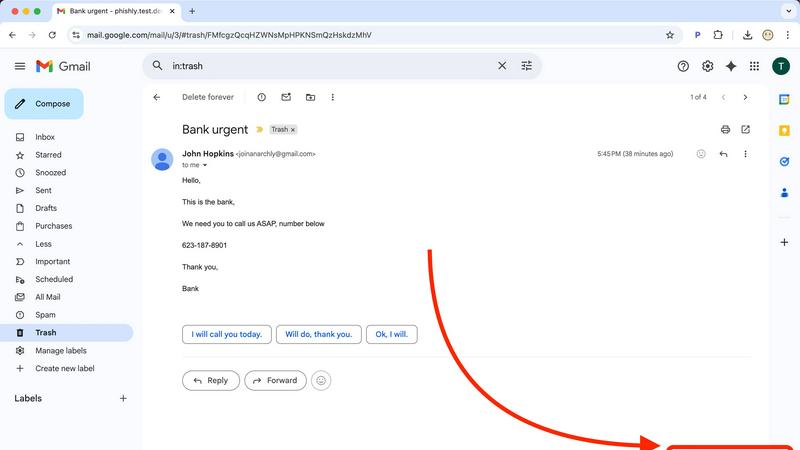
About Phishly
Phishly is an advanced AI-powered phishing detection platform designed to protect users from the growing threat of phishing attacks. Available as a Chrome extension for Gmail and through a web tool, Phishly provides an easy-to-use solution for individuals and small businesses who seek reliable phishing protection without the complexities often associated with enterprise-level security solutions. The platform allows users to scan their emails directly within Gmail by clicking "Scan with Phishly" or by pasting suspicious emails on the Phishly website for immediate analysis. Leveraging sophisticated AI algorithms, Phishly identifies various phishing indicators, including suspicious domains, urgent language, spoofed sender addresses, and common social engineering tactics. After analysis, users receive clear risk assessments categorized as Safe, Medium Risk, or High Risk, accompanied by detailed explanations that empower them to make informed decisions. Phishly prioritizes user privacy by only analyzing emails that users explicitly choose to scan, ensuring that sensitive information remains secure. With no technical expertise required, Phishly is free to use and provides instant answers, making it an invaluable tool for anyone concerned about email security.
Features of Phishly
AI-Powered Email Analysis
Phishly utilizes advanced artificial intelligence to analyze emails for potential phishing threats. This feature examines various aspects of an email such as sender authenticity, domain legitimacy, and content language, ensuring comprehensive threat detection.
Instant Risk Assessment
Upon scanning an email, Phishly delivers immediate risk assessments categorized as Safe, Medium Risk, or High Risk. This feature helps users quickly understand the potential dangers associated with an email, allowing for prompt decision-making.
User Privacy Protection
Phishly is designed with user privacy in mind. The platform only analyzes emails that users explicitly choose to scan, ensuring that personal and sensitive information remains confidential and protected from unauthorized access.
Simple User Interface
The user interface of Phishly is intuitive and straightforward, requiring no technical knowledge to operate. Users can easily navigate the Chrome extension or web tool, making phishing detection accessible to everyone, regardless of their technical background.
Use Cases of Phishly
Personal Email Security
Individuals can use Phishly to safeguard their personal email accounts against phishing attempts. By scanning suspicious emails, users gain peace of mind knowing they are protected from potential fraud and identity theft.
Small Business Protection
Small businesses can integrate Phishly into their email practices to protect sensitive client information and business operations. By utilizing Phishly, companies can reduce the risk of phishing scams that could lead to financial losses.
Education and Awareness
Phishly serves as an educational tool for users who want to learn more about phishing tactics. The detailed explanations provided after each scan help users recognize common signs of phishing, thus enhancing their overall email security awareness.
Quick Verification for Teams
Teams within organizations can leverage Phishly to quickly verify the legitimacy of emails that may contain important information or requests. This feature helps ensure that all team communications are secure, enhancing collaborative efforts without compromising safety.
Frequently Asked Questions
How does Phishly detect phishing emails?
Phishly employs advanced AI algorithms to analyze various elements of emails, including sender information, domain legitimacy, and language used. It identifies common phishing tactics and provides risk assessments based on these factors.
Is Phishly free to use?
Yes, Phishly is a free tool available for anyone who wants to enhance their email security. Users can scan emails at no cost, making it accessible for individuals and small businesses alike.
What types of emails can I scan with Phishly?
Users can scan any email they find suspicious, whether it is received in Gmail or forwarded from another platform. The tool can analyze emails for various phishing indicators, providing insights regardless of the email's origin.
Is my data safe when using Phishly?
Absolutely. Phishly only analyzes emails that users explicitly choose to scan, ensuring that personal data remains private and secure. The platform is designed to protect user information while providing reliable phishing detection services.
Explore more in this category:
Similar to Phishly

No-code 2D game editor: visual node logic, drag-and-drop scenes, live preview. Exports to Windows, macOS, Linux, Android, iOS, Web.

A free launch checklist for SaaS, apps, AI tools and more. Every step says why it matters and when you can skip it.

Free collection of online developer utilities, code formatters, and digital converters designed to streamline your daily workflow.

Online tally counter for tracking attendance, workouts, inventory, visitors, sports scores, habits, and everyday counting tasks.

The #1 Native Form Builder Plugin for Framer - No Code, No Embeds, No External Platforms.


