
MeetingMind
MeetingMind automatically records and transcribes Zoom meetings, providing searchable summaries to capture every.
Visit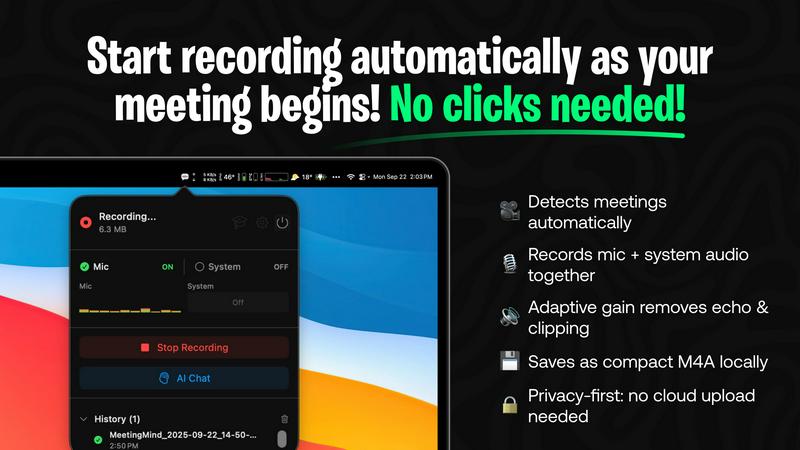
About MeetingMind
MeetingMind is an innovative AI-driven meeting assistant specifically designed to enhance productivity by automating the process of capturing and transforming meeting discussions into searchable, interactive notes. This powerful tool is particularly beneficial for professionals who frequently engage in virtual meetings, especially those held via Zoom. By eliminating the need for manual note-taking, MeetingMind streamlines the workflow for busy executives, team leaders, and anyone who values efficiency in their professional interactions. The software provides real-time, speaker-attributed transcripts with just a click, ensuring that no detail is overlooked. It utilizes on-device AI to keep users focused during meetings while offering an embedded assistant that highlights key takeaways and action items. For users concerned about privacy, MeetingMind allows connections to local Ollama models and OpenRouter keys, ensuring secure and confidential data processing. With seamless integration into the macOS ecosystem and a user-friendly interface, MeetingMind transforms meeting management, making it an essential tool for today’s professionals.
Features of MeetingMind
Automatic Detection
MeetingMind automatically detects Zoom meetings without any user intervention. This feature ensures that professionals can focus on the discussion at hand, knowing that their meeting is being recorded without the need for manual clicks.
Comprehensive Recording
The software captures both microphone and system audio simultaneously, utilizing adaptive gain technology to ensure clarity. This comprehensive recording feature guarantees that all voices and sounds are captured accurately, providing a complete audio record of the meeting.
AI Assistant
Users can choose their preferred AI for generating summaries and insights, either through local Ollama models or cloud-based OpenRouter. This flexibility allows users to tailor their experience while benefiting from intelligent, concise meeting summaries.
Markdown Export
MeetingMind offers the ability to export AI-generated summaries and transcripts in formatted markdown files. This feature not only enhances usability but also makes it easy for users to share and organize their meeting notes effectively.
Use Cases of MeetingMind
Executive Meetings
Busy executives can leverage MeetingMind to ensure that all key points from high-stakes meetings are accurately captured. The automatic detection of Zoom calls means they can focus on strategy and decision-making without worrying about note-taking.
Team Collaboration
In team meetings, MeetingMind enables collaboration by providing clear, concise summaries and action items. Team members can refer back to these notes to stay aligned on project goals and deadlines, improving overall productivity.
Client Consultations
For consultants and service providers, MeetingMind can record client consultations, ensuring that all client needs and feedback are documented. This allows for better follow-up and service delivery, enhancing client satisfaction.
Training and Workshops
Facilitators conducting training sessions or workshops can use MeetingMind to capture participant interactions and discussions. This documentation not only serves as a resource for future sessions but also helps in evaluating the effectiveness of the training.
Frequently Asked Questions
How does MeetingMind ensure privacy during meetings?
MeetingMind prioritizes user privacy by processing all data locally on the user's Mac. This means that meeting recordings and transcripts never leave the device, ensuring confidentiality and data security.
What platforms does MeetingMind support?
Currently, MeetingMind is designed specifically for macOS. It integrates seamlessly with the macOS ecosystem, making it a perfect fit for users within that environment.
Is there a limit to the free version of MeetingMind?
Yes, the free version of MeetingMind allows for 60 minutes of recording per day. This limitation is particularly useful for short meetings and daily standups, providing value without any cost.
How can I upgrade to the unlimited version of MeetingMind?
Users can upgrade to the unlimited version through the Mac App Store, where they can make a one-time purchase. This version removes time limits and includes lifetime updates without any subscription fees.
Explore more in this category:
Similar to MeetingMind

Free YouTube transcripts on the web, a Chrome extension, and an API + MCP server so AI assistants can read YouTube.

No-code 2D game editor: visual node logic, drag-and-drop scenes, live preview. Exports to Windows, macOS, Linux, Android, iOS, Web.

A free launch checklist for SaaS, apps, AI tools and more. Every step says why it matters and when you can skip it.

Free collection of online developer utilities, code formatters, and digital converters designed to streamline your daily workflow.

Moderation, routing, intent and scoring for any text over one Jev-compatible API, hosted in the EU.

MiroFish is an AI simulation chat for scenario prediction. Ask a question in plain language and it runs graph building, multi-agent simulation, and re

Online tally counter for tracking attendance, workouts, inventory, visitors, sports scores, habits, and everyday counting tasks.
