
LoadTester
LoadTester enables engineering teams to run distributed HTTP and API load tests from browser or CI/CD with live analytics and zero infrastructure.
Visit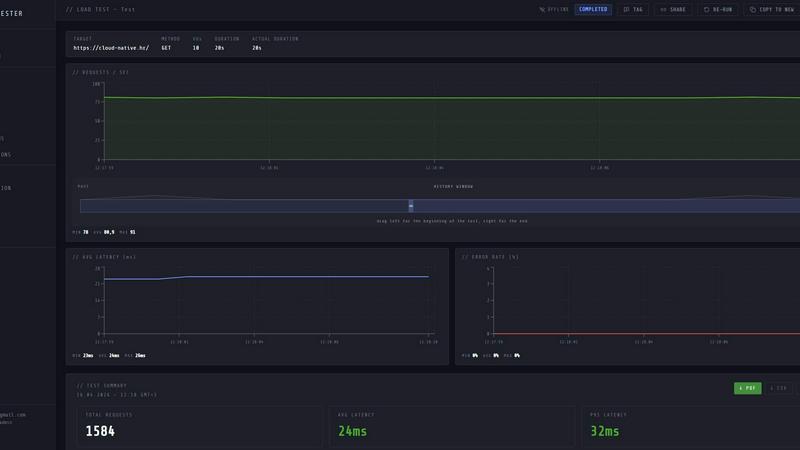
About LoadTester
LoadTester is a modern, cloud-native HTTP and API load testing tool developed by Cloud Native d.o.o. that eliminates the need for engineering teams to manage any testing infrastructure. Designed for developers, QA engineers, and platform teams, LoadTester provides a streamlined, repeatable approach to performance testing that integrates directly into existing workflows. The platform allows users to create a test scenario, choose between targeting a specific number of virtual users or a set rate of requests per second, and then launch the test from a browser or a CI/CD pipeline. Its core value proposition is simplicity and speed: tests start in under three seconds, with distributed workers auto-scaling to handle the load without any manual orchestration. During a live run, users can monitor key metrics in real time, including throughput, p50, p95, and p99 latency, error rates, and active virtual users. After a test completes, LoadTester provides a clean, actionable summary with total requests, average latency, and data sent and received. The platform further supports performance regression detection through run-to-run comparisons, scheduled baselines, and threshold-based auto-stop mechanisms. For teams that need to embed performance checks into their development lifecycle, LoadTester offers exports in PDF, CSV, and JSON formats, a REST API for programmatic access, and webhook integrations for Slack and email alerts. By removing the burden of provisioning and managing load testing infrastructure, LoadTester enables teams to catch performance regressions before users notice, ship with confidence, and prove application capacity before every launch.
Features of LoadTester
Instant Execution and Distributed Workers
LoadTester eliminates the traditional setup overhead by providing instant execution of load tests. From the moment a user hits the run button, the platform boots in under three seconds and automatically dispatches distributed workers to generate the specified load. There is no need to configure servers, manage queues, or orchestrate worker pools. This feature ensures that performance testing becomes a frictionless part of the development cycle, allowing teams to run ad-hoc tests on demand and integrate them into automated pipelines without any infrastructure ceremony.
Live Real-Time Analytics
During a live test run, LoadTester provides a streaming dashboard that displays critical performance metrics in real time. Users can watch throughput (RPS), p50, p95, and p99 latency, error counts, and active virtual users update continuously on live charts. This immediate feedback loop allows engineers to identify bottlenecks, latency spikes, or error bursts as they happen, rather than waiting for a post-run report. The live analytics capability transforms load testing from a batch analysis activity into an interactive debugging session.
Smart Auto-Stop and Threshold Guardrails
LoadTester includes intelligent guardrails that allow users to define performance thresholds before a test begins. If a metric such as p95 latency exceeds a set limit, or if the error rate surpasses a defined percentage, the platform can automatically stop the test. This prevents runaway tests from wasting resources or overwhelming downstream systems. Additionally, users can set regression thresholds that compare a current run against a baseline, triggering notifications via Slack or email if performance degrades by a specified percentage, such as 15%.
CI/CD Integration and Automation
Built for modern software delivery workflows, LoadTester integrates seamlessly with continuous integration and continuous deployment pipelines. The platform provides a REST API and webhook support, enabling teams to trigger load tests automatically on every deploy, pull request, or scheduled interval. Completed test results can be exported as PDF, CSV, or JSON files, and result links can be posted to release bots. This automation ensures that performance regressions are caught early, before code reaches production, and that performance checks become a standard, repeatable gate in the release process.
Use Cases of LoadTester
Pre-Deployment Performance Validation
Engineering teams can use LoadTester to validate the performance of a new feature or a critical endpoint before deploying to production. By running a spike test that simulates expected traffic patterns, teams can confirm that the application meets latency and error rate Service Level Objectives (SLOs). If a regression is detected via the baseline comparison feature, the deployment can be automatically blocked or flagged for review, preventing performance degradation from reaching end users.
Scheduled Baseline and Regression Monitoring
Platform and SRE teams can schedule recurring load tests to monitor the performance of key APIs over time. By running a nightly baseline test against a critical endpoint, such as an authentication or checkout service, teams can track latency trends and detect gradual performance degradation. LoadTester’s run-to-run comparison and regression alerts notify the team when a significant change occurs, enabling proactive investigation and optimization before the issue impacts user experience.
CI/CD Pipeline Quality Gates
In a continuous delivery pipeline, LoadTester acts as a quality gate that runs automatically after each deployment. The CI/CD system triggers a load test against the newly deployed environment, comparing the results against a predefined baseline. If the test passes all thresholds, the pipeline proceeds; if it fails, the deployment is halted, and the team is notified. This use case ensures that performance is treated as a first-class quality metric, on par with unit tests and integration tests.
Ad-Hoc Incident and Capacity Analysis
When an application experiences a performance incident in production, engineers can use LoadTester to quickly reproduce the scenario and analyze the root cause. By creating a test that mimics the traffic pattern observed during the incident, teams can isolate the failing component and verify the fix. Similarly, before a major product launch or marketing event, LoadTester can be used to run capacity tests that validate the application’s ability to handle the expected surge in traffic, ensuring the infrastructure is adequately provisioned.
Frequently Asked Questions
How does LoadTester compare to traditional load testing tools like JMeter or k6?
LoadTester differentiates itself by being a fully managed, cloud-native service with zero infrastructure to provision. Unlike JMeter or k6, which require users to set up and manage their own execution environments, LoadTester provides instant distributed execution from a browser or CI/CD pipeline. It also offers built-in live analytics, threshold-based auto-stop, and scheduled regression comparisons out of the box, reducing the complexity of setting up and maintaining a performance testing framework.
What types of tests can I run with LoadTester?
LoadTester supports HTTP and API load testing. You can create tests using GET, POST, PUT, and DELETE methods against any target URL. The platform allows you to choose between two modes: Virtual Users (VUs) for simulating concurrent user sessions, or Requests Per Second (RPS) for a constant throughput rate. This flexibility makes it suitable for a wide range of scenarios, from spike tests to steady-state baseline monitoring.
How are test results stored and shared?
All completed test results are stored in the LoadTester platform and are accessible from the project dashboard. Users can review detailed summaries including total requests, average latency, p95 latency, data sent, and data received. For sharing and external analysis, LoadTester provides export options in PDF, CSV, and JSON formats. Additionally, results can be shared programmatically via the platform’s REST API or through webhook integrations that post result links to release bots or team communication channels.
Can I integrate LoadTester with my existing CI/CD tools?
Yes, LoadTester is designed for seamless CI/CD integration. It provides a REST API that allows you to trigger tests, check status, and retrieve results from any automation tool, such as Jenkins, GitLab CI, GitHub Actions, or CircleCI. The platform also supports webhooks for sending notifications on test completion or threshold breaches to Slack, email, or custom endpoints. This makes it easy to add performance checks as a standard step in your deployment pipeline.
Similar to LoadTester

Your AI agent picks relevant directories, submits your product in your browser and tracks every step. One-time purchase.

Jomatter provides free online tools for HTML, CSS, and JavaScript developers, helping simplify common web development and coding tasks.

Clone any webpage pixel-perfect, export HTML/CSS/ZIP or React/Vue components.

Mainspring turns the settings macOS hides into 90+ one-click, fully reversible power-ups for Finder, Dock, screenshots and more. $29 once.

A Mac menu bar app for a full disk. See what is using your space, read whether it comes back on its own, and remove only what you tick.

Paste a URL and AI designs on-brand Open Graph images from your page's colours, fonts and logo. Free, no sign-up.

One API key and one credit balance for Reddit and X data. REST endpoints and a hosted MCP server, so your code and your agents call the same tools.

Independent iOS app studio with 24 apps on the App Store