
LinkedInPro
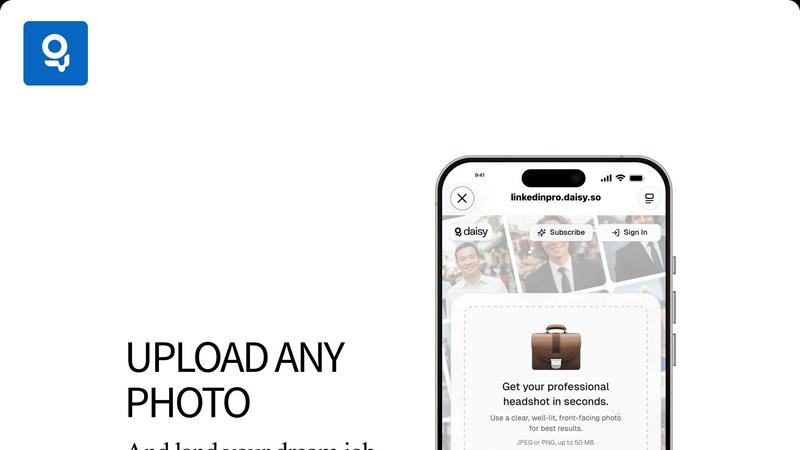
Instantly elevate your image with LinkedInPro, turning casual photos into polished LinkedIn headshots using AI.
VisitPublished on:
October 21, 2025
Pricing:
About LinkedInPro
LinkedInPro is a cutting-edge AI-powered tool that revolutionizes the way professionals present themselves online by transforming ordinary photos into stunning, professional-grade headshots in mere seconds. This innovative platform is specifically designed for job seekers, entrepreneurs, and professionals who aspire to enhance their digital presence on LinkedIn and other networking platforms. By eliminating the need for expensive photography sessions, LinkedInPro offers an accessible solution for creating high-quality images that reflect authenticity and professionalism. Utilizing advanced algorithms, the tool meticulously processes uploaded photos to enhance lighting, clarity, and presentation, ensuring that users showcase their best selves. With LinkedInPro, individuals can effortlessly update their professional images, reinforcing their personal brand and increasing their competitiveness in today's job market. This user-friendly service caters to anyone looking to elevate their online persona without the hassle and cost associated with traditional photography.
Features of LinkedInPro
AI-Powered Image Enhancement
LinkedInPro employs state-of-the-art artificial intelligence algorithms to enhance photos automatically. This feature analyzes the uploaded image, adjusting lighting, contrast, and sharpness to deliver studio-quality results that highlight the subject's authentic features.
User-Friendly Interface
The platform is designed with usability in mind, allowing users to upload their photos easily. With intuitive navigation, individuals can complete the process of transforming their images into professional headshots in just a few clicks, making it accessible for all skill levels.
Quick Processing Time
LinkedInPro is known for its rapid processing capabilities, enabling users to receive their professionally enhanced headshots in seconds. This feature is particularly beneficial for those who need to update their profiles quickly in response to job opportunities or networking events.
Versatile File Support
The platform supports a variety of image formats, including JPEG and PNG, with a maximum file size of 50 MB. This versatility allows users to upload existing images or capture new ones directly through the platform, ensuring that everyone can find a suitable option for their needs.
Use Cases of LinkedInPro
Job Seekers
Job seekers can use LinkedInPro to create polished headshots that enhance their professional profiles, making a strong first impression on potential employers. A compelling image can significantly boost their chances of standing out in a competitive job market.
Entrepreneurs
Entrepreneurs looking to establish their brand can leverage LinkedInPro to develop a consistent and professional visual identity. High-quality headshots can help convey credibility and attract investors or clients, enhancing their overall business presence.
Professionals Updating Profiles
Professionals who have not updated their profile pictures in years can utilize LinkedInPro to refresh their online presence. A modern, high-quality headshot can reflect their current career stage and personal growth, making them more relatable to their network.
Social Media Influencers
Social media influencers can benefit from LinkedInPro by obtaining high-quality headshots that complement their personal brand across various platforms. Professional images can enhance their engagement and appeal, attracting more followers and collaboration opportunities.
Frequently Asked Questions
How does LinkedInPro ensure photo quality?
LinkedInPro uses advanced AI algorithms to analyze and enhance uploaded images, optimizing factors like lighting, sharpness, and contrast to produce a professional-grade headshot that maintains authenticity.
What types of images are best for uploading?
For optimal results, users should upload clear, well-lit, front-facing photos. This ensures that the AI can effectively enhance the image while preserving the subject's natural features.
Can I use LinkedInPro for images other than headshots?
While LinkedInPro specializes in creating professional headshots, the platform's capabilities can be extended to other types of portraits. However, its primary focus remains on enhancing images suitable for professional networking.
Is my data secure with LinkedInPro?
LinkedInPro is committed to user privacy and data security. The platform adheres to strict privacy policies and terms of use, ensuring that all uploaded images and personal information are handled with care and confidentiality.
Similar to LinkedInPro

Free collection of online developer utilities, code formatters, and digital converters designed to streamline your daily workflow.

Online tally counter for tracking attendance, workouts, inventory, visitors, sports scores, habits, and everyday counting tasks.

The #1 Native Form Builder Plugin for Framer - No Code, No Embeds, No External Platforms.


Qwen Image Edit Online for prompt-based image editing, generation, and creative production.

Turn any image into editable layers with AI.

Production-ready AI image generation and editing with Seedream 5.0 Pro and Lite for ecommerce, marketing, social media, and branded content.
