
AI Formatter
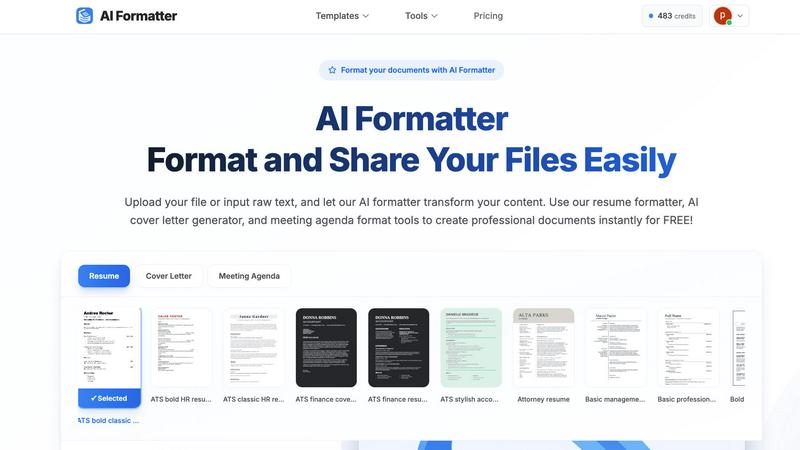
AI Formatter instantly transforms raw text into professional documents with customizable templates for resumes and.
VisitPublished on:
October 14, 2025
Pricing:
About AI Formatter
AI Formatter, developed by Sun Sky LLC, is a cutting-edge cloud-based document formatting platform tailored to optimize the creation of professional documents. By harnessing advanced AI technology, users can effortlessly transform raw text or uploaded files—including Word, PDF, and TXT formats—into impeccably formatted documents within seconds. This platform stands out with a stellar ATS (Applicant Tracking System) pass rate exceeding 95%, making it an invaluable tool for job seekers aiming to enhance their resumes and cover letters. AI Formatter boasts an extensive library of over 100 professional templates crafted for diverse needs, such as resumes, cover letters, meeting agendas, and invoices. Users can personalize these templates in real-time, modifying fonts, colors, and layouts to reflect their unique branding. The intuitive interface allows for seamless file uploads and content entry, while versatile export options and secure sharing capabilities further enhance user experience. With an introductory offer of 10 free credits, AI Formatter caters to a wide audience, including job seekers, professionals, businesses, and academics, significantly reducing the time and effort required for document preparation.
Features of AI Formatter
Extensive Template Library
AI Formatter provides users with access to a diverse collection of over 162 professional templates, optimized for ATS compatibility. This extensive library includes resumes, cover letters, meeting agendas, and invoices, all designed to meet various professional needs and standards.
Real-Time Customization
Users can customize their documents in real-time using AI Formatter. The platform allows adjustments to fonts, colors, and layouts, enabling individuals to create documents that align with their personal or corporate branding, enhancing the overall presentation.
Multi-Format Support
AI Formatter supports multiple file types, including PDF, DOC, DOCX, and TXT formats, facilitating easy uploads of existing documents or input of raw text. This feature ensures users can format their content seamlessly, regardless of the original file type.
User-Friendly Interface
The platform's user-friendly interface simplifies the document formatting process. Users can easily drag and drop files, input text, and navigate through the formatting options, making it accessible for individuals of all technical backgrounds.
Use Cases of AI Formatter
Job Seekers
AI Formatter is particularly beneficial for job seekers who want to create polished resumes and cover letters. The tool's high ATS pass rate ensures that their documents will be viewed favorably by hiring managers and automated screening systems.
Professionals
For working professionals, AI Formatter offers an efficient way to produce meeting agendas and professional reports. The ability to format documents quickly and effectively saves valuable time, allowing users to focus on other important tasks.
Academics
Researchers and students can utilize AI Formatter to prepare academic papers, thesis submissions, and presentations. The extensive template options and formatting capabilities help maintain professionalism in academic documentation.
Small Businesses
Small business owners can leverage AI Formatter to create invoices and other business documents with ease. The platform provides them with the tools needed to present their services professionally, facilitating better client relationships and transactions.
Frequently Asked Questions
How does AI Formatter ensure my documents are ATS-friendly?
AI Formatter utilizes ATS-optimized templates specifically designed to meet the standards of automated screening systems. This increases the likelihood that your resume will be noticed by recruiters.
Can I customize my templates after formatting?
Yes, once your document is formatted, you can make adjustments in real-time. You can change fonts, colors, and layouts to ensure that the final product meets your personal or corporate branding needs.
What file formats does AI Formatter support?
AI Formatter supports a variety of file formats, including PDF, DOC, DOCX, and TXT. This flexibility allows users to upload existing documents or enter raw text for formatting.
Is there a cost associated with using AI Formatter?
AI Formatter offers an introductory package of 10 free credits for document formatting. Additional pricing information may vary based on usage and specific features required.
Similar to AI Formatter

Free collection of online developer utilities, code formatters, and digital converters designed to streamline your daily workflow.

Online tally counter for tracking attendance, workouts, inventory, visitors, sports scores, habits, and everyday counting tasks.

The #1 Native Form Builder Plugin for Framer - No Code, No Embeds, No External Platforms.


PerPageFax lets you send a fax online from any browser for a flat $0.50 per page — no account, no subscription, no fax machine.

Track staff & time. Free trial. Cloud/on-prem.