
ProcessSpy
ProcessSpy is an advanced, native macOS process monitor offering real-time analytics, JavaScript filtering, and detailed system insights for power.
Visit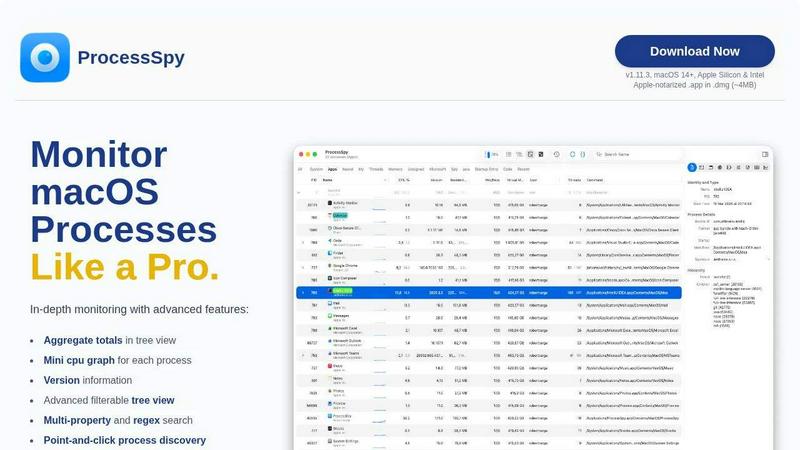
About ProcessSpy
ProcessSpy is a professional-grade process exploration and system monitoring utility designed exclusively for macOS. It serves as a powerful native alternative to tools like Sysinternals Process Explorer for Windows, addressing the significant limitations of macOS's built-in Activity Monitor. The tool is engineered for developers, system administrators, IT professionals, and power users who require deep visibility into their system's operations. Its core value proposition is revealing the hidden details of running processes that Activity Monitor obscures, such as full command-line arguments, precise version information, and hierarchical process relationships. Built using native macOS APIs and UI frameworks, ProcessSpy delivers a fast, responsive, and integrated experience without the performance overhead of cross-platform layers. It empowers users to diagnose application conflicts, identify resource hogs, manage dependencies, and terminate unresponsive processes with precision, transforming opaque system activity into transparent, actionable data.
Features of ProcessSpy
Advanced Hierarchical Process Tree
ProcessSpy visualizes processes in a detailed tree view that reflects their parent-child relationships, a critical feature for understanding daemons, agents, and spawned subprocesses. Unlike basic monitors, it displays aggregate totals for CPU usage, memory consumption, and thread counts for entire process hierarchies, allowing you to quickly assess the total resource impact of an application and all its components. This view supports the same powerful filtering and search capabilities as the main list, making complex system analysis intuitive.
JavaScript-Powered Dynamic Filtering
Beyond simple name matching, ProcessSpy allows users to define custom filters using JavaScript. This enables the creation of highly specific, multi-condition logic to isolate processes based on any combination of properties like CPU usage, memory, start time, command-line arguments, or version strings. For instance, you can script a filter to show only Java processes using more than 10% CPU that were launched in the last hour, providing unparalleled flexibility for targeted troubleshooting and monitoring.
Comprehensive Process Inspection & Context Actions
The tool provides deep inspection panels for any selected process, including lists of open files, network connections, and loaded dynamic libraries (Dylibs). Each list features a context menu with relevant actions, such as revealing a file in Finder or copying a network address. This turns static information into an interactive diagnostic workspace, enabling users to quickly investigate what resources a process is holding or what network activity it is generating.
Multi-Property and Regex Search
ProcessSpy's quick-search function is exceptionally powerful, supporting regular expressions and simultaneous searches across multiple process properties. You can perform complex queries like searching for processes with "node" in the name and a specific port in their command line, or using regex to find patterns in paths. This feature, often highlighted in developer tools documentation for efficient debugging, drastically reduces the time needed to locate specific processes among hundreds of system entries.
Use Cases of ProcessSpy
Developer Debugging and Dependency Management
Developers working with multiple runtime versions (e.g., different JDKs, Python interpreters, or Node.js versions) can use ProcessSpy to definitively identify which process corresponds to which development environment. By viewing the full executable path, command-line arguments, and version info, developers can resolve conflicts, ensure the correct version is running, and inspect environment variables, streamlining the development and debugging workflow significantly.
System Performance Analysis and Troubleshooting
When a Mac experiences slowdowns or high fan activity, ProcessSpy is essential for identifying the culprit. The aggregate CPU/memory totals in the tree view pinpoint which application family is consuming resources. The ability to flag newly discovered processes and view start times helps correlate system issues with recent software launches, a technique recommended in system administration guides for root cause analysis.
Security Auditing and Malware Identification
Security-conscious users and IT professionals can utilize ProcessSpy to audit running processes for anomalies. Inspecting entitlements, bundle identifiers, signature information, and startup entries (daemons/agents) helps identify unsigned or suspicious software. The ability to see all open files and connections for a process allows for a thorough examination of its behavior, aiding in the detection of potentially unwanted programs or malware persistence mechanisms.
Clean Application Termination and Uninstall Verification
When an application won't quit or leaves residual processes after an uninstall, ProcessSpy's detailed tree view shows all related child processes. Users can terminate an entire process tree instantly, ensuring a complete shutdown. Furthermore, the "Remember finished processes" feature (paid) allows users to verify that all components of an uninstalled application have successfully exited and review what was running, confirming a clean removal.
Frequently Asked Questions
Is ProcessSpy safe to install on my Mac?
Yes, ProcessSpy is verified as safe for macOS. The application is Apple-notarized, meaning it has been scanned by Apple for malicious content and approved. It is distributed as a code-signed .app inside a .dmg disk image, a standard and secure distribution method for macOS software. This ensures compatibility and security on both Intel and Apple Silicon Macs.
What versions of macOS are supported?
ProcessSpy is designed for modern macOS systems. The current version requires macOS 14 (Sonoma) or newer. The developer also notes support for the upcoming macOS 26 (Tahoe), indicating a commitment to maintaining compatibility with future Apple operating system releases. It does not support older, legacy versions of macOS.
What is the difference between the free and paid features?
The free version of ProcessSpy offers robust core functionality, including the advanced tree view, JavaScript filters, multi-property search, and basic process inspection. The paid license unlocks advanced diagnostic features such as viewing environment variables, process entitlements, Info.plist contents, signature details, startup entry points, and the responsible PID. It also enables historical recording of CPU/memory metrics, CSV export, and the ability to remember finished processes for later audit.
How does the licensing model work?
ProcessSpy uses a one-time purchase license model. A single license costs $24.99 and is valid for one user across an unlimited number of personal devices. The license includes lifetime updates, meaning all future feature additions and compatibility updates for the application are provided at no extra cost, offering long-term value.
Similar to ProcessSpy

Jev turns text or JSON into Choice, Score and Noul answers with probabilities. Build decision flows and call the API.

Native macOS disk analysis, careful cleanup, file organization, and developer-workspace storage. Includes a 7-day full-feature trial.

No-code 2D game editor: visual node logic, drag-and-drop scenes, live preview. Exports to Windows, macOS, Linux, Android, iOS, Web.

A free launch checklist for SaaS, apps, AI tools and more. Every step says why it matters and when you can skip it.

Moderation, routing, intent and scoring for any text over one Jev-compatible API, hosted in the EU.

A free directory of 950+ projects built on Laya, the open-source decision model. Updated daily.

The #1 Native Form Builder Plugin for Framer - No Code, No Embeds, No External Platforms.
