
Picture Enhancer
Picture Enhancer uses AI to deblur, upscale, and restore photos in your browser with three intensity levels and no software install.
Visit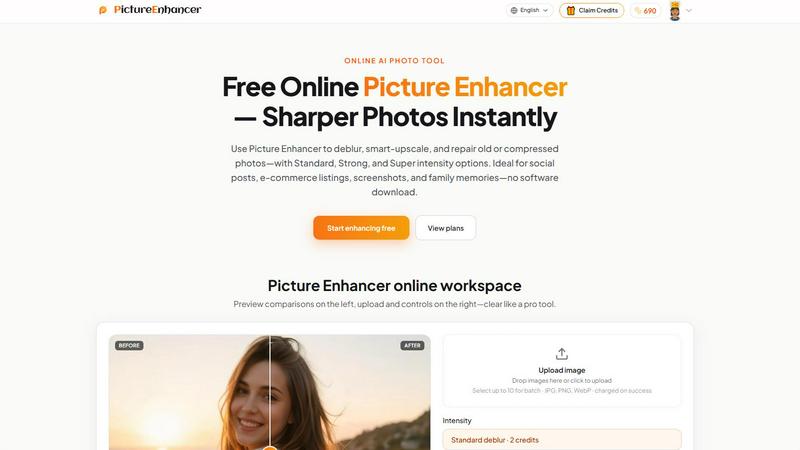
About Picture Enhancer
Picture Enhancer is a free online AI photo enhancement tool designed for creators, sellers, and everyday users who require sharper images quickly without the need for software downloads or complex editing skills. The platform leverages advanced artificial intelligence to perform three core image processing functions: deblurring, smart upscaling, and photo restoration. Users can upload JPG, PNG, or WebP images and select from three intensity levels—Standard, Strong, or Super—to achieve their desired quality improvement. The tool is particularly valuable for social media content creators, e-commerce sellers, professionals handling screenshots and UI captures, and individuals preserving family photo memories. Picture Enhancer offers a privacy-focused processing environment where uploaded images are used solely to complete the enhancement request and are not stored beyond the session. The product operates on a credit-based system: guests receive three free lifetime tries per IP without requiring signup, while signed-in users receive starter credits and can purchase additional credits through subscriptions or permanent packs. Credits are deducted only upon successful enhancement, ensuring users pay only for completed results. This combination of accessibility, privacy, and performance makes Picture Enhancer a practical solution for anyone needing fast, watermark-free image improvements across a variety of personal and professional contexts.
Features of Picture Enhancer
AI Deblur
Picture Enhancer's AI deblur feature rebuilds edges and texture from common image imperfections including camera shake, soft focus, and mild motion blur. Users can select from Standard, Strong, or Super intensity levels to match the severity of the blur. The AI analyzes the image structure and reconstructs lost detail, making faces, text, and fine textures readable again. This feature is particularly effective for photos taken in low light or with handheld devices where slight movement degrades sharpness.
Smart Upscale
The smart upscale feature enables 2x or 4x enlargement while adding realistic detail rather than simply stretching pixels. This is achieved through AI models trained on high-resolution image data to infer and generate missing information during enlargement. The feature is ideal for transforming small source files into usable sizes for social media covers, product hero shots, or print previews. Unlike traditional interpolation methods, Picture Enhancer's upscaling preserves edge sharpness and reduces artifacts.
Old Photo and Damage Restore
Picture Enhancer's restore mode addresses common issues in scanned or digitized old photographs including scratches, fading, and compression artifacts. The Strong and Super intensity levels handle heavier damage, making this feature suitable for restoring family prints and archival images. The AI identifies damaged areas and intelligently fills in missing information while maintaining the original photo's character and composition. Results are watermark-free and ready for sharing or printing.
Batch Enhance and Super Tiers
Paid users unlock the ability to batch enhance up to 10 images simultaneously, significantly improving workflow efficiency for professionals handling multiple photos. Super intensity tiers are also reserved for paid users, providing the highest level of enhancement for demanding applications. The batch feature processes each image individually with the selected mode and intensity, maintaining consistent quality across all outputs. This capability is particularly valuable for e-commerce sellers processing product images or content creators managing social media assets.
Use Cases of Picture Enhancer
Portraits and Everyday Photos
Picture Enhancer excels at reducing mild blur in portraits and everyday photographs, making faces, clothing, and background details appear cleaner and more professional. Users can enhance images for social media feeds, personal portfolios, or family albums without requiring advanced photo editing skills. The before-and-after comparison slider allows users to verify improvements before downloading, ensuring satisfaction with the final result.
E-Commerce and Product Shots
Online sellers can upscale product images and reduce compression noise to make listings stand out in competitive marketplaces. The smart upscale feature adds detail to small product photos, while the deblur and restore modes improve clarity on images taken in less-than-ideal lighting conditions. Batch processing enables efficient handling of multiple product images, saving time while maintaining consistent visual quality across an entire catalog.
Screenshots and UI Captures
Professionals creating tutorials, support documentation, or software archives benefit from Picture Enhancer's ability to sharpen text edges in screenshots and UI captures. The deblur mode makes interface elements and on-screen text readable again, especially in images captured from video or low-resolution displays. This use case is critical for technical writers, customer support teams, and developers documenting software features.
Old Photo Memories
Picture Enhancer's restore mode is specifically designed for repairing faded, scratched, or damaged scanned family photos. Users can upload old prints or negatives and reduce visual imperfections while preserving the original image's historical character. The Strong and Super intensity tiers handle heavily damaged images, making it possible to share or print restored versions of cherished family memories that were previously unusable.
Frequently Asked Questions
What is Picture Enhancer?
Picture Enhancer is a free online AI photo enhancement tool that improves image quality through deblurring, smart upscaling, and photo restoration. It is designed for creators, sellers, and everyday users who need sharper images quickly without downloading software. The tool supports JPG, PNG, and WebP formats and offers three intensity levels: Standard, Strong, and Super.
Can I try Picture Enhancer without signing in?
Yes, guests receive three free lifetime tries per IP address without requiring any signup or account creation. This allows users to test the tool's capabilities before committing to a paid plan. Guest tries are tracked by IP address and do not expire, providing ongoing access to the free trial.
How does billing work after sign-in?
Signed-in users receive starter credits upon account creation. Credits are charged only when an enhancement succeeds. Standard intensity costs 2 credits, Strong costs 4 credits, and Super costs 6 credits. Paid users unlock Super tiers and batch enhancement capabilities. Monthly subscription plans grant credits each billing cycle, while permanent credit packs never expire.
Which modes does Picture Enhancer support?
Picture Enhancer supports three primary modes: Deblur, which rebuilds edges and texture from camera shake and soft focus; Upscale, which provides 2x or 4x enlargement with added detail; and Restore, which reduces scratches, fade, and compression artifacts in old or damaged photos. Each mode offers Standard, Strong, and Super intensity levels.
Will downloads include a watermark?
No, all successful enhancements are delivered without watermarks. Users can download original-quality results directly from the workspace. Signed-in users can also revisit their enhanced images in the My Assets section for future access.
What is the difference between subscription and permanent credit packs?
Monthly subscription plans grant credits each billing cycle, providing a recurring supply for regular users. Permanent credit packs are one-time purchases that never expire, allowing users to enhance images at their own pace without ongoing payments. Both options unlock Super tiers and batch enhancement for paid users.
Are my photos safe?
Yes, Picture Enhancer processes all images privately and uses them only to complete the enhancement request. Uploaded images are not stored beyond the processing session. The platform is committed to user privacy and does not share or repurpose uploaded content.
Where do I check balance and history?
Signed-in users can check their credit balance and enhancement history in the My Assets section of the platform. This area displays available credits, past enhancements, and allows users to download previously processed images. Guest users do not have access to history features.
Pricing of Picture Enhancer
Picture Enhancer operates on a credit-based pricing model. Guests receive three free lifetime tries per IP with no signup required. Signed-in users receive starter credits upon account creation. Credits are charged only on successful enhancements: Standard intensity costs 2 credits, Strong costs 4 credits, and Super costs 6 credits. Paid users unlock Super intensity tiers and batch enhancement for up to 10 images. Monthly subscription plans grant credits each billing cycle, while permanent credit packs never expire. Specific pricing for subscriptions and packs is available on the Picture Enhancer pricing page.
Explore more in this category:
Similar to Picture Enhancer

Turn a written shot into a film-grade AI still: cinematographer lighting, a consistent cast across frames, locked looks, 8K exports, no watermark.

Create and edit AI images online with multiple models, text-to-image, image-to-image, background removal, and upscaling.

AI pet photo to pictures and short animations

Make the Alors on Danse AI meme video from two photos, soundtrack included

AI-powered image text editor to edit, replace, fix, or translate text in images while preserving the original font, color, size, and style.

AI image generation and editing with sharp typography, native 2K output, and localized edits that preserve the rest of your image.

Create release-ready album covers from a prompt or photo. Generate, refine, and export art for singles, EPs, mixtapes, and playlists.

Qwen Image Edit Online for prompt-based image editing, generation, and creative production.