
EditTextImage
EditTextImage lets you replace text in images online while preserving font, color, and perspective, no Photoshop required.
Visit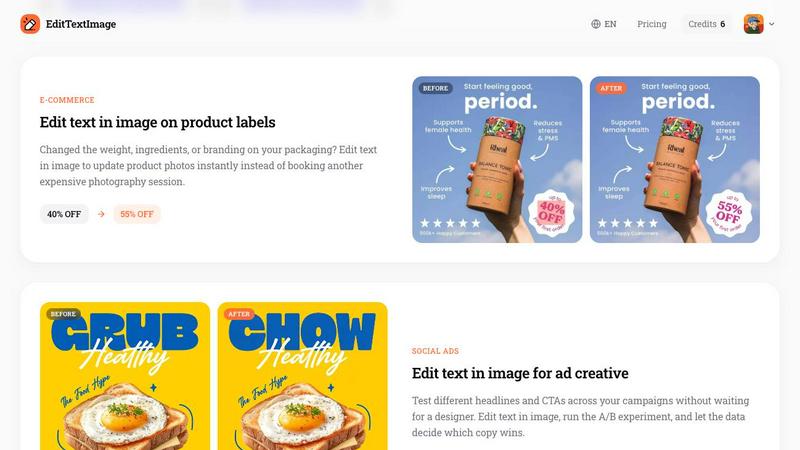
About EditTextImage
EditTextImage is an online AI tool that allows users to edit text within image files without requiring Photoshop, design skills, or the original source design file. The core value proposition is simple: upload any image containing text, specify the original text and the desired replacement, and the AI will sample the typography, color, lighting, and perspective directly from the image pixels to produce a pixel-perfect result. This tool is designed for professionals and individuals who frequently need to make text changes to finished images such as posters, screenshots, product photos, documents, and social media creatives. The process takes approximately 10 seconds and outputs images at 2K resolution. EditTextImage is particularly valuable for those who have lost the original design file, need to fix a typo, update a date, swap a headline for A/B testing, or localize app screenshots for different languages. Unlike traditional image editors that reset fonts, smear backgrounds, or warp perspectives, EditTextImage preserves every surrounding pixel exactly as it was. The tool is built on AI that samples the typeface from the pixels, meaning paid fonts and hand-lettering work seamlessly without needing font files installed. Each user gets one free credit to start with no credit card required, and additional credits are available for purchase with no subscription or expiration.
Features of EditTextImage
Pixel-Perfect Text Replacement
The AI technology in EditTextImage samples the typography, font, color, drop shadow, and perspective directly from the image pixels. This means that even paid fonts you do not have installed on your system or custom hand-lettering will be replicated exactly in the replacement text. The surrounding background pixels remain untouched, and the output maintains the original layout with no smearing or warping.
Fast Processing Speed
EditTextImage delivers results in approximately 10 seconds per edit, making it one of the fastest tools available for text replacement in images. The average time to edit text in an image is around 12 seconds, allowing users to quickly make changes and move on to the next task without waiting for complex rendering processes or manual adjustments.
High-Resolution Output
Every edit processed through EditTextImage outputs at 2K resolution, ensuring that the final image maintains high quality suitable for professional use. This resolution is ideal for printing, digital display, and social media sharing, providing crisp and clear results that match the original image quality.
No Subscription Required
EditTextImage operates on a credit-based system with no recurring subscription fees. Users receive one free credit to start with no credit card required. Additional credits are available as a one-time purchase and never expire, giving users full control over their usage without being locked into monthly payments.
Use Cases of EditTextImage
Document Fixes and Corrections
When you have lost the original source file for a document and only have a screenshot or scan, EditTextImage allows you to edit text directly on the image. This is useful for updating invoice numbers, fixing typos in contracts, correcting dates in official documents, or making any other text changes without needing the original file. The pixel-perfect preservation ensures the document looks authentic and professional.
Poster and Flyer Updates
Event organizers and marketers often face last-minute changes such as a date change, speaker dropout, or venue relocation. With EditTextImage, you can edit text on the finished poster or flyer without reopening the design file or waiting for a designer. This saves time and money, especially when the original design file is unavailable or the designer is offline.
App Screenshot Localization
App developers and marketers who need to submit screenshots to app stores in multiple languages can use EditTextImage to swap text on existing screenshots. Instead of rebuilding every UI mockup for each language, users can edit text in image to replace UI text with localized versions. The result is pixel-perfect every time, ensuring consistency across all language versions.
E-Commerce Product Label Updates
When product packaging changes such as weight, ingredients, or branding elements, e-commerce businesses can use EditTextImage to update product photos instantly. This eliminates the need to book another expensive photography session or redesign packaging mockups. The tool allows for quick updates to pricing, discounts, or promotional text on product images for A/B testing or seasonal campaigns.
Frequently Asked Questions
How does EditTextImage preserve the original font and style?
EditTextImage uses AI to sample the typeface, color, size, drop shadow, and perspective directly from the pixels of the original text in the image. It does not require the font file to be installed on your system. The AI analyzes the surrounding pixels to understand the font characteristics and then generates the replacement text with the same visual properties, ensuring the result looks natural and matches the original layout.
What file types and sizes are supported?
EditTextImage supports PNG, JPEG, and WebP file formats. The maximum file size for upload is 10 MB. This covers the most common image formats used in professional and personal projects, ensuring broad compatibility for posters, screenshots, product photos, and documents.
Is there a free trial available?
Yes, EditTextImage offers one free credit to start with no credit card required. You can sign in with Google and use your free credit to test the tool on any image. This allows you to evaluate the quality and speed of the text replacement before committing to a purchase. Credits never expire, so you can use your free credit at any time.
What are the acceptable use policies for EditTextImage?
EditTextImage has strict acceptable use policies. Users must confirm they own or are licensed to edit the uploaded image and that the edit is not intended to deceive a third party. Prohibited uses include visa or immigration submissions, fake refund or transaction proofs, and email or chat screenshots altered to falsify sender, content, or timestamp. The tool does not process IDs, passports, visa support letters, official seals, bank statements, or tampered receipts. Violations result in account termination without refund, and request logs may be shared with law enforcement.
Pricing of EditTextImage
EditTextImage offers a simple, transparent pricing structure. Each user receives one free credit to start, with no credit card required. After using the free credit, users can purchase additional credits for a one-time fee of $9.90 for 30 edits. There are no subscription fees, no recurring charges, and credits never expire. This pay-as-you-go model allows users to buy credits only when needed, making it cost-effective for occasional use as well as regular production workflows. Commercial use is included with all credits, so businesses can use the tool for client work and marketing materials without additional licensing fees.
Similar to EditTextImage

Qwen Image Edit Online for prompt-based image editing, generation, and creative production.


Turn any image into editable layers with AI.

Create Wan AI videos from text, images, references, and clips with Wan 2.7 workflows.

Production-ready AI image generation and editing with Seedream 5.0 Pro and Lite for ecommerce, marketing, social media, and branded content.

NanoEditor is an AI-powered D&D portrait generator that turns character details like ancestry, class and gear into focused fantasy RPG art.

Create polished AI images and videos from prompts or references for social posts, ads, flyers, album covers, and campaigns.

Production-ready AI image generation and editing with clear text, consistent styles, and developer-friendly APIs.