
Roast My Web vs StatPecker
Side-by-side comparison to help you choose the right product.

Roast My Web
Roast My Web provides a two-minute AI website audit to instantly identify and fix UX, SEO, and conversion issues.
Last updated: February 28, 2026

StatPecker
StatPecker delivers fast, secure AI-driven insights from your data, transforming them into stunning visuals for sharing.
Last updated: March 1, 2026
Visual Comparison
Roast My Web

StatPecker
Feature Comparison
Roast My Web
Instant AI-Powered Website Audit
Roast My Web's core functionality is its ability to conduct a thorough, multi-faceted website analysis in just two minutes. The AI engine scans the provided URL, examining critical dimensions including design aesthetics, user experience (UX) flow, conversion funnel optimization, mobile-friendliness, and on-page SEO elements. It then compiles its findings into a structured report that highlights weaknesses and provides specific, actionable fixes, eliminating guesswork and saving professionals significant manual auditing time.
Custom-Branded, Editable Client Reports
This feature allows users to fully white-label the audit reports for professional client delivery. With one click, users can add their own agency logo, brand colors, and custom text. Furthermore, the built-in manual report editor enables professionals to modify the AI-generated text, hide irrelevant sections, or add their own expert commentary. This ensures every PDF report is polished, branded, and 100% client-ready, enhancing credibility and presentation quality without requiring design skills.
Batch Audits and Competitor Analysis
For agencies and consultants managing multiple clients, Roast My Web offers powerful scalability. The batch audit feature allows users to paste over 100 URLs at once, letting the AI process them simultaneously. Additionally, the competitor analysis tool enables direct comparison against rival websites. Users can see where their site stands relative to competitors and receive targeted insights on how to improve their ranking and outperform others in their niche.
Thinking Mode for Deeper Analysis
For mission-critical pages like high-value landing pages or product launches, users can activate "Thinking Mode." This setting instructs the AI to engage in deeper reasoning, spending more computational time to catch subtle usability issues, nuanced copy problems, and complex conversion barriers. This results in higher-confidence, more detailed recommendations for pages where optimization can have the most significant impact on revenue.
StatPecker
Ask Your Query
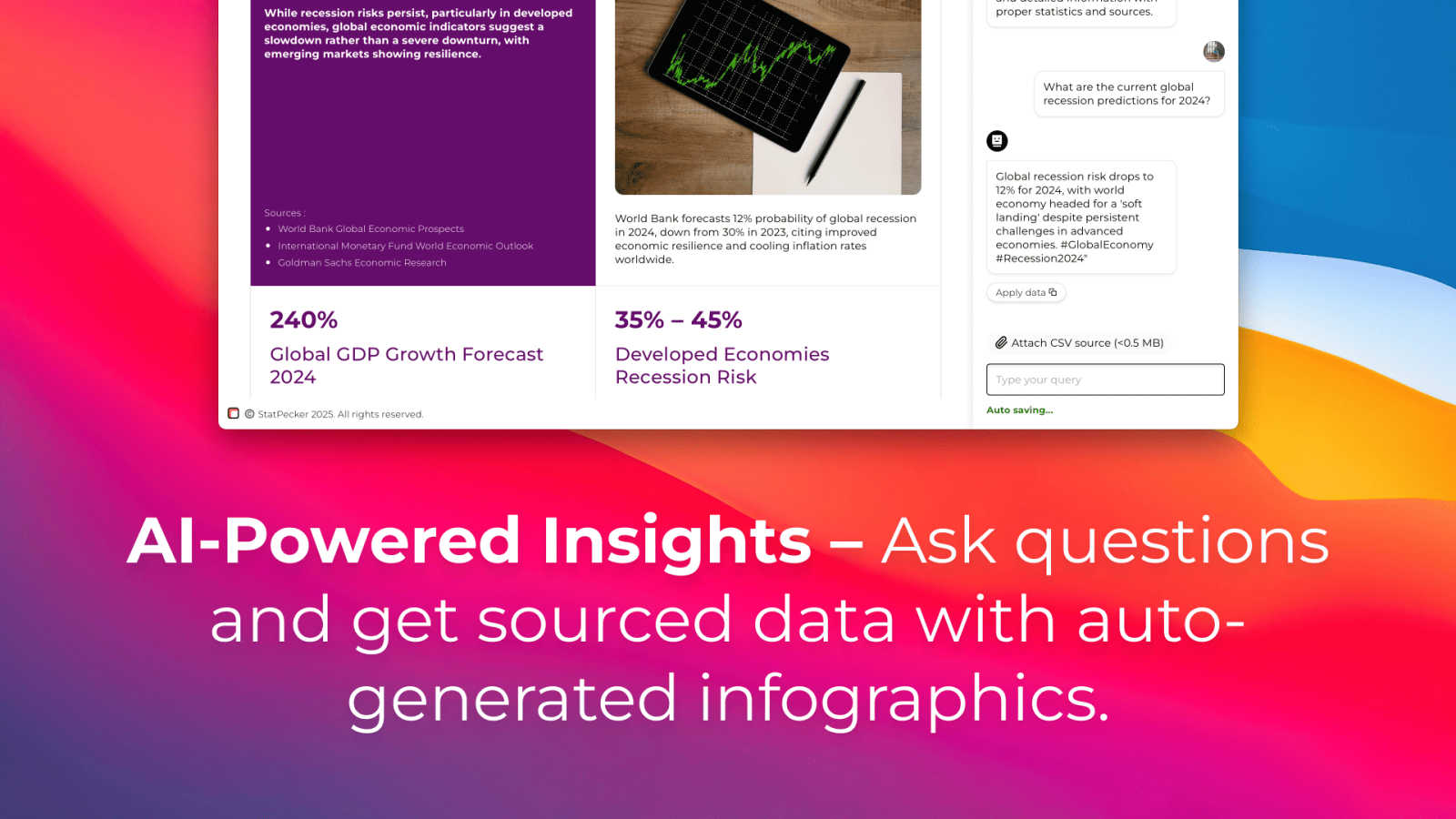
This feature allows users to obtain instant insights from validated sources using AI. By simply asking questions, users can bypass complex tools and receive accurate data visualizations tailored to their inquiries, streamlining the data analysis process.
Publish & Embed
StatPecker enables users to create interactive visuals that can be seamlessly integrated into blogs, articles, and websites. This feature enhances the reach and engagement of data presentations, making it easy to share compelling infographics with a wider audience.
Upload & Analyze CSVs
Users can upload local CSV files (up to 50MB) and extract key insights without the hassle of traditional spreadsheet tools. This functionality ensures that data analysis remains private and efficient, allowing users to explore their data with straightforward queries.
Download & Use Anywhere
StatPecker allows users to export their infographics as images, making them suitable for reports, presentations, and more. This feature ensures that users can utilize their visuals across various platforms without technical constraints.
Use Cases
Roast My Web
Digital Agencies Streamlining Client Onboarding
Agencies can use Roast My Web to instantly generate a professional, branded audit during the sales process or at the start of a new engagement. This demonstrates immediate value and expertise, setting a data-driven foundation for the project. It helps in quickly identifying low-hanging fruit for quick wins, building client trust, and efficiently scoping improvement projects, thereby saving hours per client.
Freelancers and Consultants Winning More Proposals
Freelancers (e.g., web designers, SEO specialists, conversion experts) can leverage the tool to audit a prospect's existing website before a proposal meeting. Presenting a detailed, actionable report showcases a proactive approach and deep understanding of the prospect's needs, significantly differentiating them from competitors and increasing their chances of winning the contract.
Startup Founders and Indie Hackers Optimizing Product Launches
Bootstrapped founders without dedicated UX/CRO teams can use Roast My Web to audit their landing pages and core website flows. The tool acts as an unbiased, expert consultant, identifying critical bugs, confusing UX, and conversion leaks that might otherwise be missed. This allows founders to make data-informed design and copy decisions to improve sign-ups and sales before and after launch.
SEO Professionals Conducting Comprehensive On-Page Audits
While traditional SEO tools focus heavily on technical and backlink profiles, Roast My Web complements them by deeply analyzing on-page user experience and conversion elements that impact SEO performance, such as content structure, page speed indicators, and mobile usability. This provides a holistic audit that combines technical SEO checks with conversion-focused UX tips.
StatPecker
Content Creation for Blogs
Content creators can utilize StatPecker to generate visually appealing infographics that enhance their blog posts. The platform’s automated capabilities streamline the creation process, saving time and effort while ensuring high-quality visuals that engage readers.
Data Reporting for Businesses
Business professionals can leverage StatPecker to create insightful reports that communicate key metrics and trends. The ability to quickly generate visuals from data empowers teams to make informed decisions based on clear, visually represented information.
Educational Presentations
Educators and students can use StatPecker to produce informative infographics for presentations and projects. The platform's user-friendly interface allows users to focus on storytelling rather than on complex design processes, facilitating effective communication of ideas.
Journalism and Media
Journalists can benefit from StatPecker by quickly creating compelling visuals that enhance their articles and reports. The platform enables the transformation of complex data into easily digestible formats, making stories more impactful and engaging for readers.
Overview
About Roast My Web
Roast My Web is an AI-powered website auditing platform engineered to deliver rapid, comprehensive, and actionable analysis of any website's performance and conversion potential. It addresses a critical market need identified by research from Baymard Institute, which indicates that the average large e-commerce site could achieve a 35% increase in conversion rates by fixing basic usability issues. The tool is specifically designed for digital professionals, including indie hackers, freelancers, and marketing agencies, who require a competitive edge in diagnosing and rectifying website flaws that directly impact client revenue and satisfaction. Its core value proposition lies in condensing what would traditionally be hours of manual auditing into a fully automated, two-minute process. By leveraging advanced AI, Roast My Web systematically evaluates key performance areas such as user experience (UX), conversion rate optimization (CRO), mobile responsiveness, and on-page SEO. The platform then generates detailed, client-ready reports that not only identify "sales killers" but also provide prioritized, step-by-step recommendations for improvement, empowering users to enhance online presence, win more business, and boost operational efficiency.
About StatPecker
StatPecker is an innovative AI-powered data visualization platform that aims to simplify the process of creating professional-grade infographics. Designed to address the common challenges associated with data communication, StatPecker significantly reduces the time, cost, and technical expertise typically required to convert raw data into visually compelling narratives. By automating the data storytelling process, it allows users—including content creators, journalists, data analysts, marketers, business professionals, educators, and students—to generate engaging infographics in mere seconds. The platform not only enhances the clarity and credibility of data-driven communication but also reduces production overhead. As highlighted on its official site, StatPecker provides "quick, credible answers you can publish, present, or share with your team," making it an indispensable tool for anyone looking to make data more understandable and persuasive.
Frequently Asked Questions
Roast My Web FAQ
How long does an audit take?
An audit with Roast My Web is exceptionally fast. The system is designed to analyze your website and generate a comprehensive report in approximately two minutes. This rapid turnaround allows for immediate insights and quick iterative testing on different pages or competitor sites.
What aspects of my website does the AI analyze?
The AI conducts a holistic audit across several key performance areas. This includes a detailed review of design and visual hierarchy, user experience (UX) and navigation, conversion rate optimization (CRO) elements like calls-to-action and forms, mobile responsiveness and cross-device compatibility, and fundamental on-page SEO factors such as content structure and meta-information.
Can I customize the audit reports for my clients?
Yes, extensive customization is a cornerstone feature. You can fully white-label reports by adding your agency's logo and brand colors in seconds. More importantly, the built-in manual editor allows you to modify any text within the AI-generated report, hide sections that are not relevant to a specific client, or insert your own expert advice and recommendations.
Is there a money-back guarantee?
Roast My Web stands behind its service with a customer-friendly guarantee. They offer a 30-day money-back guarantee for all purchases. If you are not satisfied with the tool or the insights it provides within the first 30 days, you can request a full refund.
StatPecker FAQ
What types of users can benefit from StatPecker?
StatPecker is designed for a diverse range of users, including content creators, journalists, data analysts, marketers, business professionals, educators, and students, all of whom can leverage the platform's capabilities to enhance data communication.
How does the Local SQL Agent feature work?
The Local SQL Agent feature allows users to upload local CSV files and perform on-device analysis without compromising data privacy. Users can ask questions about their data, and the platform generates visuals based on these queries, ensuring a seamless workflow.
Can I integrate StatPecker visuals into my existing website?
Yes, StatPecker allows users to publish and embed created visuals directly into blogs, articles, and websites, making it easy to share engaging infographics with a broader audience.
What is the pricing structure of StatPecker?
StatPecker offers a free tier with unlimited projects and embeds, alongside a paid lifetime access plan that includes all features, unlimited AI queries, and CSV uploads. Users can choose the plan that best fits their needs and budget.
Alternatives
Roast My Web Alternatives
Roast My Web is an AI-powered website auditing tool within the broader categories of analytics, marketing, and conversion optimization. It specializes in delivering rapid, comprehensive reports that assess a site's UX, SEO, and conversion potential, making it a valuable asset for agencies and digital professionals seeking to streamline their audit process. Users may explore alternatives for several common reasons. These include budget constraints, as pricing models vary significantly across the market. Others may require deeper integrations with specific platforms like Shopify or WordPress, more advanced technical SEO diagnostics, or different reporting structures that better fit their internal workflows. The need for a tool that aligns with a specific agency's service stack is a primary driver of comparison. When evaluating an alternative, key considerations should include the depth and actionability of insights, the flexibility of reporting and white-labeling options, the scope of technical checks performed, and the overall speed and reliability of the audit process. A tool's ability to provide not just data but clear, prioritized recommendations is crucial for driving actual client improvements.
StatPecker Alternatives
StatPecker is an AI-powered data visualization platform that simplifies the process of transforming raw data into compelling infographics. By automating data storytelling, it caters to a diverse audience, including content creators, marketers, and educators, enabling them to produce professional-grade visuals quickly and efficiently. Users often seek alternatives to StatPecker due to various reasons, such as pricing structures, specific features, or compatibility with their existing platforms. When selecting an alternative, it is important to consider factors such as user-friendliness, the range of visualization options available, integration capabilities, and the overall cost-effectiveness of the tool to ensure it meets your unique data needs and organizational goals.