
Phishly vs Zovo
Side-by-side comparison to help you choose the right product.

Phishly
Phishly leverages AI to instantly detect phishing emails with a simple one-click scan in Gmail and web tools.

Zovo offers 20 privacy-first Chrome extensions for developers and writers, all from a single dedicated developer.
Last updated: February 27, 2026
Visual Comparison
Phishly
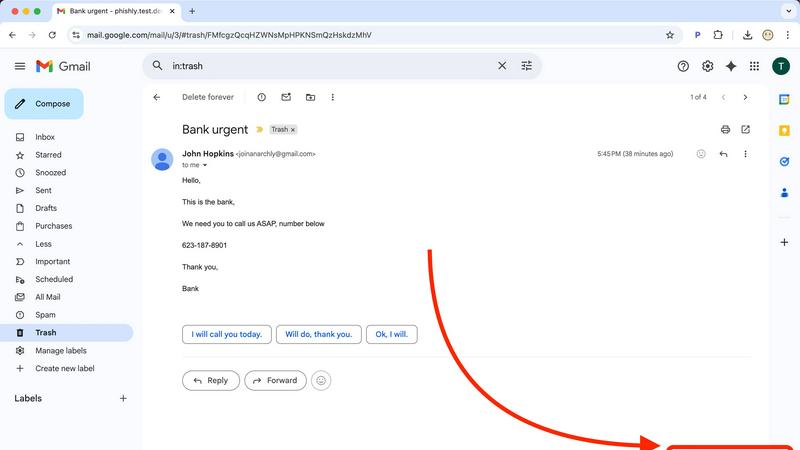
Zovo

Feature Comparison
Phishly
AI-Powered Email Analysis
Phishly utilizes advanced artificial intelligence to analyze emails for potential phishing threats. This feature examines various aspects of an email such as sender authenticity, domain legitimacy, and content language, ensuring comprehensive threat detection.
Instant Risk Assessment
Upon scanning an email, Phishly delivers immediate risk assessments categorized as Safe, Medium Risk, or High Risk. This feature helps users quickly understand the potential dangers associated with an email, allowing for prompt decision-making.
User Privacy Protection
Phishly is designed with user privacy in mind. The platform only analyzes emails that users explicitly choose to scan, ensuring that personal and sensitive information remains confidential and protected from unauthorized access.
Simple User Interface
The user interface of Phishly is intuitive and straightforward, requiring no technical knowledge to operate. Users can easily navigate the Chrome extension or web tool, making phishing detection accessible to everyone, regardless of their technical background.
Zovo
BeLikeNative
BeLikeNative helps users write like native speakers with a single keystroke. This powerful tool supports 80 languages, making it an invaluable asset for non-native speakers looking to enhance their writing quality across various contexts, whether for professional or personal use.
Tab Suspender Pro
This extension automatically suspends inactive tabs, helping users save memory and improve browser performance. With smart detection and memory tracking features, Tab Suspender Pro is particularly beneficial for those who tend to keep numerous tabs open at once, maximizing system resources effectively.
JSON Formatter Pro
JSON Formatter Pro allows users to format, validate, and explore JSON data locally. It features beautification and minification capabilities, alongside a tree explorer for easy navigation of complex JSON structures, making it essential for developers and data analysts working with APIs.
Clipboard History Pro
Never lose copied text again with Clipboard History Pro, which allows users to store up to 10,000 clips. This tool features instant search capabilities and smart paste functionality, ensuring that important snippets can be retrieved easily and efficiently, saving time during workflow.
Use Cases
Phishly
Personal Email Security
Individuals can use Phishly to safeguard their personal email accounts against phishing attempts. By scanning suspicious emails, users gain peace of mind knowing they are protected from potential fraud and identity theft.
Small Business Protection
Small businesses can integrate Phishly into their email practices to protect sensitive client information and business operations. By utilizing Phishly, companies can reduce the risk of phishing scams that could lead to financial losses.
Education and Awareness
Phishly serves as an educational tool for users who want to learn more about phishing tactics. The detailed explanations provided after each scan help users recognize common signs of phishing, thus enhancing their overall email security awareness.
Quick Verification for Teams
Teams within organizations can leverage Phishly to quickly verify the legitimacy of emails that may contain important information or requests. This feature helps ensure that all team communications are secure, enhancing collaborative efforts without compromising safety.
Zovo
Academic Writing
Students and researchers can utilize BeLikeNative to improve their academic writing, ensuring that their papers and articles are polished and articulate. The ability to rewrite content in multiple languages also helps non-native speakers present their ideas more clearly.
Web Development
Developers can greatly benefit from JSON Formatter Pro and Regex Tester Pro while working on APIs and data manipulation tasks. These tools streamline the process of debugging and validating data formats, enhancing overall productivity during development cycles.
Data Management
Data analysts and marketers can leverage the Web Scraper Lite to gather information from websites without needing coding skills. This tool's point-and-click interface simplifies the data extraction process, allowing for efficient collection and analysis of relevant information.
Productivity Enhancement
Professionals who juggle multiple projects can use Tab Suspender Pro to manage their browser tabs effectively. By automatically suspending inactive tabs, users can maintain focus on their current tasks without being overwhelmed by open tabs, thereby improving overall productivity.
Overview
About Phishly
Phishly is an advanced AI-powered phishing detection platform designed to protect users from the growing threat of phishing attacks. Available as a Chrome extension for Gmail and through a web tool, Phishly provides an easy-to-use solution for individuals and small businesses who seek reliable phishing protection without the complexities often associated with enterprise-level security solutions. The platform allows users to scan their emails directly within Gmail by clicking "Scan with Phishly" or by pasting suspicious emails on the Phishly website for immediate analysis. Leveraging sophisticated AI algorithms, Phishly identifies various phishing indicators, including suspicious domains, urgent language, spoofed sender addresses, and common social engineering tactics. After analysis, users receive clear risk assessments categorized as Safe, Medium Risk, or High Risk, accompanied by detailed explanations that empower them to make informed decisions. Phishly prioritizes user privacy by only analyzing emails that users explicitly choose to scan, ensuring that sensitive information remains secure. With no technical expertise required, Phishly is free to use and provides instant answers, making it an invaluable tool for anyone concerned about email security.
About Zovo
Zovo is a suite of 20 Chrome extensions designed by a solo developer with over a decade of experience and an impressive track record of $400K+ earned on Upwork, boasting a 100% success rate. Targeted at users who seek efficiency and enhanced productivity in their web browsing experience, Zovo enables individuals to accomplish a variety of tasks seamlessly. The flagship extension, BeLikeNative, empowers over 3,300 users to write like native speakers, providing one-keystroke rewrites in 80 languages. The collection includes tools for tab management, JSON formatting, clipboard history, form filling, session management, regex testing, web scraping, cookie handling, and API testing, among others. Every extension prioritizes user privacy, ensuring that no data is harvested or stored externally. Users play a crucial role in shaping the development roadmap by voting on new features, fostering a community-driven approach to software enhancement. Zovo is committed to delivering new tools monthly, often granting early access to members, and many tools are also available for free at zovo.one.
Frequently Asked Questions
Phishly FAQ
How does Phishly detect phishing emails?
Phishly employs advanced AI algorithms to analyze various elements of emails, including sender information, domain legitimacy, and language used. It identifies common phishing tactics and provides risk assessments based on these factors.
Is Phishly free to use?
Yes, Phishly is a free tool available for anyone who wants to enhance their email security. Users can scan emails at no cost, making it accessible for individuals and small businesses alike.
What types of emails can I scan with Phishly?
Users can scan any email they find suspicious, whether it is received in Gmail or forwarded from another platform. The tool can analyze emails for various phishing indicators, providing insights regardless of the email's origin.
Is my data safe when using Phishly?
Absolutely. Phishly only analyzes emails that users explicitly choose to scan, ensuring that personal data remains private and secure. The platform is designed to protect user information while providing reliable phishing detection services.
Zovo FAQ
What does Zovo prioritize in its extensions?
Zovo prioritizes user privacy and data security. All extensions are designed to ensure that user data never leaves their device, with no data harvesting practices involved.
Can I request features for Zovo extensions?
Yes, Zovo encourages users to submit feature requests directly. The developer actively reads these requests and prioritizes the most requested features for development.
How often are new extensions released?
New extensions are typically released monthly, with members receiving early access to these tools before they are made available to the public.
How can I reach support if I have questions?
Users can contact the developer directly via Discord or email for any questions or issues. There are no bots or ticket queues, ensuring a personalized support experience.