
Decode This Text vs Phishly
Side-by-side comparison to help you choose the right product.

Decode This Text
Decode This Text provides quick, human-like analyses of conversations in just 30 seconds for ultimate clarity and.
Last updated: February 28, 2026

Phishly
Phishly leverages AI to instantly detect phishing emails with a simple one-click scan in Gmail and web tools.
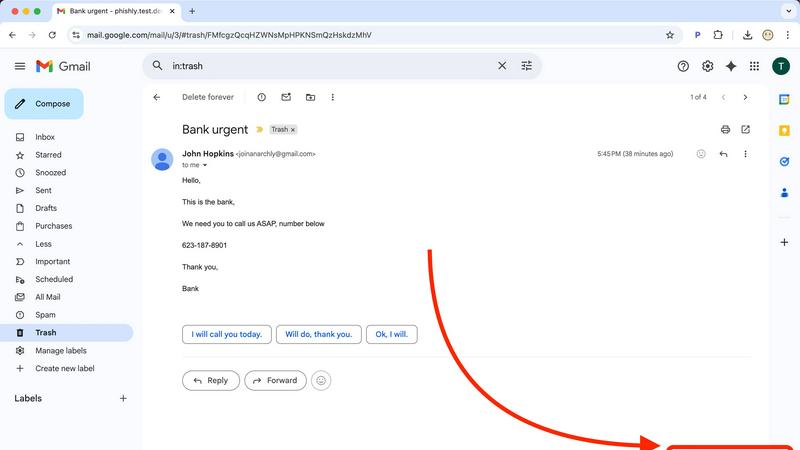
Visual Comparison
Decode This Text

Phishly
Feature Comparison
Decode This Text
Comprehensive Analysis
Decode This Text offers a thorough examination of messages, highlighting emotional tones, intentions, and contextual elements. This feature ensures that users grasp the nuances behind any communication, enabling them to respond appropriately.
Visual Input Capability
Users can conveniently upload screenshots of conversations, allowing the tool to analyze the text without requiring manual input. This feature simplifies the process for those who prefer visual communication, making it easier to decode complex interactions.
Emotional Tone Detection
This feature assesses the emotional temperature of messages, categorizing them as cold, sarcastic, or friendly. By understanding the emotional context, users can avoid misinterpretations and respond in a manner that aligns with the sender's mood.
Response Suggestions
For users unsure about how to reply, Decode This Text provides three tailored response options—calm, direct, or firm. This feature equips users with the confidence to engage in conversations effectively, regardless of the message's complexity.
Phishly
AI-Powered Email Analysis
Phishly utilizes advanced artificial intelligence to analyze emails for potential phishing threats. This feature examines various aspects of an email such as sender authenticity, domain legitimacy, and content language, ensuring comprehensive threat detection.
Instant Risk Assessment
Upon scanning an email, Phishly delivers immediate risk assessments categorized as Safe, Medium Risk, or High Risk. This feature helps users quickly understand the potential dangers associated with an email, allowing for prompt decision-making.
User Privacy Protection
Phishly is designed with user privacy in mind. The platform only analyzes emails that users explicitly choose to scan, ensuring that personal and sensitive information remains confidential and protected from unauthorized access.
Simple User Interface
The user interface of Phishly is intuitive and straightforward, requiring no technical knowledge to operate. Users can easily navigate the Chrome extension or web tool, making phishing detection accessible to everyone, regardless of their technical background.
Use Cases
Decode This Text
Navigating Ambiguous Texts
Decode This Text is invaluable when dealing with vague texts from friends or colleagues. By providing a clear interpretation, users can avoid unnecessary confusion and maintain healthy communication.
Professional Email Clarification
In the workplace, ambiguous emails can lead to miscommunication. This tool helps users decipher the true meaning behind brief or unclear messages, ensuring that responses are appropriate and informed.
Family Communication Enhancement
Family dynamics can be complicated by misunderstandings. Decode This Text assists users in interpreting family messages, promoting better understanding and reducing potential conflicts.
Relationship Insights
For those in romantic relationships, Decode This Text can help clarify intentions behind messages that may seem evasive or confusing. This insight fosters healthier conversations and strengthens connections.
Phishly
Personal Email Security
Individuals can use Phishly to safeguard their personal email accounts against phishing attempts. By scanning suspicious emails, users gain peace of mind knowing they are protected from potential fraud and identity theft.
Small Business Protection
Small businesses can integrate Phishly into their email practices to protect sensitive client information and business operations. By utilizing Phishly, companies can reduce the risk of phishing scams that could lead to financial losses.
Education and Awareness
Phishly serves as an educational tool for users who want to learn more about phishing tactics. The detailed explanations provided after each scan help users recognize common signs of phishing, thus enhancing their overall email security awareness.
Quick Verification for Teams
Teams within organizations can leverage Phishly to quickly verify the legitimacy of emails that may contain important information or requests. This feature helps ensure that all team communications are secure, enhancing collaborative efforts without compromising safety.
Overview
About Decode This Text
Decode This Text is a cutting-edge communication tool designed to assist users in unraveling the often ambiguous meanings behind various messages. Whether you're struggling to interpret a cryptic email from your boss, a vague text from a friend, or a confusing message from a client, this innovative tool provides essential clarity. By simply pasting the text or describing the context, users receive an insightful analysis of the sender's underlying intentions, emotional tone, and appropriate response strategies. This tool is particularly beneficial for anyone looking to enhance their communication skills, foster better relationships, and eliminate misunderstandings. With a user-friendly interface and rapid analysis, Decode This Text empowers you to navigate your interactions confidently, alleviating the stress of overanalyzing every word.
About Phishly
Phishly is an advanced AI-powered phishing detection platform designed to protect users from the growing threat of phishing attacks. Available as a Chrome extension for Gmail and through a web tool, Phishly provides an easy-to-use solution for individuals and small businesses who seek reliable phishing protection without the complexities often associated with enterprise-level security solutions. The platform allows users to scan their emails directly within Gmail by clicking "Scan with Phishly" or by pasting suspicious emails on the Phishly website for immediate analysis. Leveraging sophisticated AI algorithms, Phishly identifies various phishing indicators, including suspicious domains, urgent language, spoofed sender addresses, and common social engineering tactics. After analysis, users receive clear risk assessments categorized as Safe, Medium Risk, or High Risk, accompanied by detailed explanations that empower them to make informed decisions. Phishly prioritizes user privacy by only analyzing emails that users explicitly choose to scan, ensuring that sensitive information remains secure. With no technical expertise required, Phishly is free to use and provides instant answers, making it an invaluable tool for anyone concerned about email security.
Frequently Asked Questions
Decode This Text FAQ
How does Decode This Text ensure user privacy?
Decode This Text guarantees 100% anonymity. No human reads your texts, ensuring that your conversations remain private and secure.
What types of messages can I analyze with Decode This Text?
You can analyze any written communication, including text messages, emails, and social media messages. The tool is designed to handle a wide variety of contexts and formats.
How quickly can I expect to receive an analysis?
The tool typically provides a comprehensive analysis within 30 seconds, allowing users to gain clarity rapidly and respond in a timely manner.
Is there any limit to the number of messages I can decode?
Currently, there is no specified limit on the number of messages you can analyze. Users can decode as many conversations as they need to enhance their communication skills.
Phishly FAQ
How does Phishly detect phishing emails?
Phishly employs advanced AI algorithms to analyze various elements of emails, including sender information, domain legitimacy, and language used. It identifies common phishing tactics and provides risk assessments based on these factors.
Is Phishly free to use?
Yes, Phishly is a free tool available for anyone who wants to enhance their email security. Users can scan emails at no cost, making it accessible for individuals and small businesses alike.
What types of emails can I scan with Phishly?
Users can scan any email they find suspicious, whether it is received in Gmail or forwarded from another platform. The tool can analyze emails for various phishing indicators, providing insights regardless of the email's origin.
Is my data safe when using Phishly?
Absolutely. Phishly only analyzes emails that users explicitly choose to scan, ensuring that personal data remains private and secure. The platform is designed to protect user information while providing reliable phishing detection services.