
Interactive Circle of Fifths vs PseudoRun
Side-by-side comparison to help you choose the right product.

Interactive Circle of Fifths
Master music theory with an interactive Circle of Fifths for scales, chords, and harmonization.
Last updated: March 1, 2026

PseudoRun
PseudoRun is the definitive free platform for mastering IGCSE pseudocode through interactive writing and debugging.
Last updated: March 1, 2026
Visual Comparison
Interactive Circle of Fifths

PseudoRun
Feature Comparison
Interactive Circle of Fifths
Dynamic Circle Visualization
The core of the tool is a fully interactive Circle of Fifths that responds to user input. Selecting any key instantly updates the entire interface to display its related chords and scales. This dynamic visualization helps users intuitively grasp the geometric relationships between keys, understanding concepts like relative minors, key signatures, and the proximity of closely related keys, which is fundamental for modulation and composition as outlined in standard music theory pedagogy.
Integrated Instrument Visualizers (Piano & Guitar)
This feature provides immediate, practical application by displaying chord shapes and scale patterns on virtual piano and guitar fretboard interfaces. When a chord or scale is selected, the visualizer highlights the correct notes and recommended fingerings. This direct translation from theory to instrument is crucial for muscle memory and technical skill development, allowing learners to see and hear the theoretical concepts in the context of their primary instrument.
Comprehensive Scale & Chord Library
The tool offers an extensive library of musical constructs accessible through its inner ring and panel. Users can explore not only standard major and minor scales but also pentatonic, blues, diatonic, and diminished scales. Each scale can be harmonized, revealing its related chord family. This allows for deep analytical study, such as understanding why certain chords (like the V or vii°) create tension that resolves to the tonic, a cornerstone of Western harmonic function.
Chord Sequencer & Functional Analysis Panel
The dedicated panel displays the harmonized scale (e.g., C, Dm, Em, F, G, Am, B° for the key of C Major) alongside their Roman numeral analysis (I, ii, iii, etc.). This "Chord Sequencer" enables users to build and audition chord progressions while the "Function" information (Scale Degree, Resolves To) provides insight into the role each chord plays, teaching the principles of cadence and harmonic movement that define countless musical genres.
PseudoRun
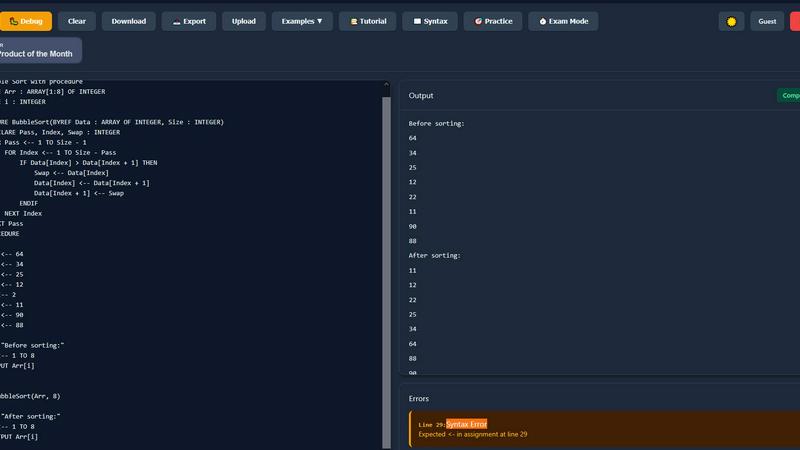
IGCSE Exam-Focused Editor
The core editor is built exclusively around the Cambridge IGCSE pseudocode syntax and conventions. This ensures that students are practicing within the exact framework required for their examinations, reducing confusion and building familiarity with the specific command set and structure assessed by the board. This focused approach, as noted in Cambridge assessment reports, directly correlates with higher student confidence and performance in algorithm-based questions.
Real-Time Syntax Validation & Error Detection
As users type, the platform performs instant validation, highlighting syntax errors and logical inconsistencies. This immediate feedback mechanism is crucial for learning, as research in educational technology indicates it helps reinforce correct patterns and allows for rapid correction of misconceptions, accelerating the learning curve for programming novices.
Step-by-Step Interactive Debugger
This feature allows users to execute their pseudocode line-by-line, observing the flow of control and tracking how variable values change in real-time. This granular visibility into program execution is proven to develop deeper conceptual understanding, moving beyond rote memorization to genuine comprehension of algorithmic processes, a key skill for IGCSE Computer Science success.
Comprehensive IGCSE Practice Library
PseudoRun includes an extensive, curated library of 50+ practice problems and examples that mirror IGCSE exam patterns. Covering essential topics like loops, arrays, and procedures, this library provides structured, incremental challenges that allow students to apply concepts in a practical context, solidifying their knowledge and exam readiness.
Use Cases
Interactive Circle of Fifths
Music Theory Education for Students
Ideal for classroom or self-directed learning, students can interact with the circle to understand key signatures, chord construction, and scale degrees in a hands-on manner. The visual and auditory feedback reinforces lessons on relative majors/minors and the cycle of fifths itself, transforming passive memorization into an active discovery process that enhances retention and comprehension of foundational concepts.
Songwriting and Composition Aid
Composers and songwriters can use the tool to break out of creative ruts. By experimenting with the chord sequencer in different keys, they can discover novel progressions and understand the functional relationships between chords. The ability to quickly switch keys and hear how a progression transforms is invaluable for arranging and developing musical ideas with coherent harmonic structure.
Instrumental Skill Development
Guitarists and pianists can use the instrument visualizers to learn new chord voicings, scale patterns, and their positions across the neck or keyboard. A guitarist, for example, can select the "Blues Scale" in A and see all applicable box patterns on the fretboard, facilitating targeted practice that directly improves improvisation and technical fluency on the instrument.
Music Analysis and Practice Planning
Advanced musicians and teachers can analyze songs by inputting their chord progressions into the tool to determine the key and understand the functional harmony at play. This analysis can then inform targeted practice sessions, such as focusing on the V-I cadence in various positions or practicing the diatonic arpeggios of a less familiar key, making practice time more efficient and effective.
PseudoRun
Independent Student Exam Preparation
IGCSE students can use PseudoRun for self-directed study and revision. They can write code for past paper algorithms, use the debugger to trace logic, and solve practice problems under timed exam conditions. This independent practice builds fluency and confidence, directly impacting exam performance.
Classroom Teaching and Demonstration
Educators can leverage PseudoRun as a dynamic teaching aid. During lessons, teachers can project the editor to demonstrate algorithm construction live, use the step-by-step debugger to visually deconstruct complex logic, and assign specific practice exercises from the library for homework, creating an interactive and engaging learning experience.
Algorithmic Thinking and Logic Development
For beginners new to programming concepts, PseudoRun serves as a low-stakes environment to experiment with computational thinking. Users can focus purely on logic and structure without the overhead of learning a full programming language's syntax, making it an ideal foundational tool before transitioning to languages like Python or Java.
Collaborative Learning and Peer Review
Study groups can use PseudoRun's cloud storage to share and access pseudocode programs from any device. Peers can review each other's algorithms, suggest optimizations, and debug collaboratively, fostering a community-based learning environment that enhances problem-solving skills through discussion and shared insight.
Overview
About Interactive Circle of Fifths
The Interactive Circle of Fifths is a sophisticated digital music theory tool designed to demystify the complex relationships between keys, chords, and scales. Moving far beyond a static diagram, it provides a dynamic, multi-sensory learning environment where users can visually explore and audibly experience core musical concepts. Its primary value proposition lies in translating abstract theory into practical, instrument-specific knowledge, making it an indispensable resource for a wide range of users. From beginners taking their first steps in understanding key signatures to advanced composers analyzing chord function and scale harmonization, the tool adapts to various skill levels. By integrating real-time piano and guitar visualizers, it bridges the gap between theoretical knowledge and physical application, showing exact finger positions and chord voicings. The tool's comprehensive coverage of musical constructs—including major and minor keys, diminished chords, and essential scales like pentatonic, blues, and diatonic—ensures a holistic approach to music education. Ultimately, it serves as a centralized platform for deepening harmonic understanding, crafting compelling progressions, and accelerating instrumental proficiency, solidifying its role as a foundational pillar for modern musical study and practice.
About PseudoRun
PseudoRun is the definitive online platform for mastering IGCSE Computer Science pseudocode. It is an interactive editor and simulator that allows users to write, execute, and debug algorithms in real-time, eliminating the dependency on complex, traditional programming environments. According to a 2023 study by the University of Cambridge on Computer Science pedagogy, tools that provide immediate feedback significantly enhance students' understanding of algorithmic logic and problem-solving skills. PseudoRun is meticulously engineered to align with the Cambridge IGCSE and O-Level Computer Science (0478/0984 & 2210) syllabus specifications, ensuring every feature directly supports exam preparation. Its primary value proposition is delivering a completely free, ad-free, and distraction-free learning environment tailored for students, educators, and beginners. By bridging the critical gap between theoretical concepts and practical implementation, PseudoRun fosters a deeper, more intuitive grasp of programming fundamentals, making it an indispensable resource for effective coding practice, classroom teaching, and independent study.
Frequently Asked Questions
Interactive Circle of Fifths FAQ
What is the Circle of Fifths and why is it important?
The Circle of Fifths is a visual representation of the relationships between the 12 tones of the chromatic scale, their corresponding key signatures, and their associated major and minor keys. It is a fundamental music theory tool because it organizes keys by the number of sharps or flats they contain, reveals closely related keys for modulation, and illustrates the foundational harmonic relationships (like the dominant-tonic connection) that underpin most Western music. This interactive tool brings that static diagram to life.
Can I use this tool if I'm a complete beginner?
Absolutely. The Interactive Circle of Fifths is designed with a gentle learning curve. Beginners can start by simply clicking on a key like C Major and hearing its scale or primary chords. The clear visual layout and instant auditory feedback help demystify basic concepts. It's recommended to start with the "Major" scale and the "Harmonized Scale" panel to first understand how basic triads are built within a key before exploring more advanced features.
How do the piano and guitar visualizers help me learn?
The visualizers translate abstract musical notes into concrete finger positions on your instrument. When you select a chord, you don't just see the note names (e.g., C, E, G); you see where to place your fingers on a piano keyboard or guitar fretboard to play that chord in a standard voicing. This bridges the gap between knowing a chord theoretically and being able to play it physically, which is essential for practical skill development and improvisation.
What is the "Function" information (Scale Degree, Resolves To) used for?
This information teaches you about harmonic function—the role a chord plays in a progression. "Scale Degree" (like I, IV, V) identifies the chord's position in the key. "Resolves To" indicates the chord's natural tendency (e.g., the V chord strongly resolves to the I chord). Understanding this is key to writing progressions that sound purposeful and emotionally directed, and for analyzing why the chords in your favorite songs work so well together.
PseudoRun FAQ
Is PseudoRun really completely free?
Yes. PseudoRun is committed to being 100% free with all features unlocked. The platform operates on a principle of zero ads and no premium paywalls, prioritizing accessible education for IGCSE students. This model is sustained through community support, such as voluntary "Buy Me a Coffee" contributions.
How does PseudoRun help specifically with IGCSE exams?
PseudoRun is meticulously aligned with the Cambridge IGCSE Computer Science pseudocode specification. The syntax, command set, and practice problems are designed to mirror exam requirements and patterns. Features like the Exam Mode Timer and syllabus-specific exercises train students for the exact format and time pressures of the actual assessment.
Do I need to create an account to use PseudoRun?
No account creation is required to start using the core features immediately. You can "Try Now without Login." However, creating a free account enables the use of cloud storage to save your pseudocode programs across devices, which is recommended for ongoing study and progress tracking.
Can I use PseudoRun on my tablet or smartphone?
Yes, PseudoRun is a web-based platform designed with a responsive interface. It is accessible from any modern device with a web browser, including tablets and smartphones, allowing students to practice pseudocode anytime, anywhere, provided they have an internet connection.
Alternatives
Interactive Circle of Fifths Alternatives
The Interactive Circle of Fifths is a sophisticated digital music theory tool within the education and learning software category. It is designed to provide an interactive, multi-instrumental approach to understanding key relationships, chord progressions, and scale patterns through dynamic visual and auditory feedback. Users may seek alternatives for various practical reasons. These can include budget constraints, a need for platform-specific applications (like mobile-first tools), or a desire for features tailored to a different learning style or specific instrument focus beyond piano and guitar. Some may also look for software that integrates directly with digital audio workstations for composition. When evaluating alternatives, key considerations should be the depth of music theory covered, the quality of instrument-specific visualizers, the range of scales and modes included, and the overall user experience. The goal is to find a tool that effectively bridges theoretical knowledge with practical application, supporting the user's specific musical journey and instrumental goals.
PseudoRun Alternatives
PseudoRun is a specialized educational technology platform in the IGCSE Computer Science learning category. It functions as a free, interactive pseudocode editor and simulator, designed to help students master algorithmic thinking by writing, debugging, and executing code in real-time, directly aligned with Cambridge exam specifications. Users may seek alternatives for various reasons, including the need for different feature sets, such as support for other programming languages or curriculum standards beyond IGCSE. Others might require offline access, collaborative tools for classrooms, or more advanced project management capabilities not central to PseudoRun's exam-focused mission. When evaluating an alternative, key considerations should include alignment with your specific syllabus, the quality of real-time feedback and debugging tools, and overall platform accessibility. Research from educational journals, like the Journal of Computer Assisted Learning, emphasizes that tools providing immediate, corrective feedback significantly enhance learning outcomes in introductory programming.