Daily vs documentorium
Side-by-side comparison to help you choose the right product.

Daily is a research-backed planner that reduces cognitive load to help you focus on essential tasks.

documentorium
Documentorium generates professional contractor documents and PDFs using guided, trade-specific forms in seconds.
Last updated: March 26, 2026
Visual Comparison
Daily
documentorium

Feature Comparison
Daily
The Unstructured Brain Dump
Daily's foundational feature is a zero-barrier input system designed to capture mental clutter instantly. Users can type or dictate tasks, ideas, and reminders as they arise, without the need to assign due dates, projects, or priority levels. This aligns with David Allen's "Getting Things Done" methodology, where capturing all open loops is the critical first step to achieving a "mind like water" state (Allen, 2015). By removing the friction of organization at the point of entry, Daily ensures no important thought is lost and helps clear the user's mental RAM.
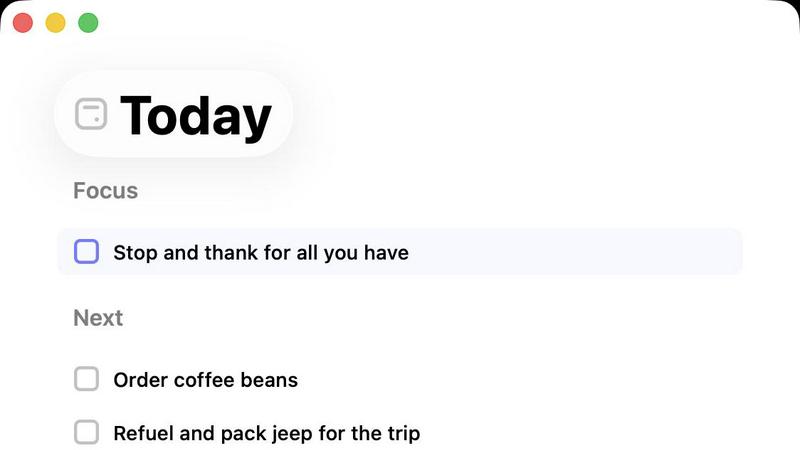
The Intentional "Today" View
This is the heart of Daily's methodology. Each morning, users review their master list and deliberately select only the tasks that are truly important for the current day. The Today view then displays this curated, shortlist in a clean, focused interface. This practice of daily intentional planning, as opposed to reactive task management, is proven to reduce anxiety and increase the likelihood of goal completion by providing a clear, manageable target (Locke & Latham, 2002).
Gentle Task Carry-Forward
At the end of the day, any incomplete tasks in the Today view are not marked as failures. Instead, Daily automatically returns them to the master list. The user must then consciously re-evaluate and re-select them for the next day if they remain a priority. This built-in reset mechanism encourages regular prioritization, prevents task list stagnation, and mitigates the demotivating effect of a perpetually red overdue list common in other apps.
Purposefully Minimalist Design
Daily is architected for cognitive ease, not feature richness. It intentionally lacks complex tags, nested subtasks, elaborate calendars, and social features. This constrained design philosophy reduces the cognitive load associated with learning and using the tool itself, allowing users to spend their mental energy on their actual work. The interface is quiet, visually calm, and free of distracting notifications or gamification elements.
documentorium
Trade-Specific Template Library
documentorium offers a curated catalog of more than 200 guided templates meticulously designed for 26 distinct trade categories. Unlike generic office software, each template—be it for a quote, work order, service report, or warranty—contains fields and terminology specific to that trade. For an electrician, this means fields for circuit amperage and NEC code references; for an HVAC tech, it includes SEER ratings and refrigerant types. This specificity ensures completeness, accuracy, and professional relevance, removing the guesswork from document creation and significantly reducing errors of omission.
Guided Form Interface & Instant PDF Generation
The platform utilizes a simple, step-by-step guided form interface that prompts users to enter all required information systematically. This structured approach prevents users from overlooking critical details. Upon form completion, documentorium's engine instantly processes the data into a professionally formatted, print-ready PDF document. This process, which takes mere seconds, eliminates the manual labor of designing layouts, adjusting fonts, and ensuring consistent branding, delivering a client-ready document with zero formatting effort required by the user.
Complete Document History & Prefill Capability
Every document created is automatically saved to the user's secure account history, creating a searchable digital filing cabinet. This feature provides a complete audit trail for all jobs and client interactions. Furthermore, the system intelligently uses this historical data to prefill information on new forms. For repeat clients or similar jobs, details like client name, address, and standard service descriptions auto-populate, dramatically speeding up the creation of subsequent documents and ensuring consistency across all business communications.
All-Access, Flat-Rate Subscription Model
documentorium operates on a straightforward, transparent pricing model. A single annual subscription provides full, unrestricted access to the entire template library and all platform features. There are no tiered plans, per-document fees, or hidden costs. This predictable, all-inclusive pricing allows tradespeople to budget effectively and use the service for every document need without worrying about incremental charges, making it a cost-effective solution for businesses of all sizes within the trades.
Use Cases
Daily
Managing ADHD and Cognitive Overload
Individuals with ADHD or those prone to overwhelm benefit from Daily's external capture system, which offloads working memory. The forced daily curation in the Today view provides the structure needed to combat impulsivity and prioritize, while the simple interface minimizes distractions. It serves as a consistent, forgiving framework to manage executive dysfunction.
Preventing Creative Professional Burnout
Writers, designers, and developers often juggle disparate projects and ideas. Daily provides a single, simple repository for all creative and administrative tasks. The brain dump feature captures fleeting inspiration, while the Today view helps them set a realistic, focused daily intention, protecting deep work time and preventing the scatter-brain effect that leads to burnout.
The Mindful Morning Routine
Users can integrate Daily into a grounding morning ritual. Instead of starting the day by reacting to emails, they open Daily, review their master list, and mindfully choose 3-5 key tasks for the day. This practice establishes agency, sets a positive tone, and creates a psychological contract for the day's work, enhancing focus and satisfaction.
Academic Task and Deadline Management
Students can use Daily to capture all assignments, readings, and study goals. Before each study session, they use the Today view to select a specific, achievable set of tasks for that block of time. This helps break down large projects, prevents last-minute cramming, and reduces the anxiety of an overwhelming syllabus by focusing only on the immediate next step.
documentorium
Creating a Detailed, Legally-Sound Service Contract
A general contractor securing a major home renovation project can use documentorium to generate a comprehensive contract. By selecting the appropriate contracting template, they are guided through including all critical clauses: payment schedules, scope of work details, change order procedures, material specifications, and warranty terms. This ensures the contract is thorough and protects both parties, projecting professionalism and reducing legal risk far more effectively than a handshake agreement or a self-drafted document.
Streamlining the Quote-to-Invoice Workflow for an HVAC Technician
An HVAC technician on a service call can use documentorium to create a detailed inspection report and quote on-site using a mobile device. After client approval, the same job data can be instantly converted into a formal work order. Once the repair is complete, the technician can generate the final invoice directly from the saved job record, ensuring all parts, labor, and previously agreed-upon rates are accurately transferred, creating a seamless, professional, and efficient customer journey from initial contact to payment.
Submitting a Competitive and Professional Bid for a Roofing Project
A roofing company bidding on a commercial project can utilize documentorium's bid templates to structure a compelling proposal. The guided form ensures inclusion of all necessary components: detailed material specifications (brand, type, warranty), labor breakdown, project timeline, safety compliance statements, and total cost summary. This results in a polished, complete bid that instills confidence in the potential client and competitively positions the roofer against others who may submit less formal or incomplete proposals.
Generating Compliance-Ready Inspection Reports for an Electrician
A licensed electrician completing a home electrical inspection for a real estate transaction can use a specialized inspection report template. The form will include all required checkpoints per common codes, spaces for detailed notes on each circuit and panel, and sections for photographic evidence. This allows for the rapid creation of a standardized, thorough report that meets regulatory and insurance requirements, demonstrating due diligence and expertise to clients and authorities alike.
Overview
About Daily
Daily is a minimalist digital to-do list and daily planner engineered for individuals experiencing cognitive overload and task paralysis. Its core philosophy, supported by research on decision fatigue and the Zeigarnik Effect—which states that uncompleted tasks occupy mental space—is to provide a low-friction "external brain" (Allen, 2015). Unlike complex productivity systems that demand upfront organization, Daily allows users to perform a "brain dump," capturing tasks, reminders, and thoughts instantly without judgment or categorization. The application's primary value proposition is fostering clarity and calm through intentional constraint. Its central "Today" view acts as a cognitive filter, displaying only the tasks selected for immediate focus, thereby reducing anxiety and improving executive function by limiting choices (Schwartz, 2004). For the overwhelmed professional, creative, or student, Daily offers not a tool for doing more, but a structured sanctuary for thinking clearly, prioritizing effectively, and beginning each day with grounded purpose. It gently carries forward unfinished items, eliminating the guilt of an ever-growing list and promoting sustainable productivity.
About documentorium
documentorium is a specialized document automation platform engineered specifically for skilled trades and service professionals. It addresses a critical pain point in industries like electrical, plumbing, contracting, HVAC, roofing, and solar installation: the excessive time and effort required to create professional, job-specific business documents from scratch. The platform's core value proposition is replacing blank-page document creation with a streamlined, guided process. Users gain access to a comprehensive library of over 200 professionally crafted templates across 26 trade categories. These are not generic forms but are built with field-level specificity for each trade, ensuring all necessary technical and commercial details are captured correctly. By filling out a structured, intuitive form, a tradesperson can generate a clean, print-ready PDF document in seconds. This eliminates formatting headaches, reduces administrative overhead, and projects a polished, credible image to clients. documentorium functions as a centralized document engine, consolidating the entire workflow from quote to invoice, thereby enhancing operational efficiency and allowing professionals to focus more on their craft and less on paperwork.
Frequently Asked Questions
Daily FAQ
How is Daily different from other to-do apps like Todoist or Microsoft To Do?
Daily is philosophically distinct. While apps like Todoist excel at complex project management with labels, filters, and dates, Daily is designed for cognitive relief. It emphasizes the psychological process of daily intentional selection and letting go, rather than comprehensive organization. It's for those who feel controlled by their task list, not those who need to manage highly complex workflows.
What happens to tasks I don't complete today?
Tasks you do not complete are simply moved out of your Today view and back into your master list. They do not become "overdue." The next day, you are prompted to review your full list and consciously decide if each item still deserves a spot in your new Today view. This system encourages regular re-prioritization and eliminates guilt.
Can I use Daily for team or shared projects?
No, Daily is intentionally designed as a personal, private thinking tool. It does not include collaboration, sharing, or assignment features. Its value is in providing a quiet space for individual clarity and focus, away from the noise and expectations of team-based project management platforms.
Is there a way to set recurring tasks or reminders?
Daily typically avoids automated reminders to maintain its philosophy of active, daily choice. The focus is on you deciding what matters today, not an app notifying you based on a past rule. For true recurring habits (e.g., "take medication"), you would manually re-add it to your Today view each day, reinforcing the habit through intentional action.
documentorium FAQ
Can I cancel my subscription at any time?
Yes, you retain full control over your subscription. You can cancel directly from your account settings at any time. Upon cancellation, your access to create new documents will remain active until the end of your current pre-paid billing period. There are no cancellation penalties, lock-in contracts, or hidden fees, ensuring flexibility for your business.
What happens to my data and documents when the free trial ends?
Your existing documents and data are preserved and remain accessible in your account history. When the trial expires, you retain the ability to view, download, and print all documents you created during the trial. To create or edit new documents, you will need to activate a paid subscription. No user data or document history is deleted after the trial period.
Do I lose access to my old documents if I don't subscribe after the trial?
No, you do not lose access to your documents. As noted in the platform's policies, your document history is maintained. You can log in to your account to view and download any documents you created during your active period. The subscription is required for the creation and editing of new documents, but your historical work remains yours to access.
Does documentorium provide legal advice for contracts or forms?
No. documentorium provides document automation tools and template frameworks designed for common trade scenarios. The platform and its templates are intended to facilitate the efficient generation of business documents and are not a substitute for professional legal advice. Users are responsible for ensuring that the documents they create meet their specific legal, regulatory, and contractual requirements.