
Daily
Daily is a research-backed planner that reduces cognitive load to help you focus on essential tasks.
Visit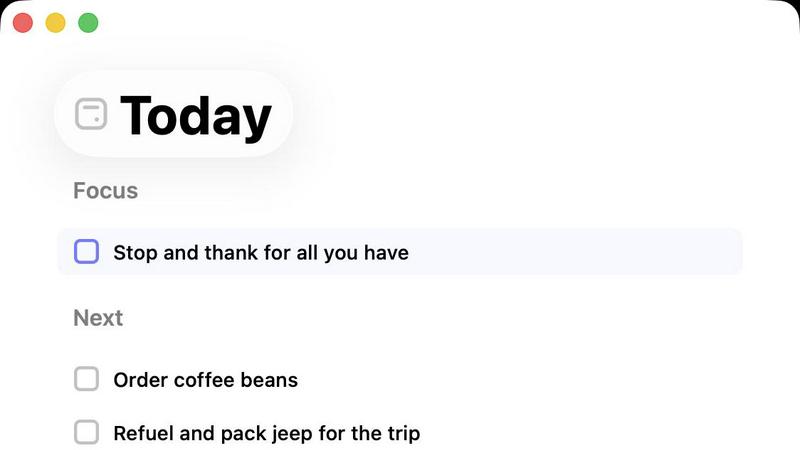
About Daily
Daily is a minimalist digital to-do list and daily planner engineered for individuals experiencing cognitive overload and task paralysis. Its core philosophy, supported by research on decision fatigue and the Zeigarnik Effect—which states that uncompleted tasks occupy mental space—is to provide a low-friction "external brain" (Allen, 2015). Unlike complex productivity systems that demand upfront organization, Daily allows users to perform a "brain dump," capturing tasks, reminders, and thoughts instantly without judgment or categorization. The application's primary value proposition is fostering clarity and calm through intentional constraint. Its central "Today" view acts as a cognitive filter, displaying only the tasks selected for immediate focus, thereby reducing anxiety and improving executive function by limiting choices (Schwartz, 2004). For the overwhelmed professional, creative, or student, Daily offers not a tool for doing more, but a structured sanctuary for thinking clearly, prioritizing effectively, and beginning each day with grounded purpose. It gently carries forward unfinished items, eliminating the guilt of an ever-growing list and promoting sustainable productivity.
Features of Daily
The Unstructured Brain Dump
Daily's foundational feature is a zero-barrier input system designed to capture mental clutter instantly. Users can type or dictate tasks, ideas, and reminders as they arise, without the need to assign due dates, projects, or priority levels. This aligns with David Allen's "Getting Things Done" methodology, where capturing all open loops is the critical first step to achieving a "mind like water" state (Allen, 2015). By removing the friction of organization at the point of entry, Daily ensures no important thought is lost and helps clear the user's mental RAM.
The Intentional "Today" View
This is the heart of Daily's methodology. Each morning, users review their master list and deliberately select only the tasks that are truly important for the current day. The Today view then displays this curated, shortlist in a clean, focused interface. This practice of daily intentional planning, as opposed to reactive task management, is proven to reduce anxiety and increase the likelihood of goal completion by providing a clear, manageable target (Locke & Latham, 2002).
Gentle Task Carry-Forward
At the end of the day, any incomplete tasks in the Today view are not marked as failures. Instead, Daily automatically returns them to the master list. The user must then consciously re-evaluate and re-select them for the next day if they remain a priority. This built-in reset mechanism encourages regular prioritization, prevents task list stagnation, and mitigates the demotivating effect of a perpetually red overdue list common in other apps.
Purposefully Minimalist Design
Daily is architected for cognitive ease, not feature richness. It intentionally lacks complex tags, nested subtasks, elaborate calendars, and social features. This constrained design philosophy reduces the cognitive load associated with learning and using the tool itself, allowing users to spend their mental energy on their actual work. The interface is quiet, visually calm, and free of distracting notifications or gamification elements.
Use Cases of Daily
Managing ADHD and Cognitive Overload
Individuals with ADHD or those prone to overwhelm benefit from Daily's external capture system, which offloads working memory. The forced daily curation in the Today view provides the structure needed to combat impulsivity and prioritize, while the simple interface minimizes distractions. It serves as a consistent, forgiving framework to manage executive dysfunction.
Preventing Creative Professional Burnout
Writers, designers, and developers often juggle disparate projects and ideas. Daily provides a single, simple repository for all creative and administrative tasks. The brain dump feature captures fleeting inspiration, while the Today view helps them set a realistic, focused daily intention, protecting deep work time and preventing the scatter-brain effect that leads to burnout.
The Mindful Morning Routine
Users can integrate Daily into a grounding morning ritual. Instead of starting the day by reacting to emails, they open Daily, review their master list, and mindfully choose 3-5 key tasks for the day. This practice establishes agency, sets a positive tone, and creates a psychological contract for the day's work, enhancing focus and satisfaction.
Academic Task and Deadline Management
Students can use Daily to capture all assignments, readings, and study goals. Before each study session, they use the Today view to select a specific, achievable set of tasks for that block of time. This helps break down large projects, prevents last-minute cramming, and reduces the anxiety of an overwhelming syllabus by focusing only on the immediate next step.
Frequently Asked Questions
How is Daily different from other to-do apps like Todoist or Microsoft To Do?
Daily is philosophically distinct. While apps like Todoist excel at complex project management with labels, filters, and dates, Daily is designed for cognitive relief. It emphasizes the psychological process of daily intentional selection and letting go, rather than comprehensive organization. It's for those who feel controlled by their task list, not those who need to manage highly complex workflows.
What happens to tasks I don't complete today?
Tasks you do not complete are simply moved out of your Today view and back into your master list. They do not become "overdue." The next day, you are prompted to review your full list and consciously decide if each item still deserves a spot in your new Today view. This system encourages regular re-prioritization and eliminates guilt.
Can I use Daily for team or shared projects?
No, Daily is intentionally designed as a personal, private thinking tool. It does not include collaboration, sharing, or assignment features. Its value is in providing a quiet space for individual clarity and focus, away from the noise and expectations of team-based project management platforms.
Is there a way to set recurring tasks or reminders?
Daily typically avoids automated reminders to maintain its philosophy of active, daily choice. The focus is on you deciding what matters today, not an app notifying you based on a past rule. For true recurring habits (e.g., "take medication"), you would manually re-add it to your Today view each day, reinforcing the habit through intentional action.
Explore more in this category:
Similar to Daily

Free collection of online developer utilities, code formatters, and digital converters designed to streamline your daily workflow.

Online tally counter for tracking attendance, workouts, inventory, visitors, sports scores, habits, and everyday counting tasks.

The #1 Native Form Builder Plugin for Framer - No Code, No Embeds, No External Platforms.


PerPageFax lets you send a fax online from any browser for a flat $0.50 per page — no account, no subscription, no fax machine.

Track staff & time. Free trial. Cloud/on-prem.