Cosy vs Playwriter
Side-by-side comparison to help you choose the right product.

Cosy automates member onboarding and introductions in Slack, boosting engagement while saving you valuable time.
Last updated: February 28, 2026

Playwriter
Playwriter empowers agents to control your existing Chrome browser with AI, utilizing full Playwright API without headless instances or bot detection.
Last updated: March 18, 2026
Visual Comparison
Cosy
Playwriter

Feature Comparison
Cosy
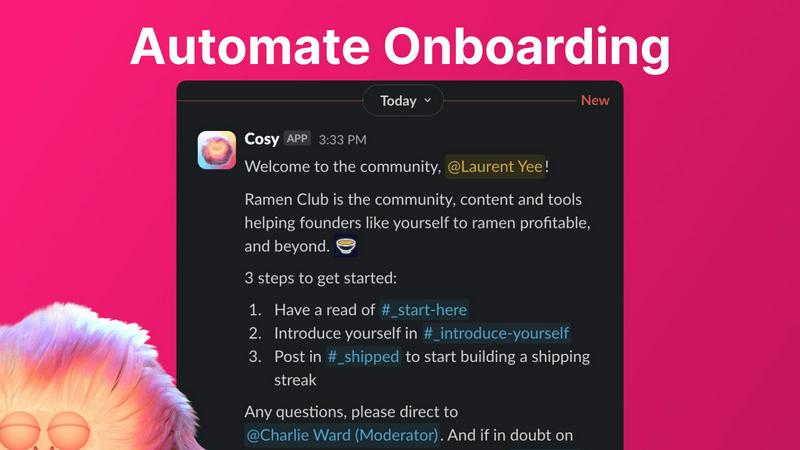
Automate Onboarding
Cosy allows you to create and automate up to 10 distinct onboarding welcome DM sequences. This feature ensures that new members receive a warm welcome either immediately or on a predetermined schedule. You can customize messages with names, links, and emojis, significantly reducing the time spent on individual welcomes and follow-ups.
Connect Your Members
Enhance community interaction by automatically introducing community members to each other via DMs. This feature allows opted-in members to be paired regularly based on a customizable schedule, fostering new connections and making it easier for members to engage with one another.
Member Directory
Cosy provides a searchable directory of all community members, enabling them to find one another without leaving Slack. Members can fill out custom profiles with relevant information, making it easy to search for individuals based on keywords or specific criteria, thereby increasing engagement and collaboration.
Content Highlights
Easily surface the most engaging posts in your community using quick slash commands. With features to identify the top 10 most engaged messages in specific channels or across all public channels, as well as unreplied messages, community leaders can ensure that important discussions do not go unnoticed.
Playwriter
Seamless Browser Integration
With Playwriter, agents operate within your existing Chrome browser session. This means that all your logins, cookies, and extensions are accessible, allowing for a smoother and more efficient browsing experience without the need to log in repeatedly or deal with bot detection.
Full Automation API Access
Playwriter grants agents complete access to the Playwright API through a single execute tool. This eliminates the need for multiple wrappers or tools, reducing context usage and simplifying the automation process. You can execute any Playwright code directly within your browser.
Real-time Collaboration
One of the standout features of Playwriter is its real-time collaboration capability. You can observe your agent's actions as they occur, allowing you to intervene whenever necessary, such as when encountering captchas or consent walls, ensuring a human touch in automated processes.
Enhanced Debugging and Editing Tools
Playwriter includes a powerful debugger and live code editor that allows developers to set breakpoints, intercept network requests, and edit code on the fly. This capability is essential for troubleshooting and refining automation scripts, making it a valuable tool for developers and testers.
Use Cases
Cosy
Onboarding New Members
When a new member joins your Slack workspace, Cosy can automatically send them a series of welcome messages that guide them through the community's features. This ensures a smooth transition for newcomers and provides them with the necessary resources to engage effectively.
Fostering Connections
By utilizing the automated member introduction feature, community managers can regularly connect individuals who may not have otherwise met. This not only increases engagement but also fosters a sense of belonging among members, enhancing the community culture.
Streamlining Member Information
With the member directory, community leaders can easily maintain an up-to-date database of member profiles. This enables members to find others with specific skills or interests, facilitating collaboration and resource sharing within the community.
Highlighting Engagement
Community managers can use the content highlight feature to track and promote popular discussions. By surfacing the most engaged posts, they can encourage further interaction and participation, ensuring that members are always in the loop on trending topics.
Playwriter
Automated Web Testing
Playwriter can be used for comprehensive automated web testing, allowing QA teams to execute tests in real time within the actual browser environment. This approach helps identify issues that may arise only in specific browser conditions.
Data Scraping
Developers can leverage Playwriter for effective data scraping tasks. By using the agent to navigate websites while maintaining session integrity, users can extract data more efficiently without triggering bot detection mechanisms.
Performance Profiling
With full API access, teams can use Playwriter to profile web performance more effectively. They can set breakpoints and monitor network requests, gaining insights into how web applications behave under different conditions.
Interactive User Simulation
Playwriter is ideal for simulating real user interactions on web applications. By allowing agents to operate within the browser, businesses can test user flows accurately and identify potential usability issues before they impact users.
Overview
About Cosy
Cosy is an innovative Slack-native tool designed to enhance community engagement by transforming your Slack workspace into a vibrant hub of interaction. It automates essential community management tasks, allowing community leaders and managers to concentrate on fostering connections rather than getting bogged down with administrative responsibilities. With features such as automated onboarding sequences, member introductions, and a searchable member directory, Cosy simplifies the process of building and maintaining a cohesive community. This tool is ideal for organizations, clubs, and online communities striving to improve member interaction and streamline communication. By leveraging automation, Cosy saves valuable time while ensuring that no new member feels overlooked or isolated. Its seamless integration with Slack allows for easy engagement within the platform, making community management more efficient and effective.
About Playwriter
Playwriter is an innovative tool designed for developers and teams that require seamless interaction between AI agents and web browsers. Unlike traditional AI agents that lack robust browsing capabilities, Playwriter enables agents to operate within your actual browser session, complete with existing logins, extensions, and cookies. This functionality eliminates the constraints imposed by fresh browser instances, such as immediate bot detection and the inability to use user-specific tools. Playwriter serves as a bridge between your browser and the Playwright API, allowing for full automation capabilities while maintaining real-time collaboration. Ideal for developers, QA teams, and automation experts, Playwriter enhances productivity by allowing agents to handle repetitive tasks while humans remain in control for complex interactions.
Frequently Asked Questions
Cosy FAQ
How does Cosy automate onboarding for new members?
Cosy allows you to set up automated onboarding messages that can be sent to new members immediately upon joining or at a scheduled time. Each message can be customized to include personal touches that make new members feel welcomed.
Can I customize the member introduction messages?
Yes, Cosy provides a customizable template for member introduction messages. You can tailor the message to suit your community's tone and include relevant details to facilitate engaging conversations between newly introduced members.
Is the member directory easy to use for all members?
Absolutely. Members can easily create and edit their profiles within the member directory, which is searchable and user-friendly. The directory helps enhance interactions by allowing members to find others based on specific interests or keywords.
What are the commands for accessing content highlights?
You can access content highlights using specific slash commands in Slack. For example, use /most-engaged-messages for the top posts in a channel or /most-engaged-messages-all for the best posts across all public channels. This helps in keeping the community informed about popular discussions.
Playwriter FAQ
What browsers does Playwriter support?
Playwriter currently supports Google Chrome, providing a robust environment for web automation and testing. Future updates may include support for other browsers.
How does Playwriter ensure security?
Playwriter operates entirely on your local machine, with no remote servers involved. This design minimizes security risks associated with data leakage, as sensitive information remains within your control.
Can multiple agents use Playwriter at the same time?
Yes, Playwriter supports multiplexing, allowing multiple agents or CLI instances to work with the same browser session simultaneously. This feature enhances collaboration and productivity.
Is Playwriter open source?
Yes, Playwriter is open source and is licensed under the MIT License. This allows developers to contribute to its development and customize it according to their needs.
Alternatives
Cosy Alternatives
Cosy is a Slack-native tool that automates member onboarding and introductions, falling into the productivity and management category. It is designed to enhance community engagement by streamlining various community management tasks, allowing leaders to focus on fostering interaction rather than dealing with administrative burdens. Users often seek alternatives to Cosy for reasons such as pricing, specific feature sets, or compatibility with other platforms. When choosing an alternative, it is essential to consider factors like ease of use, integration capabilities, and the ability to customize functionalities to meet the unique needs of your community. A thorough evaluation of these aspects will ensure a suitable solution is identified.
Playwriter Alternatives
Playwriter is an innovative tool that falls within the automation category, specifically designed to enhance control over Chrome through AI via command line interface (CLI) or multi-channel platform (MCP). Its unique capability allows AI agents to utilize the user's actual browser session, circumventing limitations of traditional AI browsing which often lacks essential logins, extensions, and is prone to bot detection. Users often seek alternatives to Playwriter for various reasons, including pricing concerns, specific feature sets, or compatibility with different platforms. When evaluating potential alternatives, it is crucial to consider factors such as the breadth of automation capabilities, ease of integration with existing workflows, and the support for necessary features like debugging, network interception, and accessibility options.