
Cosy
Cosy automates member onboarding and introductions in Slack, boosting engagement while saving you valuable time.
VisitPublished on:
November 13, 2025
Pricing:
About Cosy
Cosy is an innovative Slack-native tool designed to enhance community engagement by transforming your Slack workspace into a vibrant hub of interaction. It automates essential community management tasks, allowing community leaders and managers to concentrate on fostering connections rather than getting bogged down with administrative responsibilities. With features such as automated onboarding sequences, member introductions, and a searchable member directory, Cosy simplifies the process of building and maintaining a cohesive community. This tool is ideal for organizations, clubs, and online communities striving to improve member interaction and streamline communication. By leveraging automation, Cosy saves valuable time while ensuring that no new member feels overlooked or isolated. Its seamless integration with Slack allows for easy engagement within the platform, making community management more efficient and effective.
Features of Cosy
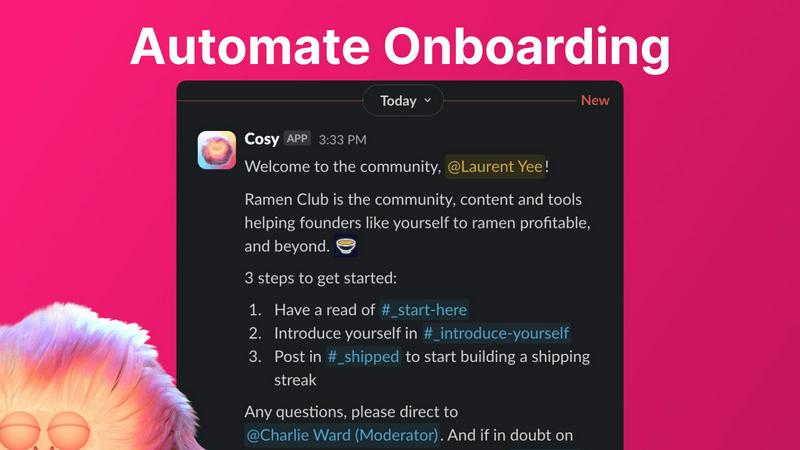
Automate Onboarding
Cosy allows you to create and automate up to 10 distinct onboarding welcome DM sequences. This feature ensures that new members receive a warm welcome either immediately or on a predetermined schedule. You can customize messages with names, links, and emojis, significantly reducing the time spent on individual welcomes and follow-ups.
Connect Your Members
Enhance community interaction by automatically introducing community members to each other via DMs. This feature allows opted-in members to be paired regularly based on a customizable schedule, fostering new connections and making it easier for members to engage with one another.
Member Directory
Cosy provides a searchable directory of all community members, enabling them to find one another without leaving Slack. Members can fill out custom profiles with relevant information, making it easy to search for individuals based on keywords or specific criteria, thereby increasing engagement and collaboration.
Content Highlights
Easily surface the most engaging posts in your community using quick slash commands. With features to identify the top 10 most engaged messages in specific channels or across all public channels, as well as unreplied messages, community leaders can ensure that important discussions do not go unnoticed.
Use Cases of Cosy
Onboarding New Members
When a new member joins your Slack workspace, Cosy can automatically send them a series of welcome messages that guide them through the community's features. This ensures a smooth transition for newcomers and provides them with the necessary resources to engage effectively.
Fostering Connections
By utilizing the automated member introduction feature, community managers can regularly connect individuals who may not have otherwise met. This not only increases engagement but also fosters a sense of belonging among members, enhancing the community culture.
Streamlining Member Information
With the member directory, community leaders can easily maintain an up-to-date database of member profiles. This enables members to find others with specific skills or interests, facilitating collaboration and resource sharing within the community.
Highlighting Engagement
Community managers can use the content highlight feature to track and promote popular discussions. By surfacing the most engaged posts, they can encourage further interaction and participation, ensuring that members are always in the loop on trending topics.
Frequently Asked Questions
How does Cosy automate onboarding for new members?
Cosy allows you to set up automated onboarding messages that can be sent to new members immediately upon joining or at a scheduled time. Each message can be customized to include personal touches that make new members feel welcomed.
Can I customize the member introduction messages?
Yes, Cosy provides a customizable template for member introduction messages. You can tailor the message to suit your community's tone and include relevant details to facilitate engaging conversations between newly introduced members.
Is the member directory easy to use for all members?
Absolutely. Members can easily create and edit their profiles within the member directory, which is searchable and user-friendly. The directory helps enhance interactions by allowing members to find others based on specific interests or keywords.
What are the commands for accessing content highlights?
You can access content highlights using specific slash commands in Slack. For example, use /most-engaged-messages for the top posts in a channel or /most-engaged-messages-all for the best posts across all public channels. This helps in keeping the community informed about popular discussions.
Explore more in this category:
Similar to Cosy

Free collection of online developer utilities, code formatters, and digital converters designed to streamline your daily workflow.


Online tally counter for tracking attendance, workouts, inventory, visitors, sports scores, habits, and everyday counting tasks.

The #1 Native Form Builder Plugin for Framer - No Code, No Embeds, No External Platforms.


A directory of AI tools where every listing was opened and used by a person.

Submit your SaaS growth tool free. Pass screening and get a permanent listing page, a dofollow link, and real visibility.
