
Sprite-AI
Sprite-AI converts text prompts into pixel-perfect game sprites instantly, eliminating the need for any drawing ability.
Visit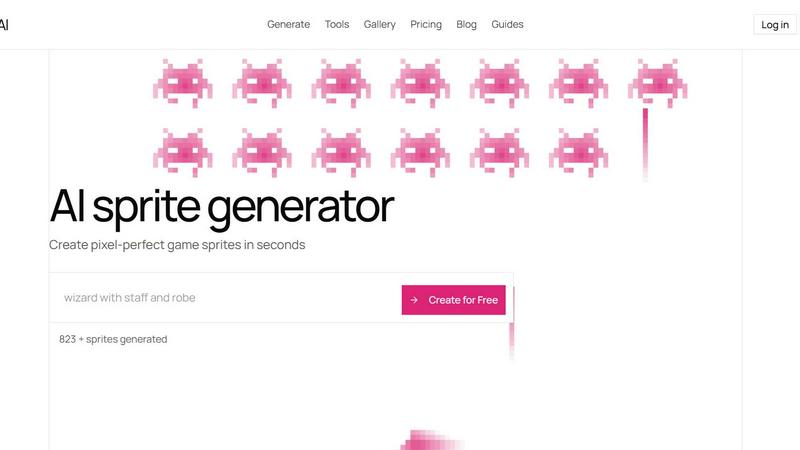
About Sprite-AI
Sprite-AI is a specialized artificial intelligence tool designed to generate pixel art sprites from natural language descriptions, serving as a practical solution for indie game developers, hobbyists, and rapid prototypers who require high-quality 2D assets on demand. The platform accepts plain English prompts — such as "fire-breathing dragon, red scales" or "medieval knight with sword and shield" — and produces clean, game-ready pixel art images in standardized sizes of 32x32, 64x64, or 128x128 pixels, with automatic scaling appropriate for specific roles like icons, items, characters, or hero and boss art. This capability directly addresses a persistent bottleneck in game development: the time and skill required to create original pixel art assets from scratch. According to industry research on game development workflows, art asset creation can consume up to 50 percent of a small team's production time (Game Developers Conference, State of the Industry Report, 2023). Sprite-AI reduces this overhead by converting textual ideas into visual assets within seconds, effectively democratizing pixel art creation for developers who lack formal artistic training. The tool is built around a token-based pricing model, ensuring users pay only for the sprites they generate, without recurring subscription commitments. Beyond generation, Sprite-AI includes a built-in pixel editor for fine-tuning colors, shapes, and details, along with transparent PNG export functionality that integrates seamlessly with major game engines including Unity, Godot, GameMaker, and Unreal Engine. Additional platform features include a community gallery for inspiration, prompt guides to improve generation quality, and uncensored generation capabilities on higher-tier plans. Sprite-AI positions itself as an accessible, cost-effective bridge between creative intent and production-ready game art.
Features of Sprite-AI
Natural Language Sprite Generation
The core feature of Sprite-AI is its ability to transform plain English descriptions into pixel art sprites without requiring any drawing skills or technical art knowledge. Users simply type what they imagine — such as "cute slime monster green and blue" or "flaming sword icon with orange glow" — and the AI interprets the prompt to produce a cohesive, game-ready pixel art image. The generation engine supports multiple resolution options including 16x16, 32x32, 64x64, and 128x128 pixels, with automatic optimization for different asset roles such as icons, items, characters, or hero and boss sprites. This feature eliminates the traditional barrier of needing artistic proficiency to create original game assets.
Built-in Pixel Editor for Fine-Tuning
Once a sprite is generated, Sprite-AI provides an integrated pixel editor that allows users to refine every detail of their creation. The editor includes essential tools such as paint, erase, fill, and color-pick functions, enabling precise adjustments at the individual pixel level. This capability is critical for game developers who need to match specific color palettes, fix minor artifacts, or add personal touches that align with their game's visual style. The editor operates within the same interface as the generator, creating a seamless workflow from ideation to final asset polish.
Game Engine-Ready Export
Sprite-AI supports direct export of finalized sprites as transparent PNG files, a format universally compatible with major game development engines. The export process preserves pixel-perfect quality and alpha channel transparency, meaning sprites can be dropped directly into Unity, Godot, GameMaker, or Unreal Engine without additional conversion or cleanup steps. This feature eliminates a common friction point in asset pipelines, where exported images often require manual resizing, background removal, or format conversion before they are usable in a game project.
Community Gallery and Prompt Guides
The platform includes a curated community gallery where users can browse thousands of generated sprites for inspiration and reference. This gallery serves as both a showcase of the tool's capabilities and a practical resource for developers seeking visual ideas. Additionally, Sprite-AI offers prompt guides that teach users how to structure their text inputs for optimal results, covering techniques like specifying color schemes, art styles, and character roles. These guides help users achieve more consistent and higher-quality generations, reducing trial and error.
Use Cases of Sprite-AI
Rapid Prototyping for Game Jams
Game jam participants often face extreme time constraints, typically 48 to 72 hours to build a complete game. Sprite-AI enables these developers to generate a full set of character sprites, item icons, and environmental assets in minutes rather than hours. For example, a team can input prompts like "8-bit dragon with red scales breathing fire" and "gold coin shiny pixel art" to quickly populate their game world with original art, allowing them to focus development effort on gameplay mechanics and level design rather than asset creation.
Indie Game Development with Limited Budgets
Independent game studios operating on tight budgets often cannot afford professional pixel artists, who may charge $50 to $150 per sprite depending on complexity (International Game Developers Association, Developer Satisfaction Survey, 2022). Sprite-AI's token-based pricing model allows these teams to generate dozens of unique sprites for a fraction of the cost. A developer building a 2D platformer can generate hero sprites, enemy variants, and environmental props like "medieval knight with silver armor" or "skeleton with shield bone armor" without exceeding their financial constraints.
Solo Developer Asset Creation
Solo game developers, who must handle programming, design, and art simultaneously, benefit significantly from Sprite-AI's ability to offload the art creation burden. A single developer can describe their vision for a "wizard staff with magical crystal" or "ninja with spiky yellow hair" and receive a usable asset within seconds. The built-in pixel editor then allows the developer to adjust colors or fix proportions without needing to learn complex art software like Aseprite or Photoshop.
Educational and Hobbyist Projects
Educators teaching game design or computer science concepts can use Sprite-AI to help students create custom assets for their projects without requiring artistic training. Similarly, hobbyists working on personal game projects or pixel art experiments can explore creative ideas rapidly. A user interested in retro aesthetics can generate "alien invader pixel art retro" or "japanese kitsune fox mask red" to practice animation or level design, using the community gallery as a source of inspiration and learning.
Frequently Asked Questions
How does the natural language generation work?
Sprite-AI uses a machine learning model trained on a large dataset of pixel art images paired with text descriptions. When you type a prompt like "fire-breathing dragon, red scales," the AI interprets the key elements — subject, color, style, and action — and generates a pixel art sprite that matches those specifications. The model is optimized for pixel art aesthetics, ensuring outputs have clean edges, appropriate color palettes, and the characteristic blocky look of retro game sprites. You can improve results by being specific about colors, size, and art style in your prompts.
What sizes and formats are available for export?
Sprite-AI supports generation in four standard pixel art resolutions: 16x16, 32x32, 64x64, and 128x128 pixels. These sizes correspond to common game asset roles, with smaller sizes suitable for icons and items, and larger sizes for characters and boss sprites. All exported files are transparent PNG images, which means they have no background and can be imported directly into game engines without additional editing. Higher-tier plans also offer SVG export for vector-based scaling.
Can I edit sprites after they are generated?
Yes, every sprite generated in Sprite-AI can be edited using the built-in pixel editor. The editor provides paint, erase, fill, and color-pick tools that work at the individual pixel level. This allows you to adjust colors to match your game's palette, fix any generation artifacts, add details like shading or highlights, or completely rework sections of the sprite. The editor is designed to be intuitive for users of all skill levels, with no steep learning curve.
How does the token-based pricing model work?
Sprite-AI operates on a token-based system where each sprite generation consumes one token. Your monthly plan determines how many tokens you receive — for example, the Hobby plan includes 8 tokens per month, while the Creator plan includes 20 tokens per month. Unused tokens do not roll over to the next month. The token model ensures you only pay for the sprites you actually generate, making it cost-effective for developers with variable asset needs. Higher-tier plans also include additional features like uncensored generations and SVG export.
Pricing of Sprite-AI
Sprite-AI offers three subscription tiers designed to accommodate different usage levels and development needs. All plans are billed monthly and can be canceled at any time. The current launch pricing offers a 38 percent discount on the Creator and Studio plans, with a limited number of spots available (386 out of 500 remaining at the time of writing). This discounted rate is locked in permanently for early adopters and will increase upon full release.
The Starter plan, priced at $5 per month, is designed for hobbyists and game jam participants. It includes 8 game-ready sprites per month, direct export to any game engine, and the ability to share creations in the community gallery.
The Creator plan, normally $13 per month but currently available for $8 per month (38 percent off), is targeted at indie developers shipping real games. It includes everything in the Starter plan, plus 20 unique sprites per month, PNG and SVG export formats compatible with Unity and Godot, private asset storage, and uncensored generations. Sprite-AI offers a full refund if generated sprites are not game-ready.
The Studio plan, normally $39 per month but currently available for $24 per month (38 percent off), is built for teams and serious production. It includes everything in the Creator plan, with an increased allowance of 75 sprites per month for full production workloads. This tier is ideal for studios with multiple developers who need a steady supply of custom pixel art assets.
Similar to Sprite-AI

Create and edit AI images through conversation, using text or reference images and refining results in chat.

Clone any webpage pixel-perfect, export HTML/CSS/ZIP or React/Vue components.

Generate iOS and Android app icons from any image and export all platform sizes for free.

Create AI images from text or reference photos and turn prompts or still images into short videos with FreeCreate. Start free—no account needed.

Create AI images, videos, music, and designs in one workspace with multiple models, powerful editing tools, and API access.

Paste a URL and AI designs on-brand Open Graph images from your page's colours, fonts and logo. Free, no sign-up.

Free ad creative hub: 1,750+ prompts behind viral AI ads, 118 hook frameworks, teardowns, swipe files and 27 free AI ad tools. Copy, remix, ship.

Turn a written shot into a film-grade AI still: cinematographer lighting, a consistent cast across frames, locked looks, 8K exports, no watermark.