
Easy Watermark Remover
Easy Watermark Remover uses AI or cropping to instantly remove Gemini watermarks from images online with no signup required.
Visit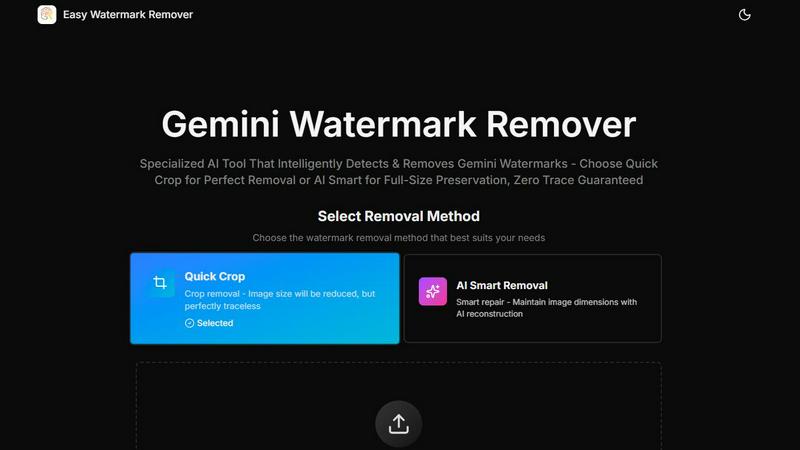
About Easy Watermark Remover
Easy Watermark Remover is a specialized, browser-based online tool designed to remove both visible lightning logos and invisible SynthID watermarks from images generated by Google's Gemini AI and Imagen 3. Unlike generic photo editing software that treats watermark removal as a simple object erasure task, this tool is purpose-built to address the unique challenges posed by Gemini exports, where watermarks are consistently placed in the lower-right corner and often blend into gradients, generated textures, or product shadows. The platform offers two distinct removal methods: Quick Crop for instant, traceless results when the corner contains no critical detail, and AI Smart Removal, which employs deep learning pixel reconstruction to maintain the original image dimensions while seamlessly repairing the watermarked area. All processing runs entirely locally on the user's device, ensuring that no images are uploaded to external servers, thereby preserving user privacy and data security. The tool supports common image formats including PNG, JPG, and WebP, with a maximum file size of 16MB, and enables batch processing for efficiency. It works across all devices without requiring signup, registration, or software installation, making it an accessible solution for content creators, marketers, e-commerce professionals, and anyone who needs to quickly and professionally remove Gemini watermarks for presentations, blog thumbnails, product mockups, or social media assets. The core value proposition lies in its corner-aware cleanup, texture-aware reconstruction, and dimension-aware choice between cropping and AI repair, ensuring that the final image matches the original quality and context.
Features of Easy Watermark Remover
AI Smart Removal
This feature uses deep learning pixel reconstruction to intelligently analyze and repair the watermarked area while preserving the original image dimensions. Unlike simple cloning or blurring tools, AI Smart Removal understands the surrounding texture, color gradients, and generated patterns to recreate pixels that blend seamlessly with the rest of the image. This is particularly valuable when the Gemini watermark overlaps a subject edge, product shadow, layout detail, or any content that cannot be cropped without losing important visual information. The AI model is trained specifically on the types of artifacts and compression noise common to AI-generated images, ensuring high fidelity in the repaired region.
Quick Crop
Quick Crop offers the fastest and most traceless removal method by simply trimming the lower-right corner where the Gemini watermark is typically placed. This approach is ideal when the watermark sits on empty space, such as a plain sky, a solid wall, a blurred background, or any area devoid of critical subject matter. The resulting image will have slightly reduced dimensions, but the cleaned area is perfectly free of any artifacts, reconstruction errors, or soft patches. For social media graphics, thumbnails, or images where exact dimensions are not critical, Quick Crop provides a one-click solution that requires no processing time or AI computation.
Local, Privacy-First Processing
All image processing is executed entirely within the user's browser using WebAssembly and client-side JavaScript. No image data is ever uploaded to any server, transmitted over the internet, or stored on external infrastructure. This architecture ensures that sensitive or proprietary images remain under the user's control at all times, eliminating concerns about data breaches, unauthorized access, or third-party usage. This is particularly important for e-commerce professionals handling product images, marketers dealing with unreleased campaign materials, or content creators who value their digital assets' confidentiality.
Batch Processing and Multi-Format Support
The tool supports batch processing, allowing users to upload and process multiple images simultaneously without repeating the workflow for each file. It accepts PNG, JPG, and WebP formats up to 16MB per file, covering the most common image types used in digital content creation. After processing, exported images maintain their original quality and format, ensuring no additional compression artifacts are introduced. This feature is essential for users who need to clean large volumes of Gemini-generated images for product catalogs, blog posts, or social media campaigns in a single, efficient session.
Use Cases of Easy Watermark Remover
Content Creators Removing Watermarks from Blog Thumbnails
Content creators who use Gemini AI to generate illustrative images for blog posts, articles, or social media often need to remove the visible watermark before publishing. For thumbnails where the lower-right corner typically contains a plain background or sky, Quick Crop provides a near-instant solution that preserves the image's visual impact. When the watermark overlaps with a subject's edge or a key visual element, AI Smart Removal reconstructs the area without altering the composition, allowing creators to maintain the original framing and focus. This ensures that the final thumbnail looks professional and unmarked, meeting platform guidelines and audience expectations.
E-Commerce Professionals Cleaning Product Mockups
E-commerce professionals frequently use AI-generated images for product mockups, promotional banners, and catalog listings. The Gemini watermark often appears in the lower-right corner, which may coincide with a product shadow, a layout boundary, or a critical design element. In these scenarios, cropping is not viable because it would alter the image's dimensions and disrupt the layout. AI Smart Removal allows these users to maintain the exact canvas size required for their e-commerce platform while seamlessly erasing the watermark, ensuring that product presentations remain consistent, professional, and free of any AI branding.
Marketers Preparing Presentation Graphics
Marketers who incorporate AI-generated visuals into slide decks, pitch decks, or client presentations require images that appear polished and unmarked. The watermark, if left visible, can detract from the professionalism of the presentation and raise questions about image sourcing. Using the tool, marketers can quickly process multiple images before a deadline, choosing Quick Crop for images where the corner is irrelevant or AI Smart Removal for images that must retain their full dimensions. The local processing ensures that confidential campaign materials are never exposed to external servers, maintaining data security throughout the preparation process.
Social Media Managers Cleaning User-Generated AI Content
Social media managers often curate or repurpose AI-generated images for brand posts, stories, and advertisements. These images may come from various sources and contain the Gemini watermark, which needs to be removed to align with brand guidelines and avoid confusion about the image's origin. The batch processing feature enables managers to clean an entire set of images for a campaign in one go, while the format support ensures compatibility with all major social media platforms. The ability to preview the cleaned image before download allows for quality control, ensuring that faces, text, or detailed textures near the watermark are not compromised.
Frequently Asked Questions
Is Easy Watermark Remover completely free to use?
Yes, Easy Watermark Remover is a free, browser-based online tool. There are no hidden charges, subscription fees, or paywalls for using any of its features, including both Quick Crop and AI Smart Removal methods. Users can process unlimited images without needing to sign up, register, or provide any personal information. The tool is supported through website traffic and optional donations, ensuring that it remains accessible to everyone who needs to remove Gemini watermarks from their images.
Does the tool upload my images to a server?
No, all image processing is performed entirely locally on your device. The tool uses client-side JavaScript and WebAssembly to execute the removal algorithms within your browser. Your images are never sent to any external server, stored in the cloud, or accessible by the website operator. This privacy-first architecture ensures that your data remains under your control, making the tool safe for processing sensitive, confidential, or proprietary images without risk of data breaches or unauthorized access.
What image formats and sizes are supported?
The tool supports PNG, JPG, and WebP image formats, with a maximum file size of 16MB per image. These three formats cover the vast majority of use cases for digital content creation, including web graphics, product photos, social media assets, and presentation images. If your image exceeds the 16MB limit, you may need to compress or resize it before uploading. The tool also supports batch processing, allowing you to upload and process multiple images simultaneously for increased efficiency.
How do I choose between Quick Crop and AI Smart Removal?
The choice depends on the content surrounding the watermark. Use Quick Crop when the Gemini watermark sits on empty space, such as a plain sky, a solid wall, a blurred background, or any area that does not contain important subject detail. This method is faster and results in a perfectly traceless image, though the dimensions will be slightly reduced. Use AI Smart Removal when the watermark overlaps a subject edge, product shadow, layout detail, text, or any content that must be preserved. This method maintains the original image dimensions by reconstructing the watermarked area using deep learning, but you should preview the result to ensure the repair matches the surrounding texture and lighting.
Explore more in this category:
Similar to Easy Watermark Remover

AI pet photo to pictures and short animations

AI-powered image text editor to edit, replace, fix, or translate text in images while preserving the original font, color, size, and style.


AI image generation and editing with sharp typography, native 2K output, and localized edits that preserve the rest of your image.

Remove unwanted objects, people, text and watermarks from photos with AI

Qwen Image Edit Online for prompt-based image editing, generation, and creative production.

Turn any image into editable layers with AI.

Production-ready AI image generation and editing with Seedream 5.0 Pro and Lite for ecommerce, marketing, social media, and branded content.