
ComicsMaker
ComicsMaker is an AI tool that transforms prompts into structured comic strips, manga panels, and storyboards for export-ready drafts.
VisitPublished on:
July 7, 2026
Pricing:
About ComicsMaker
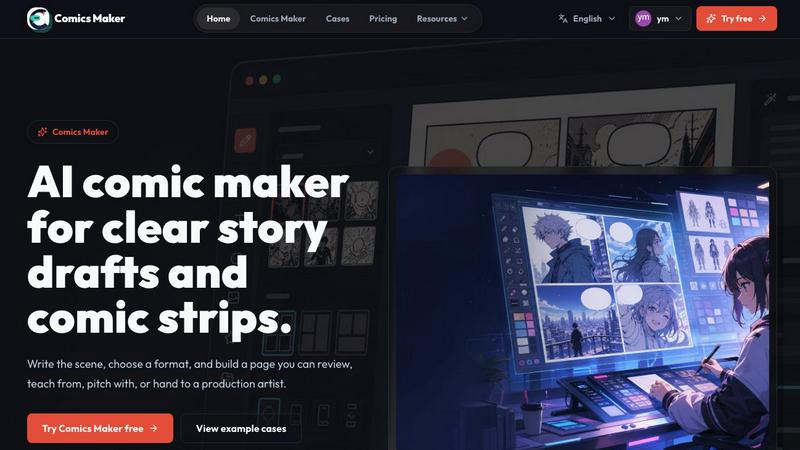
ComicsMaker is an AI-powered comic creation platform designed to bridge the gap between a raw creative idea and a polished, reviewable comic page. It serves as a practical tool for creators, marketers, educators, and indie storytellers who need to rapidly turn concepts into visual narratives without the overhead of a full production pipeline. The product functions as an end-to-end studio, allowing users to plan story beats, generate consistent panels from text prompts, add dialogue, and arrange pages directly in a browser. Its core value proposition lies in its ability to accelerate the ideation phase, providing a structured workflow that moves from a simple scene brief to a structured comic draft with clear panel layouts, mood settings, and character consistency. Unlike general-purpose image generators, ComicsMaker is built specifically for sequential art, offering controls for pacing, shot type, and reading order. This makes it uniquely suited for creating comic strips, manga panels, storyboard sequences, character scenes, and social-ready visual drafts. The platform emphasizes fast ideation and practical exports, enabling teams to test story clarity and visual direction before committing to longer production cycles. By focusing on a structured, browser-based workflow, ComicsMaker democratizes comic creation, making it accessible to users without extensive artistic training while still providing enough control for professional use in marketing, education, and independent publishing.
Features of ComicsMaker
Scene-to-Panel Planning
ComicsMaker allows users to start with a single scene description, specifying the character, setting, visible action, and change. The platform then helps break this raw idea into a structured comic sequence, planning the beats across a chosen number of panels. This feature ensures that the narrative foundation is solid before any visual generation begins, moving from a 1600-character scene brief to a clear panel plan that defines the story's pacing and flow.
Structured Layout and Pacing Controls
The platform provides a clean middle panel for making layout decisions, keeping panel count, pacing, shot type, and reading order visible before time is spent on polish. Users can choose from single panel, three-panel strip, 2x2 page, and vertical flow formats. This structured approach ensures that the visual narrative is logically organized, with simple controls for size, tone, and production notes, all while maintaining an empty canvas ready for the next idea.
Visual Style Consistency
ComicsMaker enables users to lock the visual direction of a project before generating panels. By using style notes, character details, and reference language, every panel generated belongs to the same world. This feature allows for the reuse of character and environment notes across a project, ensuring that the look remains consistent enough to continue. The resulting exports are drafts that an artist or teammate can clearly understand and build upon.
Dialogue and Caption Integration
The platform allows users to add dialogue and captions directly to the generated panels, keeping the text close to the panel plan. This feature facilitates the transition from visual draft to a complete comic page, allowing creators to check story clarity, panel order, and dialogue space. It ensures that the final output is not just a collection of images but a coherent narrative with spoken and descriptive text integrated into the layout.
Use Cases of ComicsMaker
Rapid Creative Prototyping
Indie storytellers and concept artists can use ComicsMaker to quickly visualize a scene or story idea. By inputting a brief description, mood, and character details, they can generate a rough comic draft in minutes. This allows for rapid iteration on narrative concepts, testing different panel layouts and pacing to see what works best before committing to a full script or detailed artwork, saving significant time in the early creative phase.
Marketing and Social Campaigns
Marketers can leverage ComicsMaker to create engaging visual campaigns for social media. The platform's ability to generate consistent comic-style visuals from brand briefs allows for the rapid production of product reveals, customer journey stories, or promotional sequences. The structured output ensures that each panel has a clear job, making it easy to review pacing and story clarity before generating the final images for a campaign.
Educational Storytelling
Educators can use ComicsMaker to transform lesson plans or historical events into engaging comic strips. By naming the characters, setting, and action, teachers can create visual narratives that explain complex concepts or tell stories in a more accessible format. The platform's dialogue and caption features allow for the integration of educational text, making it a powerful tool for classroom storytelling and visual learning aids.
Storyboard and Pre-Production
Film and animation teams can utilize ComicsMaker for rapid storyboarding. The platform's panel planning and layout controls enable directors and storyboard artists to quickly block out scenes, experiment with shot types, and establish pacing. The generated drafts serve as a clear visual reference that can be handed off to artists or used in pitch decks, streamlining the pre-production process for longer projects.
Frequently Asked Questions
How does ComicsMaker turn a scene description into a comic page?
Users start by writing a scene in plain language, including the character, setting, visible action, and change. The platform then plans the story beats and generates panels based on the chosen layout (e.g., single, 3-panel, or 2x2). Users can then add dialogue and captions to complete the page, all within the browser.
Can I maintain a consistent art style across multiple panels?
Yes, ComicsMaker allows you to lock the visual direction before generating panels. By using consistent style notes, character details, and reference language, the platform ensures that every generated panel belongs to the same visual world, allowing for the reuse of character and environment notes throughout a project.
What export formats are available for my comic drafts?
ComicsMaker provides practical exports that are reviewable and shareable. The drafts include prompts, notes, and panel data, which can be handed off to an artist or teammate. The platform supports JSON project export, allowing users to save and continue their work, or share the project data with collaborators.
Is ComicsMaker suitable for professional marketing teams?
Absolutely. Marketers can use ComicsMaker to create visual campaigns, product reveals, and brand stories. The structured workflow allows teams to review pacing and story clarity before generating images, ensuring that each panel has a clear job. This makes it a practical tool for producing social-ready visual drafts and campaign assets quickly.
Pricing of ComicsMaker
ComicsMaker offers a tiered pricing structure to accommodate different user needs and scales of production. The free plan provides 10 starter credits for testing the image generation capabilities. For regular creators making comic strips, lessons, and social campaigns, the Creator plan is available at $15 per month, which primarily increases the monthly credit allowance. For teams producing brand comics, campaigns, and classroom content, the Studio plan is offered at $39 per month. All plans follow the same editor workflow and include JSON project export, with the main differentiator being the number of monthly credits available for image generation.
Similar to ComicsMaker


Try MiniMax Hailuo H3 video generation in the browser

AI image generation and editing with sharp typography, native 2K output, and localized edits that preserve the rest of your image.

Remove unwanted objects, people, text and watermarks from photos with AI

Create release-ready album covers from a prompt or photo. Generate, refine, and export art for singles, EPs, mixtapes, and playlists.

Qwen Image Edit Online for prompt-based image editing, generation, and creative production.


Turn any image into editable layers with AI.