
Hush Touch | Voice-to-Text for MacOS vs URL to Any
Side-by-side comparison to help you choose the right product.

Hush Touch | Voice-to-Text for MacOS
Hush Touch is an offline voice-to-text app for macOS that learns your vocabulary and improves accuracy every use.
Last updated: February 27, 2026

URL to Any
URL to Any effortlessly converts any URL into multiple formats like PDF, HTML, and Markdown for seamless content.
Last updated: March 2, 2026
Visual Comparison
Hush Touch | Voice-to-Text for MacOS

URL to Any
Feature Comparison
Hush Touch | Voice-to-Text for MacOS
Dual-Engine Recognition
Hush Touch employs a dual-engine approach that combines the DictationTranscriber for natural flow and punctuation with the SFSpeechRecognizer for custom vocabulary enhancement. This synergy ensures accurate transcriptions that cater to specific user needs, adapting to the unique language used within various professions.
Custom Vocabulary
With the capability to learn and store up to 500 specific terms, Hush Touch enhances dictation accuracy by recognizing technical jargon, brand names, and medical terminology. The app's auto-learn feature allows it to adapt to corrections made by users, ensuring that it evolves with their vocabulary.
Smart Text Processing
The app's smart text processing features include filler word removal, auto-correction for common errors, and voice snippets for frequently used phrases. All these functionalities operate locally and in real-time, allowing for seamless and efficient dictation without delays or interruptions.
Context Modes & Hands-Free Functionality
Hush Touch offers various context modes—General, Email, Code, and Notes—to optimize the dictation experience based on the type of content being created. Users can initiate hands-free dictation by saying "Hey Siri, start touch," with automatic text insertion following a brief pause, making it an ideal tool for multitasking.
URL to Any
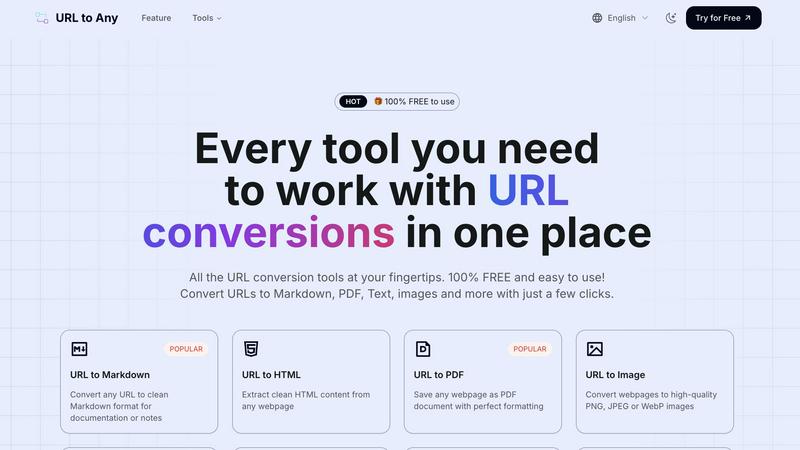
URL to Markdown
The URL to Markdown feature allows users to convert any webpage into a clean and structured Markdown format. This is particularly useful for documentation, note-taking, and content creation, as Markdown is widely used for its simplicity and ease of integration with various platforms.
URL to PDF
With the URL to PDF feature, users can save any webpage as a PDF document with perfect formatting. This ensures that critical information is preserved in a widely recognized format, making it easy to share and print while maintaining the original layout and design.
URL to Image
The URL to Image feature enables users to convert webpages into high-quality images in formats such as PNG, JPEG, or WebP. This is ideal for capturing visual content or creating graphics for presentations and reports, ensuring clarity and resolution.
URL to QR Code
The URL to QR Code feature generates QR codes from any URL, facilitating easy sharing. Users can create scannable codes that link directly to webpages, making it simple to distribute content, whether in physical print or digital formats.
Use Cases
Hush Touch | Voice-to-Text for MacOS
Professional Correspondence
Hush Touch is an excellent tool for professionals who need to draft emails and messages quickly. By using voice dictation, users can compose lengthy correspondence without the hassle of typing, enabling them to focus on content rather than format.
Medical Documentation
Healthcare professionals can utilize Hush Touch to document patient notes and medical records hands-free. The app's ability to recognize medical terminology and maintain accuracy ensures that critical information is captured correctly and efficiently.
Creative Writing
Writers can leverage Hush Touch to brainstorm ideas and draft creative pieces seamlessly. The app allows for a natural flow of thought, enabling authors to express their ideas without interruption while benefiting from real-time transcription.
Coding and Technical Documentation
For software engineers and technical writers, Hush Touch simplifies the process of documenting code and technical specifications. Its dual-engine recognition supports specific programming language syntax and terminology, making it a valuable asset for anyone in the tech industry.
URL to Any
Content Creation
Content creators can utilize URL to Any to easily convert online articles into Markdown or PDF formats for documentation or reference, streamlining their workflow and enhancing productivity.
Educational Resources
Educators can convert web resources into PDFs or images for classroom materials, ensuring that students have access to well-formatted and easily shareable content tailored for learning purposes.
Research and Archiving
Researchers can save important webpages in various formats for citation and record-keeping, allowing them to compile valuable information efficiently without the risk of losing access to original content.
Social Media Sharing
Marketers and social media managers can use the URL to QR Code feature to create easily shareable codes for their campaigns, making it simpler for audiences to access websites or promotional content quickly.
Overview
About Hush Touch | Voice-to-Text for MacOS
Hush Touch is an innovative voice-to-text application designed specifically for macOS users seeking a fast, natural, and privacy-focused dictation experience. Unlike many dictation tools that rely on cloud processing, Hush Touch operates entirely on-device, ensuring user data remains private and secure. By integrating two advanced Apple transcription engines with an Apple Intelligence final pass, the app delivers highly accurate text conversions that continuously improve over time. With Hush Touch, users can effortlessly draft emails, messages, notes, and documents hands-free, initiating dictation through a customizable hotkey or Siri. The app excels in recognizing specialized vocabulary, removing unnecessary filler words, and maintaining clear punctuation—all while being lightweight (only 5.5 MB) and requiring minimal setup. Hush Touch is perfect for professionals in various fields, such as writers, doctors, and engineers, who demand a reliable dictation solution without the hassle of ongoing subscriptions.
About URL to Any
URL to Any is a versatile web content conversion tool that streamlines the way users interact with online information. Designed for a diverse audience including content creators, developers, educators, and everyday internet users, URL to Any enables individuals to convert any webpage into multiple formats such as Markdown, PDF, HTML, images, and QR codes effortlessly. The tool's primary value proposition lies in its user-friendly interface and the fact that it is completely free to use, making it accessible to everyone without the burden of registration. Users can transform complex web pages into more manageable formats with just a few clicks, saving time and enhancing productivity. Whether you need to save important information for research, create shareable documents, or simply wish to archive content for later reference, URL to Any serves as an invaluable resource for anyone who frequently interacts with digital content. With instant results and no software installation required, users can focus on their work without unnecessary delays.
Frequently Asked Questions
Hush Touch | Voice-to-Text for MacOS FAQ
How does Hush Touch maintain privacy?
Hush Touch processes all voice data on-device, eliminating reliance on cloud storage and ensuring that users' information remains private and secure throughout the dictation process.
Can I customize the vocabulary in Hush Touch?
Yes, Hush Touch allows users to input up to 500 custom terms, which the app can learn over time. This feature enhances dictation accuracy, particularly for specialized jargon and technical language.
Is there a trial available for Hush Touch?
Yes, Hush Touch offers a 7-day free trial with no credit card required. Users can experience its features and capabilities before committing to a purchase.
What is the pricing structure for Hush Touch?
Hush Touch is available for a one-time fee of $20, providing users with a lifetime license without any subscription costs, ensuring long-term access to the app without ongoing expenses.
URL to Any FAQ
What formats can I convert URLs to with URL to Any?
URL to Any supports a variety of formats including Markdown, PDF, HTML, images (PNG, JPEG, WebP), text, JSON, XML, MP3, and more, catering to diverse user needs.
Is there a cost associated with using URL to Any?
No, URL to Any is completely free to use. There are no hidden fees or registration requirements, allowing users to access the tools without any financial barriers.
How quickly will I receive my converted content?
The processing engine of URL to Any is optimized for speed, providing users with their converted content in seconds. This ensures that you can continue your work without unnecessary delays.
Is my data secure when using URL to Any?
Yes, URL to Any prioritizes user privacy and security. All data is processed securely, and the tool does not store any information on its servers, ensuring complete confidentiality.
Alternatives
Hush Touch | Voice-to-Text for MacOS Alternatives
Hush Touch | Voice-to-Text for MacOS is an innovative voice-to-text application designed specifically for macOS users. It belongs to the AI Assistants category and offers a unique offline dictation experience, utilizing advanced Apple transcription engines to ensure accuracy and privacy. Users often seek alternatives for various reasons, including pricing, feature sets, and compatibility with other platforms. The desire for enhanced functionality, broader language support, or different user interfaces can also drive users to explore other options. When choosing an alternative to Hush Touch, it is essential to consider factors such as the application’s transcription accuracy, ease of use, and whether it operates offline. Users should also evaluate the pricing model, as some alternatives may require ongoing subscriptions, while others offer one-time purchases. Furthermore, looking for features like customizable commands, seamless integration with existing workflows, and privacy assurances can significantly impact user satisfaction.
URL to Any Alternatives
URL to Any is a versatile web content conversion tool that belongs to the category of AI Assistants, specifically designed to streamline how users interact with online content. With its ability to transform any URL into various formats such as Markdown, PDF, HTML, images, and QR codes, URL to Any caters to a wide range of users, from content creators to developers. Users often seek alternatives to URL to Any for various reasons, including pricing models, specific feature sets, or compatibility with different platforms. When choosing an alternative, it is crucial to consider factors such as user interface simplicity, conversion speed, and the variety of output formats offered. Evaluating these aspects will help ensure that the selected tool aligns with individual needs and enhances productivity.