
Never Drop vs SupaSidebar
Side-by-side comparison to help you choose the right product.

Never Drop
NeverDrop instantly captures contacts and drafts personalized follow-ups, ensuring you never lose a lead at events.
Last updated: February 28, 2026

SupaSidebar
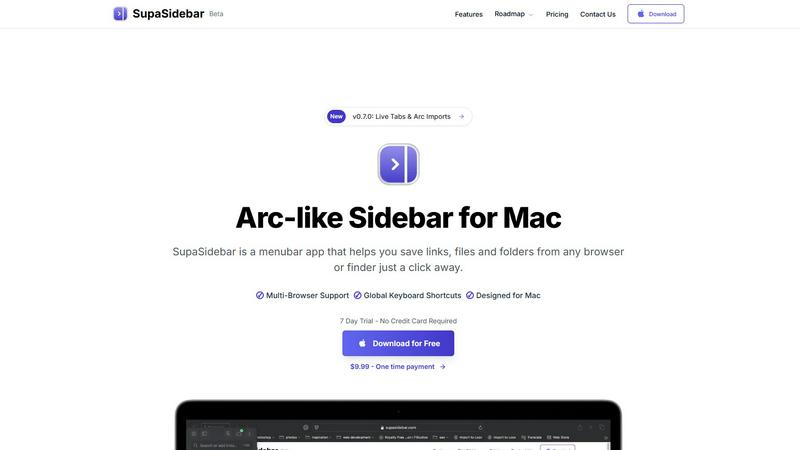
SupaSidebar boosts Mac productivity by providing instant access to files, links, and folders from any app with ease.
Last updated: February 28, 2026
Visual Comparison
Never Drop

SupaSidebar
Feature Comparison
Never Drop
Instant Business Card Scanning
Never Drop allows users to scan any business card in seconds. The app utilizes AI-powered Optical Character Recognition (OCR) technology to extract essential contact details such as name, company, title, phone number, and email instantly. This feature eliminates the need for manual entry, reducing errors and saving valuable time.
Automatic Email Enrichment
One of the standout features of Never Drop is its ability to automatically enrich captured contact profiles with verified work emails. This is particularly useful as business cards may sometimes contain generic or outdated email addresses. By searching for verified emails based on the contact's name and company, Never Drop ensures that users have accurate and reliable information for follow-ups.
Personalized AI-Generated Follow-Ups
Never Drop takes follow-up efficiency to the next level by generating personalized emails based on users' voice notes and conversation context. This ensures that follow-ups are not generic templates but rather tailored messages that reflect the nuances of the conversation. Users can review, tweak, and send these emails in less than two minutes, allowing for rapid engagement.
Team Collaboration and Organization
Never Drop is designed for sales teams, providing a centralized workspace where users can organize leads by event, reassign contacts among team members, and monitor overall team activity through an intuitive dashboard. This feature fosters collaboration and ensures that no lead is overlooked, improving overall sales effectiveness.
SupaSidebar
Natural Swipe & Show on Finder
This feature allows users to quickly access their saved links, files, and folders with a simple swipe gesture. The integration with Finder enhances usability, making it easy to manage all digital assets in one place without leaving the current workspace.
Global Keyboard Shortcuts
SupaSidebar empowers users with global keyboard shortcuts enabling them to save URLs and files instantly. For instance, pressing CMD CTRL S saves a URL, while CMD CTRL C copies the current website link to the sidebar, significantly speeding up the workflow.
Recents Tracking
The Recents feature tracks every website used in the past 48 hours, providing a quick way to revisit recent work. This helps users avoid the hassle of searching through numerous tabs, ensuring that they can find their work instantly when needed.
Unlimited Spaces
With the Pro version of SupaSidebar, users can create unlimited spaces, allowing them to organize links and files according to their specific needs. This flexibility is perfect for users who require customized setups for different projects or areas of focus.
Use Cases
Never Drop
Trade Shows
Sales teams attending trade shows can leverage Never Drop to capture leads on the spot. By scanning business cards and adding contextual notes, teams can ensure they remember key details about potential clients, facilitating more meaningful follow-ups.
Conferences
At conferences, networking opportunities abound. With Never Drop, users can quickly gather contact information from fellow attendees and generate personalized follow-up emails, enhancing the chances of converting connections into clients.
Networking Events
Networking events often involve numerous interactions within a short timeframe. Never Drop simplifies the process by allowing users to scan business cards and send tailored follow-ups immediately, ensuring timely engagement with new contacts.
Business Dinners
During business dinners, the informal setting can lead to valuable connections. Never Drop enables users to capture important details and follow up with personalized emails, helping to solidify relationships developed in more casual environments.
SupaSidebar
Research Projects
For students and researchers, SupaSidebar simplifies the process of collecting and organizing online resources. Users can save relevant links and files in dedicated spaces, making it easier to compile information for reports or presentations.
Creative Workflows
Graphic designers, writers, and other creatives can leverage SupaSidebar to manage their assets efficiently. By pinning frequently used resources and files, they can minimize distractions and streamline their creative processes, enhancing productivity.
Multitasking Professionals
Professionals who juggle multiple tasks can benefit from SupaSidebar’s ability to keep essential files and links at their fingertips. The fast search functionality ensures that they can switch between projects without losing their focus or wasting time.
Educational Use
Teachers and students alike can utilize SupaSidebar for lesson planning and study resources. By organizing links to educational materials and tools, users create an efficient and accessible repository for learning and teaching.
Overview
About Never Drop
Never Drop is a cutting-edge lead-capture app meticulously crafted for sales teams navigating high-pressure environments such as trade shows, conferences, and networking events. This innovative tool revolutionizes the way leads are collected and managed by enabling users to effortlessly scan business cards using their smartphones. Upon scanning, users can enhance the captured information with voice notes or text, providing crucial context about their interactions. This feature ensures that sales professionals retain vital details that could influence future conversations. Furthermore, Never Drop harnesses advanced AI technology to generate personalized follow-up emails within just two minutes, significantly reducing the chances of leads falling through the cracks. With seamless integration into popular Customer Relationship Management (CRM) systems like HubSpot, Never Drop guarantees that your sales pipeline remains organized and primed for action. Say farewell to lost leads and embrace a streamlined follow-up process that transforms potential connections into closed deals.
About SupaSidebar
SupaSidebar is a cutting-edge sidebar application designed exclusively for macOS users, inspired by the Arc browser's interface. This innovative tool is crafted to enhance productivity by offering a unified platform for managing links, files, and folders from various browsers such as Safari, Chrome, Firefox, Brave, and Arc. Ideal for researchers, creatives, and multitaskers, SupaSidebar allows users to effortlessly save, access, and organize their digital assets using intuitive keyboard shortcuts. The application is built to help users maintain focus and improve organization, ensuring that crucial resources are always just a click away. With its lightweight, native design, SupaSidebar integrates seamlessly into the macOS environment, transforming the way users manage their online resources and workflows. Whether you are navigating the web for research or juggling multiple projects, SupaSidebar serves as an indispensable tool to streamline your digital management tasks.
Frequently Asked Questions
Never Drop FAQ
What is Never Drop?
Never Drop is a lead-capture app designed for sales teams at events. It enables users to scan business cards, add contextual notes, and automatically generates personalized follow-up emails in under two minutes, enriching contacts with verified emails and syncing with CRM systems.
How does business card scanning work?
Users can take a photo of any business card using the Never Drop mobile app. The app's AI-powered OCR technology extracts contact details—such as name, company, title, phone number, and email—within seconds, streamlining the lead capture process.
What types of events is Never Drop for?
Never Drop is ideal for various events, including trade shows, conferences, networking gatherings, meetups, and business dinners. The app allows users to organize scans by event, making it easy to manage leads from multiple occasions.
Do I need the mobile app?
Yes, the Never Drop mobile app is essential for scanning business cards, recording voice context, and triggering follow-ups on-the-go. Users can also access a web dashboard for managing teams, reviewing scans, and handling settings, but both platforms work together seamlessly for optimal functionality.
SupaSidebar FAQ
Is SupaSidebar a browser extension?
No, SupaSidebar is a standalone menubar application designed exclusively for macOS. It integrates with multiple browsers but operates independently, ensuring user data remains private and secure.
Which browsers does SupaSidebar work with?
SupaSidebar supports all major browsers, including Safari, Chrome, Firefox, Brave, and Arc. This versatility allows users to manage their links and files seamlessly across different platforms.
What macOS version do I need?
To use SupaSidebar, you need macOS 13 or later. The application is optimized for the latest macOS features, providing a smooth user experience.
Where is my data stored?
All data is stored locally on your Mac, ensuring privacy and security. SupaSidebar does not collect or store user data online, giving users peace of mind while managing their digital assets.
Alternatives
Never Drop Alternatives
Never Drop is an innovative lead-capture application designed for sales teams operating in dynamic environments such as trade shows and networking events. It falls under the category of productivity and management tools, specifically focusing on enhancing lead generation and follow-up processes. Users often seek alternatives to Never Drop for various reasons, including pricing, additional features, or specific platform compatibility that better suits their needs. When searching for an alternative, it is essential to consider factors such as ease of use, integration capabilities with existing systems, and the effectiveness of lead management features. In any search for alternatives, users should prioritize tools that offer seamless data capture and management, robust personalization options for follow-ups, and efficient integration with CRM platforms. The ability to enrich lead data with contextual notes or AI-generated follow-ups is also crucial for ensuring that no potential deal is overlooked. Ultimately, the right alternative should streamline the lead capture process while enhancing overall sales productivity.
SupaSidebar Alternatives
SupaSidebar is a cutting-edge sidebar application designed to enhance productivity for macOS users. It falls under the productivity and management category, offering a streamlined interface that allows users to access links, files, and folders from various web browsers simultaneously. This innovative tool is particularly beneficial for individuals who frequently conduct research or work on creative projects, as it helps keep essential resources organized and readily available. Users often seek alternatives to SupaSidebar for various reasons, including pricing, feature sets, and specific platform requirements. When choosing an alternative, it is crucial to consider factors such as ease of integration with existing workflows, the ability to customize features according to personal needs, and the overall user experience. Evaluating these aspects can help users find a solution that aligns with their productivity goals.