SoloTools vs Tradepal
Side-by-side comparison to help you choose the right product.

SoloTools
SoloTools rapidly generates polished client proposals with tailored scopes, pricing, and timelines in seconds.
Last updated: March 4, 2026

Tradepal
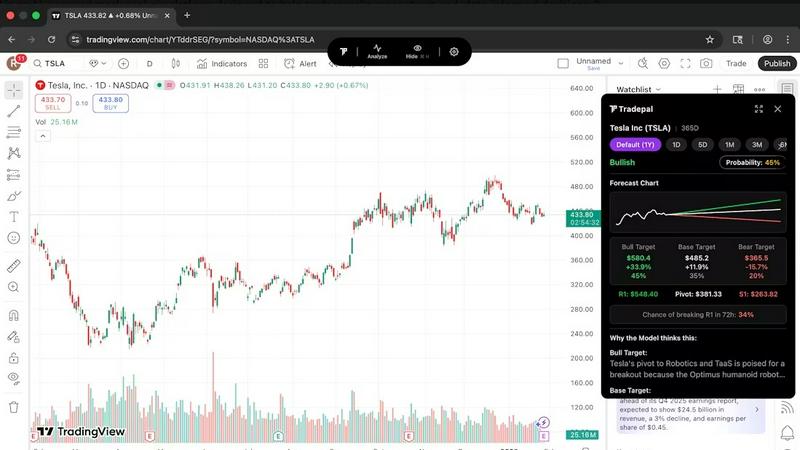
Tradepal offers AI-driven stock analysis, transforming chart screenshots into actionable insights with price targets.
Last updated: February 27, 2026
Visual Comparison
SoloTools

Tradepal
Feature Comparison
SoloTools
AI-Powered Proposal Generation
SoloTools employs cutting-edge AI technology to generate proposals quickly and efficiently. Users simply input their project details, and the AI takes care of the rest, crafting a comprehensive and professional document in just about 12 seconds.
Customizable Templates
The platform offers six starter templates designed for various industries such as web design, SEO, marketing, and consulting. Each template is pre-filled with industry-specific context, allowing users to tailor their proposals effectively to meet client expectations.
E-Signature Collection
With SoloTools, clients can easily sign proposals electronically using a simple canvas e-signature feature. This ensures that the signing process is streamlined and legally binding, removing the hassle of manual signatures and facilitating a quicker agreement process.
Proposal Analytics
SoloTools provides insightful analytics that track the performance of each proposal. Users can see when proposals are viewed, accepted, or declined, helping them understand their conversion funnel and optimize future submissions for better results.
Tradepal
AI Forecasts
Tradepal provides intraday forecasts that highlight potential ranges, reversals, and volatility. Utilizing a blended ensemble of AI models, these forecasts are updated in real time, allowing traders to identify risks before they manifest in price movements.
Price Cone Projections
Users can visualize future price cones directly on their charts with Tradepal's intuitive layout. This feature allows for personalized views that can be saved for future trading sessions, enhancing user experience and efficiency.
News and Sentiment Analysis
Tradepal offers a comprehensive stream of market sentiment by tracking professional trader sources and financial news. This feature enables users to observe shifts in crowd conviction, helping them anticipate market movements before they occur.
Universal Chart Support
With Tradepal, users can analyze any chart from any platform instantly. The AI technology reads charts and delivers actionable insights, forecasts, sentiment analysis, and price targets in mere seconds, streamlining the trading process.
Use Cases
SoloTools
Freelance Web Designers
Freelance web designers can utilize SoloTools to rapidly generate proposals for website redesign projects, allowing them to focus more on creative aspects rather than administrative tasks.
Independent Consultants
Independent consultants can benefit from SoloTools by quickly creating tailored proposals for various consulting projects, enhancing their professionalism and increasing their chances of winning contracts.
Marketing Professionals
Marketing professionals can use the platform to draft proposals for campaigns or projects with ease, ensuring they deliver compelling and well-structured documents that resonate with potential clients.
Small Business Owners
Small business owners looking to outsource services can leverage SoloTools to prepare professional proposals for vendors or contractors, making the procurement process smoother and more efficient.
Tradepal
Validating Trading Ideas
Traders can utilize Tradepal to confirm their trading strategies by leveraging AI-driven insights. By analyzing stock charts with Tradepal, users can validate their hypotheses and make informed decisions based on data rather than gut feelings.
Reducing Emotional Bias
For many traders, emotional decisions can lead to costly mistakes. Tradepal acts as an objective advisor, helping users remain disciplined and focused on data-oriented strategies, ultimately leading to better trading outcomes.
Enhancing Market Research
Investors can employ Tradepal for in-depth market research by accessing real-time sentiment analysis and technical forecasts. This enables them to stay ahead of market trends and make strategic investment choices.
Monitoring Market Movements
With features like smart alerts and watchlists, Tradepal helps users stay vigilant about unusual market activity. This allows traders to react promptly to significant price movements or changes in market sentiment.
Overview
About SoloTools
SoloTools is an advanced AI-powered proposal generator tailored specifically for freelancers and independent consultants. This innovative tool is designed to simplify and streamline the proposal creation process, allowing users to craft high-quality, client-ready proposals in a matter of seconds. By inputting essential project details such as client name, project type, budget, and scope notes, users can bypass the tedious task of starting from a blank document. Within approximately 30 seconds, SoloTools leverages powerful AI technology to generate a polished proposal that includes critical elements like an executive summary, detailed scope of work, itemized pricing, a clear timeline, and standard terms. This feature-rich platform is ideal for busy professionals looking to save time and enhance their client interactions. With fully editable proposals, downloadable PDFs, and shareable links, SoloTools elevates the proposal experience. Its free plan allows users to create three proposals monthly, while the Pro plan provides unlimited proposals, custom branding options, and analytics to track client engagement.
About Tradepal
Tradepal is an innovative AI-powered trading assistant designed for active traders and investors who seek rapid, objective analysis of stock charts without the guesswork commonly associated with trading. This platform empowers users to analyze any U.S.-listed stock chart with ease, either by clicking the "Analyze" button while viewing a chart or by uploading a screenshot through the web app. Tradepal's advanced algorithms detect essential technical patterns, identify support and resistance levels, assess trend strength, and gauge momentum. The tool then generates clear bullish, base, and bearish scenarios, complete with confidence scores and price targets. Unlike conventional trading platforms, Tradepal does not execute trades; instead, it serves as a valuable second opinion, enabling traders to validate their strategies, mitigate emotional biases, and make data-driven decisions. Tradepal is compatible with popular charting platforms, ensuring it integrates seamlessly into existing trading workflows without disrupting user habits.
Frequently Asked Questions
SoloTools FAQ
How does SoloTools work?
SoloTools simplifies proposal creation by allowing users to enter project details, which the AI then processes to generate a complete proposal, including all necessary sections in seconds.
Is there a free trial available?
Yes, SoloTools offers a free plan that allows users to create up to three proposals each month at no cost. Users can cancel anytime without the need for a credit card.
What types of proposals can be created using SoloTools?
SoloTools supports a variety of proposal types, including those for web design, consulting, marketing services, and more, making it a versatile tool for various professions.
Can I customize the proposals generated by SoloTools?
Absolutely. All proposals generated through SoloTools are fully editable, allowing users to tailor the content to fit their specific needs and preferences before sending them to clients.
Tradepal FAQ
How do I use Tradepal?
To start using Tradepal, sign up and download the application for macOS or Windows. The app runs in the background while you trade. Simply click "Analyze" when viewing a U.S.-listed stock chart, and Tradepal will generate instant insights based on the chart.
Is Tradepal financial advice?
Tradepal is not a financial advisor and does not provide personalized financial advice. Instead, it offers data-driven insights and analysis to assist traders in making informed decisions based on their own strategies.
What charts are compatible with Tradepal?
Tradepal is designed to work with any U.S.-listed stock chart across various trading platforms. Users can analyze charts instantly, regardless of the platform they are using, ensuring broad compatibility.
Do I need trading experience to use Tradepal?
While having trading experience can enhance the use of Tradepal, it is not a prerequisite. The platform is user-friendly and provides valuable insights that can benefit both novice and experienced traders alike.
Alternatives
SoloTools Alternatives
SoloTools is an AI-powered proposal generator tailored for freelancers and independent consultants. It simplifies the proposal creation process by allowing users to quickly input project details and receive a polished document in seconds. As part of the Business & Finance category, it aims to enhance client interactions and streamline workflows. Users often seek alternatives to SoloTools for various reasons, including pricing, feature sets, and specific platform requirements. When exploring alternatives, it is essential to consider aspects such as ease of use, customization options, pricing structures, and the ability to track client engagement. Evaluating these factors will ensure you find a solution that meets your unique business needs.
Tradepal Alternatives
Tradepal is an AI-powered trading assistant designed specifically for active traders and investors seeking rapid, objective stock chart analysis. By transforming screenshots into actionable insights, Tradepal provides users with clear assessments of bullish, bearish, and neutral market scenarios, complete with price targets and confidence scores. This innovative tool streamlines the trading process, allowing users to validate their trading ideas and reduce emotional bias without executing trades directly. Users often explore alternatives to Tradepal due to various reasons such as pricing, specific features, and compatibility with preferred trading platforms. When choosing an alternative, it is crucial to consider aspects like the quality of analysis, user experience, integration capabilities with existing tools, and overall cost-effectiveness. Finding a suitable option requires evaluating how well the alternative fits within one’s current trading workflow and whether it enhances decision-making efficiency.