Shrinkpad vs SparkPix
Side-by-side comparison to help you choose the right product.

Shrinkpad
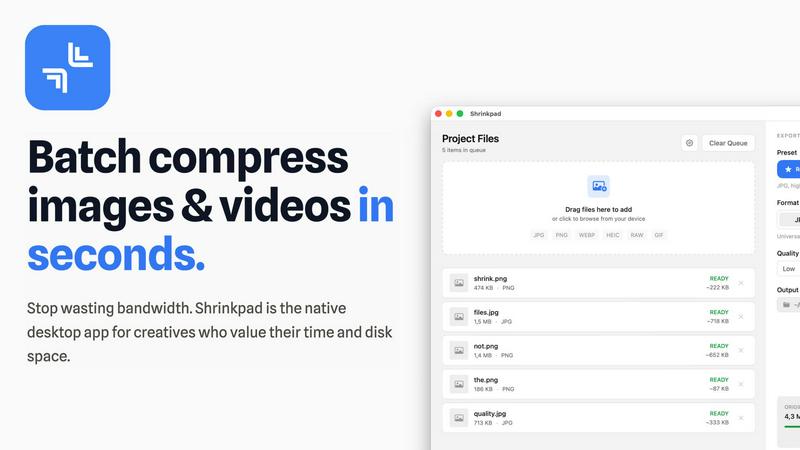
Effortlessly batch compress images and videos on Mac, optimizing quality while saving time and disk space.
Last updated: February 28, 2026

SparkPix
SparkPix is a powerful online AI photo editor that transforms images through simple text commands, enhancing quality and changing styles effortlessly.
Last updated: March 11, 2026
Visual Comparison
Shrinkpad
SparkPix

Feature Comparison
Shrinkpad
Batch Compression
Shrinkpad allows users to batch compress images and videos in seconds. It automatically analyzes visual complexity, applying the perfect compression ratio without introducing artifacts, resulting in significant file size reductions and improved performance.
One-Drop Import
With the one-drop import feature, users can simply drag any folder onto Shrinkpad. The software automatically identifies and adds all supported images and videos to the batch list, eliminating the need for manual file selection and saving valuable time.
Mixed Media Batches
Shrinkpad excels at processing mixed media batches, enabling users to compress photos and videos together in the same batch. It intelligently applies optimal compression settings for each file type, ensuring the highest quality output across different media formats.
Privacy First
Prioritizing user privacy, Shrinkpad processes all files locally on the user's machine, ensuring no cloud uploads occur. This feature guarantees that sensitive assets remain secure, providing peace of mind for creatives handling confidential projects.
SparkPix
AI Photo Editor
With SparkPix's AI Photo Editor, you can quickly apply edits by typing commands such as "remove background" or "enhance colors." The AI processes these instructions and delivers results in under 30 seconds, allowing for rapid and effective editing.
Background Remover
The one-click background removal feature is a standout capability of SparkPix. It allows users to easily isolate subjects in portraits, product photos, or complex scenes, creating clean and professional-looking images without any hassle.
Unblur Image
SparkPix's Unblur Image feature leverages advanced AI algorithms to fix issues related to motion blur, out-of-focus shots, and compression artifacts. This tool ensures that your images maintain clarity and sharpness, improving overall quality.
Photo Restoration
Ideal for preserving family memories, SparkPix offers a photo restoration feature that can repair old, faded, scratched, or damaged photos. This functionality is perfect for users looking to revive cherished images from the past.
Use Cases
Shrinkpad
Optimizing Web Assets
Web developers and designers can utilize Shrinkpad to compress images and videos for websites, resulting in faster load times and improved user experiences. By reducing file sizes significantly, they can enhance overall site performance and SEO rankings.
Streamlining Design Workflows
Photographers and graphic designers often export large volumes of assets from applications like Figma or Photoshop. Shrinkpad simplifies this process by allowing them to export everything at 2x or 4x resolutions and handle optimization in bulk, saving hours of busywork.
Enhancing Video Production
Video editors can leverage Shrinkpad to compress large video files without sacrificing quality. This is particularly beneficial for projects requiring fast turnaround times, as it allows editors to share high-quality footage quickly and efficiently.
Managing Digital Archives
Content creators frequently accumulate vast libraries of images and videos. Shrinkpad aids in managing these digital archives by compressing files for better storage management while maintaining the quality necessary for future projects.
SparkPix
Social Media Content Creation
Content creators can leverage SparkPix to enhance their photographs before posting on social media. By using features like background removal and style transfer, users can create visually striking posts that attract more engagement.
E-commerce Product Photography
Online sellers can utilize SparkPix to create professional product images that stand out in a crowded marketplace. The AI background remover and photo enhancer tools ensure that product photos are eye-catching and high-quality.
Personal Photo Restoration
Individuals looking to restore old family photos can benefit from SparkPix's photo restoration capabilities. This use case is especially valuable for those wanting to preserve family history and memories for future generations.
Artistic Transformation
Photographers and artists can experiment with SparkPix's style transfer feature to transform their images into various art forms, including anime, watercolor, and oil painting styles. This opens up new creative avenues for artistic expression.
Overview
About Shrinkpad
Shrinkpad is a powerful batch image and video compression tool specifically crafted for macOS users, designed for a wide array of creatives, including photographers, designers, and content creators. This innovative software enables users to efficiently compress hundreds of media files in mere seconds without compromising visual quality. By simply dragging and dropping entire folders containing images and videos, Shrinkpad processes them locally on the device, ensuring complete privacy and security. Utilizing native macOS frameworks, it can minimize file sizes by up to 90%, which significantly enhances storage management and optimizes performance for applications and websites. Supporting over 50 file formats, such as JPG, PNG, HEIC, MP4, and MOV, Shrinkpad's user-friendly interface and customizable settings make it an ideal solution for anyone looking to streamline their media optimization workflow while maintaining high-quality output.
About SparkPix
SparkPix is an innovative AI-powered photo editing tool designed to simplify the editing process for users of all skill levels. Whether you are a professional photographer, a social media influencer, or just someone looking to enhance personal photos, SparkPix enables you to edit images effortlessly by simply typing instructions. The platform eliminates the need for extensive Photoshop skills, making advanced photo editing accessible to everyone. With a free-to-start model and various credit-based plans, SparkPix allows users to apply a wide range of edits in less than 30 seconds. Its intuitive interface and powerful AI capabilities make it an ideal solution for anyone looking to enhance, restore, or creatively transform their images without the steep learning curve associated with traditional editing software.
Frequently Asked Questions
Shrinkpad FAQ
Can I use Shrinkpad for free?
Yes, Shrinkpad offers a Free Starter plan, which includes essential tools for casual use, allowing users to batch process up to 10 files at a time in common formats.
What file formats does Shrinkpad support?
Shrinkpad supports over 50 file formats, including popular image formats like JPG, PNG, WEBP, and AVIF, as well as video formats such as MP4 and MOV, ensuring compatibility with various media types.
Does Shrinkpad support video compression?
Absolutely. Shrinkpad is designed to handle video compression alongside image compression, allowing users to process mixed media files in one batch efficiently.
How many files can I process at once?
The Free Starter plan limits users to 10 files per batch, while the Personal plan allows unlimited batch processing, enabling creators to handle thousands of files without crashing the application.
SparkPix FAQ
How does SparkPix work?
SparkPix uses advanced AI algorithms to interpret text commands entered by the user. Once a command is given, the AI processes the image and applies the specified edits, delivering results in a matter of seconds.
Is SparkPix free to use?
Yes, SparkPix offers a free tier that provides users with 5 credits to start editing. No credit card is required, making it easy for new users to try the service without financial commitment.
Can I use SparkPix on mobile devices?
Absolutely. SparkPix is web-based and is compatible with desktop, iPhone, and Android devices. This means you can edit your photos anytime and anywhere without needing to download software.
What types of edits can I perform with SparkPix?
SparkPix allows users to perform a range of edits, including background removal, image unblurring, photo restoration, style transfers, and object removal, among others. This versatility caters to various editing needs.
Alternatives
Shrinkpad Alternatives
Shrinkpad is a powerful batch image and video compression tool designed specifically for macOS users. It allows creatives, including photographers and content creators, to efficiently compress large volumes of media files while maintaining high visual quality. As users explore their options, they often seek alternatives for various reasons such as pricing, feature sets, and compatibility with different platforms. When selecting an alternative to Shrinkpad, users should consider key factors such as the software's ease of use, the range of supported file formats, the quality of compression, and whether it processes files locally or relies on cloud-based solutions. Additionally, features like batch processing capabilities and customization options can significantly impact user experience.
SparkPix Alternatives
SparkPix is an innovative AI photo editor designed for users who want to enhance and modify their images without needing advanced skills in software like Photoshop. By allowing users to edit photos through simple text commands, it caters to a wide range of needs, from background removal to photo restoration. As the demand for intuitive and efficient photo editing tools grows, many users seek alternatives that better suit their specific requirements, whether it be pricing, additional features, or compatibility with different platforms. When searching for an alternative to SparkPix, users should consider factors such as the breadth of features offered, user interface simplicity, and overall performance. It's also important to evaluate the pricing structure and any potential limitations on usage. Ultimately, users should look for an alternative that aligns with their unique editing needs while providing a seamless and enjoyable editing experience.