
Facejam vs Shrinkpad
Side-by-side comparison to help you choose the right product.

Facejam
Transform your selfies into professional headshots effortlessly with FaceJam's AI-powered photo generator.
Last updated: February 27, 2026

Shrinkpad
Effortlessly batch compress images and videos on Mac, optimizing quality while saving time and disk space.
Last updated: February 28, 2026
Visual Comparison
Facejam

Shrinkpad
Feature Comparison
Facejam
Extensive Style Library
FaceJam offers a library of over 100 professional styles, allowing users to select the perfect look that aligns with their industry. Whether you're in real estate, law, or creative fields, there's a tailored option for you.
Quick Turnaround Time
In just minutes, users can generate high-quality headshots without the need for scheduling appointments or waiting for edits. This feature is especially beneficial for busy professionals who need to present themselves effectively in a short timeframe.
Realistic Results
The AI technology behind FaceJam ensures that the headshots produced look like they were captured by a professional photographer. The realistic quality of the images helps users maintain a polished and credible online presence.
Secure Photo Handling
FaceJam prioritizes user privacy by ensuring that uploaded photos are used solely for generating headshots. Users retain full ownership and commercial rights to their generated images, ensuring peace of mind regarding their personal data.
Shrinkpad
Batch Compression
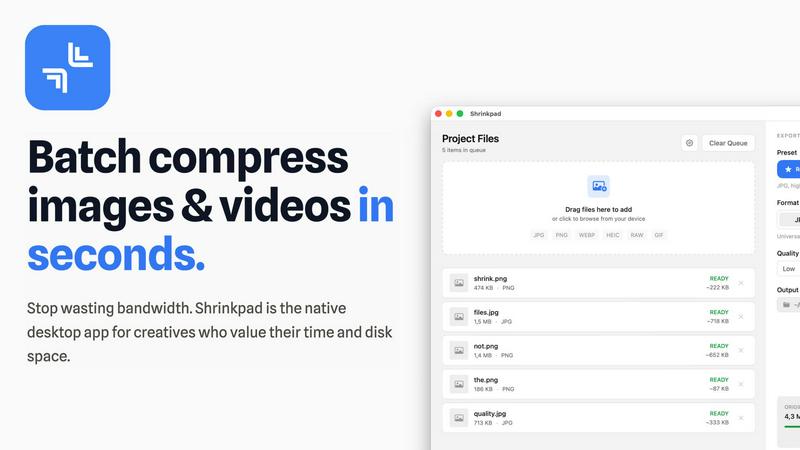
Shrinkpad allows users to batch compress images and videos in seconds. It automatically analyzes visual complexity, applying the perfect compression ratio without introducing artifacts, resulting in significant file size reductions and improved performance.
One-Drop Import
With the one-drop import feature, users can simply drag any folder onto Shrinkpad. The software automatically identifies and adds all supported images and videos to the batch list, eliminating the need for manual file selection and saving valuable time.
Mixed Media Batches
Shrinkpad excels at processing mixed media batches, enabling users to compress photos and videos together in the same batch. It intelligently applies optimal compression settings for each file type, ensuring the highest quality output across different media formats.
Privacy First
Prioritizing user privacy, Shrinkpad processes all files locally on the user's machine, ensuring no cloud uploads occur. This feature guarantees that sensitive assets remain secure, providing peace of mind for creatives handling confidential projects.
Use Cases
Facejam
LinkedIn Profiles
Professionals can create standout LinkedIn headshots that enhance their online presence and improve their chances of networking and job opportunities. A polished image can significantly impact hiring decisions in competitive markets.
Corporate Team Pages
Businesses can utilize FaceJam to produce uniform and professional headshots for their team members. This not only elevates the corporate image but also fosters a sense of unity and professionalism across the company.
Personal Branding
Entrepreneurs and freelancers can maintain a consistent and professional appearance across all their online platforms, including websites and social media. This consistency helps build trust and recognition in their respective fields.
Marketing Materials
FaceJam-generated headshots can be used in various marketing materials, such as brochures, pitch decks, and email signatures. High-quality images lend credibility to marketing efforts and enhance the overall aesthetic of promotional content.
Shrinkpad
Optimizing Web Assets
Web developers and designers can utilize Shrinkpad to compress images and videos for websites, resulting in faster load times and improved user experiences. By reducing file sizes significantly, they can enhance overall site performance and SEO rankings.
Streamlining Design Workflows
Photographers and graphic designers often export large volumes of assets from applications like Figma or Photoshop. Shrinkpad simplifies this process by allowing them to export everything at 2x or 4x resolutions and handle optimization in bulk, saving hours of busywork.
Enhancing Video Production
Video editors can leverage Shrinkpad to compress large video files without sacrificing quality. This is particularly beneficial for projects requiring fast turnaround times, as it allows editors to share high-quality footage quickly and efficiently.
Managing Digital Archives
Content creators frequently accumulate vast libraries of images and videos. Shrinkpad aids in managing these digital archives by compressing files for better storage management while maintaining the quality necessary for future projects.
Overview
About Facejam
FaceJam is an innovative AI-powered tool designed to transform your selfies into high-quality, professional headshots in just minutes. Targeted towards professionals, entrepreneurs, and anyone who needs a polished image for online platforms, FaceJam eliminates the hassle of expensive photo shoots and time-consuming editing processes. By simply uploading a few selfies and choosing from over 100 industry-specific styles, users can generate realistic headshots that are ready for use on LinkedIn, resumes, personal branding websites, and more. This product is particularly valuable for individuals looking to enhance their professional image without the significant costs associated with hiring a photographer. With FaceJam, you gain access to a quick, easy, and secure solution to create stunning headshots that truly represent you.
About Shrinkpad
Shrinkpad is a powerful batch image and video compression tool specifically crafted for macOS users, designed for a wide array of creatives, including photographers, designers, and content creators. This innovative software enables users to efficiently compress hundreds of media files in mere seconds without compromising visual quality. By simply dragging and dropping entire folders containing images and videos, Shrinkpad processes them locally on the device, ensuring complete privacy and security. Utilizing native macOS frameworks, it can minimize file sizes by up to 90%, which significantly enhances storage management and optimizes performance for applications and websites. Supporting over 50 file formats, such as JPG, PNG, HEIC, MP4, and MOV, Shrinkpad's user-friendly interface and customizable settings make it an ideal solution for anyone looking to streamline their media optimization workflow while maintaining high-quality output.
Frequently Asked Questions
Facejam FAQ
How does your AI headshot generator work?
FaceJam operates through a simple two-step process: users upload their selfies and select their preferred template. The AI then generates headshots based on these inputs, ensuring a user-friendly experience.
What do you do with my uploaded photos?
Uploaded photos are utilized solely to create realistic headshots of the user. FaceJam does not use these photos to improve its model or for any other purposes, ensuring user privacy and data security.
How many good photos can I expect?
FaceJam guarantees at least one high-quality image in every pack. The total number of satisfactory images may vary based on the quality of the uploaded selfies, with many users reporting 5-10+ impressive results.
Who owns my AI photos?
Users retain full ownership of their generated AI photos. FaceJam grants a commercial license that allows users to utilize their headshots as they see fit, providing flexibility for personal and professional use.
Shrinkpad FAQ
Can I use Shrinkpad for free?
Yes, Shrinkpad offers a Free Starter plan, which includes essential tools for casual use, allowing users to batch process up to 10 files at a time in common formats.
What file formats does Shrinkpad support?
Shrinkpad supports over 50 file formats, including popular image formats like JPG, PNG, WEBP, and AVIF, as well as video formats such as MP4 and MOV, ensuring compatibility with various media types.
Does Shrinkpad support video compression?
Absolutely. Shrinkpad is designed to handle video compression alongside image compression, allowing users to process mixed media files in one batch efficiently.
How many files can I process at once?
The Free Starter plan limits users to 10 files per batch, while the Personal plan allows unlimited batch processing, enabling creators to handle thousands of files without crashing the application.
Alternatives
Facejam Alternatives
Facejam is an innovative tool designed to transform selfies into studio-quality headshots using AI technology. Belonging to the image and photo category, it allows users to upload their pictures and select from over 50 industry-specific styles to create a polished, professional appearance without the need for a photographer or extensive editing. Users often seek alternatives to Facejam for reasons such as pricing, specific feature sets, or compatibility with their preferred platforms. When evaluating alternatives, it’s essential to consider factors like the variety of styles offered, the realism of the generated images, the speed of the output, and the level of privacy and security provided for personal images.
Shrinkpad Alternatives
Shrinkpad is a powerful batch image and video compression tool designed specifically for macOS users. It allows creatives, including photographers and content creators, to efficiently compress large volumes of media files while maintaining high visual quality. As users explore their options, they often seek alternatives for various reasons such as pricing, feature sets, and compatibility with different platforms. When selecting an alternative to Shrinkpad, users should consider key factors such as the software's ease of use, the range of supported file formats, the quality of compression, and whether it processes files locally or relies on cloud-based solutions. Additionally, features like batch processing capabilities and customization options can significantly impact user experience.