ScopeSnap vs SupaSidebar
Side-by-side comparison to help you choose the right product.

ScopeSnap
ScopeSnap transforms messy discovery notes into structured project scopes and polished proposals in minutes, streamlining freelance workflows.
Last updated: March 18, 2026

SupaSidebar
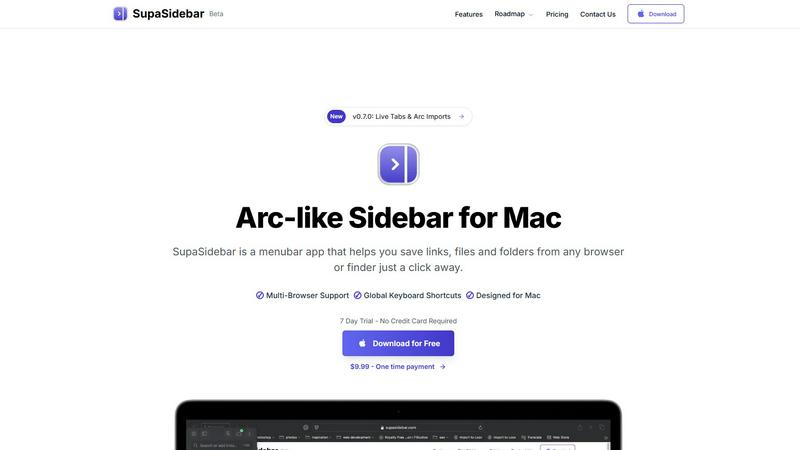
SupaSidebar boosts Mac productivity by providing instant access to files, links, and folders from any app with ease.
Last updated: February 28, 2026
Visual Comparison
ScopeSnap

SupaSidebar
Feature Comparison
ScopeSnap
Intelligent Context Input
ScopeSnap allows users to easily input context by pasting in transcripts, emails, and notes from discovery conversations. This feature ensures that all relevant information is gathered in one place, providing a comprehensive foundation for project scoping.
AI-Driven Backlog Generation
Once the context is inputted, ScopeSnap leverages advanced AI to automatically generate epics and scope items. It surfaces open questions and flags assumptions, thus providing a structured backlog that highlights areas needing further clarification.
Collaborative Refinement and Estimation
Users can review the structured backlog, assign roles, set estimates, and resolve open questions within the platform. This collaborative feature encourages team involvement and ensures that all aspects of the project are thoroughly vetted before moving forward.
Automatic Proposal Generation
After refining the scope, ScopeSnap enables users to automatically generate a polished proposal or statement of work. This feature streamlines the process of delivering professional documentation to clients, enhancing the overall client experience and improving project clarity.
SupaSidebar
Natural Swipe & Show on Finder
This feature allows users to quickly access their saved links, files, and folders with a simple swipe gesture. The integration with Finder enhances usability, making it easy to manage all digital assets in one place without leaving the current workspace.
Global Keyboard Shortcuts
SupaSidebar empowers users with global keyboard shortcuts enabling them to save URLs and files instantly. For instance, pressing CMD CTRL S saves a URL, while CMD CTRL C copies the current website link to the sidebar, significantly speeding up the workflow.
Recents Tracking
The Recents feature tracks every website used in the past 48 hours, providing a quick way to revisit recent work. This helps users avoid the hassle of searching through numerous tabs, ensuring that they can find their work instantly when needed.
Unlimited Spaces
With the Pro version of SupaSidebar, users can create unlimited spaces, allowing them to organize links and files according to their specific needs. This flexibility is perfect for users who require customized setups for different projects or areas of focus.
Use Cases
ScopeSnap
Freelance Development
Freelance developers can utilize ScopeSnap to efficiently convert discovery call notes into structured project scopes. This not only saves time but also mitigates the risk of overlooking critical requirements, facilitating smoother project execution.
Software Agencies
Software agencies can leverage ScopeSnap to standardize their proposal generation process. By creating a consistent workflow for scoping and estimating projects, agencies can improve their operational efficiency and client satisfaction.
Client Consultations
During initial client consultations, ScopeSnap can assist in capturing and organizing thoughts and ideas. This structured approach allows developers to present clear and actionable project outlines, leading to better client engagement.
Project Management
Project managers can benefit from ScopeSnap by using it as a tool to refine project scopes and estimates collaboratively with their teams. This ensures that everyone is aligned on project objectives and deliverables, reducing the likelihood of scope creep.
SupaSidebar
Research Projects
For students and researchers, SupaSidebar simplifies the process of collecting and organizing online resources. Users can save relevant links and files in dedicated spaces, making it easier to compile information for reports or presentations.
Creative Workflows
Graphic designers, writers, and other creatives can leverage SupaSidebar to manage their assets efficiently. By pinning frequently used resources and files, they can minimize distractions and streamline their creative processes, enhancing productivity.
Multitasking Professionals
Professionals who juggle multiple tasks can benefit from SupaSidebar’s ability to keep essential files and links at their fingertips. The fast search functionality ensures that they can switch between projects without losing their focus or wasting time.
Educational Use
Teachers and students alike can utilize SupaSidebar for lesson planning and study resources. By organizing links to educational materials and tools, users create an efficient and accessible repository for learning and teaching.
Overview
About ScopeSnap
ScopeSnap is an innovative AI-driven tool designed to empower freelance developers and software agencies by transforming chaotic discovery notes into organized project scopes, precise estimates, and professional client-ready proposals. Estimating custom software projects is often a cumbersome process fraught with risks, including missed requirements and vague scopes that can lead to project overruns. ScopeSnap alleviates these challenges by facilitating a structured workflow that enables users to break down project ideas into clear, estimatable tasks. This iterative refinement process ensures every feature is meticulously understood and confidently priced. Once the scope is finalized, ScopeSnap seamlessly generates polished proposals or statements of work (SOW) that are ready to be sent to clients, saving time and enhancing professionalism in client interactions.
About SupaSidebar
SupaSidebar is a cutting-edge sidebar application designed exclusively for macOS users, inspired by the Arc browser's interface. This innovative tool is crafted to enhance productivity by offering a unified platform for managing links, files, and folders from various browsers such as Safari, Chrome, Firefox, Brave, and Arc. Ideal for researchers, creatives, and multitaskers, SupaSidebar allows users to effortlessly save, access, and organize their digital assets using intuitive keyboard shortcuts. The application is built to help users maintain focus and improve organization, ensuring that crucial resources are always just a click away. With its lightweight, native design, SupaSidebar integrates seamlessly into the macOS environment, transforming the way users manage their online resources and workflows. Whether you are navigating the web for research or juggling multiple projects, SupaSidebar serves as an indispensable tool to streamline your digital management tasks.
Frequently Asked Questions
ScopeSnap FAQ
What types of documents can ScopeSnap generate?
ScopeSnap can generate polished proposals and statements of work (SOW) based on the structured project scope created from discovery notes, making it easy to present to clients.
How does ScopeSnap ensure accuracy in project estimates?
By breaking down project ideas into clear, estimatable tasks and allowing for iterative refinement, ScopeSnap helps ensure that all requirements are understood and accurately estimated, minimizing the risk of missing critical components.
Is ScopeSnap suitable for both freelancers and larger software agencies?
Yes, ScopeSnap is designed to cater to both freelancers and software agencies, providing tools that enhance the scoping and estimating process regardless of project size or complexity.
Can ScopeSnap integrate with other project management tools?
While specific integrations may vary, ScopeSnap aims to provide a seamless experience for users, making it easier to incorporate the tool into existing workflows and project management systems. For the latest integration capabilities, users should check the ScopeSnap website.
SupaSidebar FAQ
Is SupaSidebar a browser extension?
No, SupaSidebar is a standalone menubar application designed exclusively for macOS. It integrates with multiple browsers but operates independently, ensuring user data remains private and secure.
Which browsers does SupaSidebar work with?
SupaSidebar supports all major browsers, including Safari, Chrome, Firefox, Brave, and Arc. This versatility allows users to manage their links and files seamlessly across different platforms.
What macOS version do I need?
To use SupaSidebar, you need macOS 13 or later. The application is optimized for the latest macOS features, providing a smooth user experience.
Where is my data stored?
All data is stored locally on your Mac, ensuring privacy and security. SupaSidebar does not collect or store user data online, giving users peace of mind while managing their digital assets.
Alternatives
ScopeSnap Alternatives
ScopeSnap is an innovative tool designed to streamline project scoping and proposals for freelance developers and software agencies. By utilizing AI technology, it transforms messy discovery notes into structured project scopes and client-ready proposals, reducing the time and effort needed to estimate custom software projects. Users often seek alternatives to ScopeSnap due to various factors such as pricing, specific feature sets, or compatibility with their preferred platforms. When choosing an alternative, it is crucial to consider the software's ease of use, the depth of features offered, integration capabilities, and overall cost-effectiveness to ensure it meets your project's unique requirements.
SupaSidebar Alternatives
SupaSidebar is a cutting-edge sidebar application designed to enhance productivity for macOS users. It falls under the productivity and management category, offering a streamlined interface that allows users to access links, files, and folders from various web browsers simultaneously. This innovative tool is particularly beneficial for individuals who frequently conduct research or work on creative projects, as it helps keep essential resources organized and readily available. Users often seek alternatives to SupaSidebar for various reasons, including pricing, feature sets, and specific platform requirements. When choosing an alternative, it is crucial to consider factors such as ease of integration with existing workflows, the ability to customize features according to personal needs, and the overall user experience. Evaluating these aspects can help users find a solution that aligns with their productivity goals.