HeyVid vs Refbox
Side-by-side comparison to help you choose the right product.

HeyVid is an all-in-one AI generator that creates stunning videos and images quickly and effortlessly for professional content creators.
Last updated: April 4, 2026

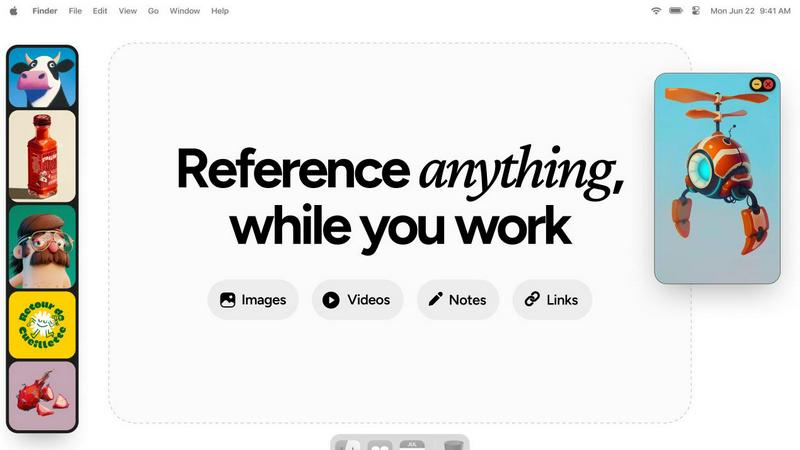
Refbox keeps your reference images, videos, and notes visible above any workspace for instant access and enhanced.
Last updated: February 28, 2026
Visual Comparison
HeyVid

Refbox
Feature Comparison
HeyVid
Text to Video
The Text to Video feature allows users to transform written content into engaging videos instantly. By inputting text, users can create visually appealing videos that communicate their message effectively, making it an ideal tool for marketers and educators.
Image to Video
With the Image to Video tool, users can animate still images and bring them to life through captivating video sequences. This feature is perfect for storytellers and brands looking to enhance their visual narratives and create dynamic presentations.
AI Image Refiner & Stylizer
HeyVid's AI Image Refiner & Stylizer enhances the quality of existing images, allowing users to apply various artistic styles and refinements. This feature helps in creating visually stunning imagery that stands out in marketing materials and social media posts.
One-Click AI Video Maker
The One-Click AI Video Maker simplifies the video creation process by automating the production workflow. Users just need to describe their vision, and HeyVid will generate a professional-quality video that meets their specifications, saving time and effort.
Refbox
Floating Reference Panel
Refbox features a unique floating reference panel that allows users to maintain constant visibility of their inspiration while working on other tasks. This minimizes distractions and helps creatives stay focused, thereby enhancing productivity.
Versatile Media Support
The application supports a wide range of media types, including images, GIFs, videos, and markdown notes. This versatility allows users to consolidate their references in one organized space, streamlining the creative process.
Multiple Viewing Modes
Users can choose from different viewing modes, such as a Masonry grid for quick access, independent frames on their desktops, or a full-screen gallery mode for secondary monitors. This flexibility caters to various working styles and preferences.
Seamless Integration and Shortcuts
Refbox allows for easy integration with other applications through the use of keyboard shortcuts. Users can quickly swap out references, minimize frames, and change collections with simple commands, significantly reducing friction in their workflow.
Use Cases
HeyVid
Marketing Campaigns
Marketers can leverage HeyVid to create captivating video ads and promotional materials that engage their target audience. The platform's diverse generation tools allow for unique content tailored to specific campaigns, driving higher conversion rates.
Online Education
Educators can utilize HeyVid to develop instructional videos, tutorials, and presentations. The ease of creating visual content enhances the learning experience for students, making complex topics more accessible and engaging.
Social Media Content
Content creators can produce eye-catching short-form videos and thumbnails that capture attention on platforms like Instagram and TikTok. HeyVid's tools enable fast production, allowing creators to keep up with the demands of social media trends.
Brand Storytelling
Businesses can use HeyVid to craft compelling brand stories that resonate emotionally with their audience. By creating videos that highlight their mission and values, brands can build stronger connections and foster customer loyalty.
Refbox
Graphic Design
Graphic designers can utilize Refbox to keep essential reference images and color palettes readily accessible while they work on projects. This aids in maintaining a cohesive design vision without the need to constantly switch tabs or applications.
Animation
Animators benefit from Refbox by having access to keyframes, reference videos, and notes that can remain visible throughout their animation process. This continuity helps maintain their creative flow and enhances the quality of their work.
UI/UX Development
UI/UX developers can use Refbox to pin user interface inspirations, color schemes, and user feedback notes in one location. This organized approach facilitates quicker iterations and enhances user experience design.
Concept Art Creation
Concept artists can leverage Refbox to gather and display various artistic influences, sketches, and notes that inspire their work. With everything in one place, they can easily reference materials and maintain their creative momentum.
Overview
About HeyVid
HeyVid is a powerful AI-driven platform that simplifies the process of creating high-quality videos and images. It caters to a diverse range of users, including marketers, educators, entrepreneurs, and content creators, providing them with the tools necessary to produce professional-grade content quickly and efficiently. With HeyVid, users can easily convert text to video, images to video, and even enhance existing visuals. This all-in-one solution streamlines the content creation workflow, allowing users to focus on their creative ideas rather than the technical complexities of video production. The platform features an intuitive interface that adapts to various skill levels, making it accessible for beginners while still offering advanced capabilities for seasoned professionals. By leveraging cutting-edge AI models, HeyVid elevates the creative process, enabling users to generate captivating content that resonates with their audience.
About Refbox
Refbox is a cutting-edge desktop application specifically designed to enhance the workflow of visual creatives by minimizing disruptions that arise from context switching. It serves as a persistent, floating reference panel that allows users to pin their sources of inspiration—such as images, GIFs, videos, and notes—into always-visible windows that stay on top of any application. This innovative design addresses the well-documented productivity costs associated with shifting attention between tasks, a phenomenon that can lead to significant declines in efficiency and increased cognitive load, as highlighted in research on interrupted work. By providing a centralized hub for reference materials, Refbox enables artists, designers, animators, and 3D modelers to sustain a deep focus or "flow," vital for producing high-quality creative output. With features that consolidate media from the web, local files, and the clipboard, users can easily access their visual references without navigating away from their main workspace. The application supports various viewing modes, including a Masonry grid, independent frames, and a full-screen gallery, ensuring that creative professionals can interact with their materials in the manner that best suits their workflow.
Frequently Asked Questions
HeyVid FAQ
What types of content can I create with HeyVid?
HeyVid allows you to create various types of content, including videos from text or images, animations, and refined images. The platform supports multiple generation methods to cater to diverse creative needs.
Is HeyVid suitable for beginners?
Yes, HeyVid is designed with an intuitive interface that makes it accessible for users of all skill levels. Beginners can easily navigate the platform and create professional content without prior editing experience.
Can I use HeyVid for commercial purposes?
Absolutely. HeyVid is suitable for both personal and commercial use, making it a great tool for businesses, marketers, and content creators looking to produce high-quality videos and images for their projects.
Are there any limitations on the types of media I can upload?
While HeyVid supports various media formats, it's recommended to check the specific guidelines provided by the platform. Users are encouraged to use high-quality images and text for optimal results in video generation.
Refbox FAQ
What platforms does Refbox support?
Refbox is designed for desktop use and is compatible with both Windows and macOS operating systems, ensuring a broad user base among visual creatives.
Can I customize the layout of my reference materials?
Yes, Refbox allows users to customize the layout of their reference materials through various viewing modes, including Masonry grid and independent frames, to suit individual preferences.
Is there a way to save my reference materials?
Absolutely. Users can save media items directly to Refbox or copy them to other applications, providing flexibility in managing their reference materials.
Does Refbox offer any collaboration features?
Currently, Refbox focuses on individual workflows, but users can share their reference collections by exporting them or through shared access to their machines, facilitating collaboration indirectly.
Alternatives
HeyVid Alternatives
HeyVid is an all-in-one AI video and image generator, designed to help users create high-quality visual content quickly and efficiently. As a product in the productivity and management category, it appeals to those looking to streamline their media creation processes. However, users often seek alternatives to HeyVid for various reasons, including pricing concerns, specific feature requirements, or compatibility with different platforms and workflows. Identifying the right alternative involves assessing the unique needs of your projects, such as the types of media you wish to create, the level of customization required, and the overall user experience. When searching for alternatives, it is essential to consider factors such as ease of use, the range of features offered, pricing structures, and customer support. Look for platforms that provide robust tools for both video and image generation, while also ensuring they meet your specific needs in terms of functionality and integration with other software. This due diligence will help you find a solution that aligns with your creative goals and enhances your productivity.
Refbox Alternatives
Refbox is a specialized desktop application designed for visual creatives, allowing them to keep reference images, videos, and notes visible above any workspace. As a productivity tool, it addresses the challenges posed by context switching, which can hinder efficiency and focus among artists, designers, animators, and 3D modelers. Users often seek alternatives to Refbox due to various factors, including pricing, specific feature requirements, or compatibility with different operating systems. When selecting an alternative, it's essential to consider factors such as the application’s ability to aggregate media from multiple sources, the customization options for visual organization, and the overall user experience. Additionally, evaluating how well the tool integrates into existing workflows can significantly affect productivity and creative output.