poseup vs SparkPix
Side-by-side comparison to help you choose the right product.

poseup
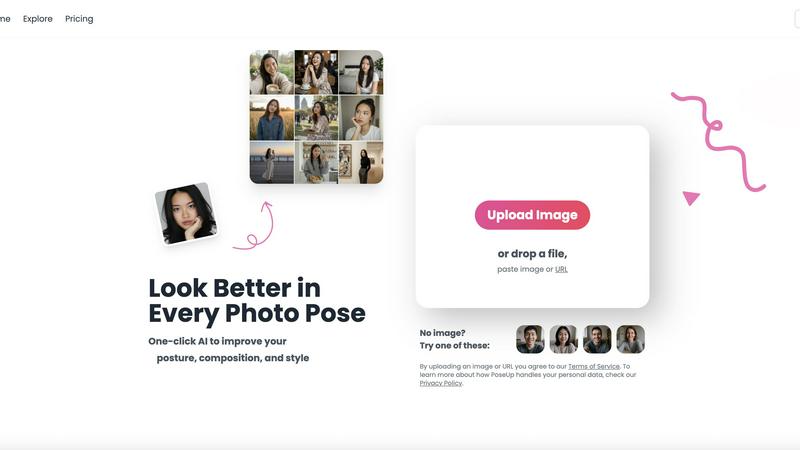
PoseUp's AI instantly enhances photo posture and composition for professional results, as supported by digital imaging.
Last updated: February 28, 2026

SparkPix
SparkPix is a powerful online AI photo editor that transforms images through simple text commands, enhancing quality and changing styles effortlessly.
Last updated: March 11, 2026
Visual Comparison
poseup
SparkPix

Feature Comparison
poseup
One-Click AI Pose Enhancement
This core feature allows users to instantly improve their photos with a single action. The AI comprehensively analyzes the human subject's posture, limb positioning, and spatial relationship within the frame. It then applies corrections based on principles of body kinetics and visual harmony, transforming awkward or unbalanced poses into naturally appealing ones without any manual editing required from the user.
Intelligent Posture Correction
PoseUp's technology specifically targets bodily posture, identifying and rectifying common issues such as slouching, uneven shoulders, or unnatural spinal alignment. By adjusting the subject's stance to reflect confident and healthy posture, the tool enhances the subject's presence and the photograph's professional quality, a key factor in perceived appeal and authority in imagery.
Compositional Balance Optimization
Beyond the subject's pose, the AI evaluates the overall composition of the image. It assesses elements like the rule of thirds, subject framing, and negative space to suggest or implement cropping and alignment adjustments. This ensures the final image is not only well-posed but also visually balanced and engaging, adhering to professional photographic standards.
Multi-Format Support & Accessibility
To ensure broad accessibility, PoseUp supports a wide range of common image formats including JPG, PNG, WEBP, and HEIC, with uploads up to 5MB. This user-friendly approach lowers the barrier to entry, allowing anyone with a digital photo to utilize advanced AI enhancement without worrying about file compatibility or needing specialized software knowledge.
SparkPix
AI Photo Editor
With SparkPix's AI Photo Editor, you can quickly apply edits by typing commands such as "remove background" or "enhance colors." The AI processes these instructions and delivers results in under 30 seconds, allowing for rapid and effective editing.
Background Remover
The one-click background removal feature is a standout capability of SparkPix. It allows users to easily isolate subjects in portraits, product photos, or complex scenes, creating clean and professional-looking images without any hassle.
Unblur Image
SparkPix's Unblur Image feature leverages advanced AI algorithms to fix issues related to motion blur, out-of-focus shots, and compression artifacts. This tool ensures that your images maintain clarity and sharpness, improving overall quality.
Photo Restoration
Ideal for preserving family memories, SparkPix offers a photo restoration feature that can repair old, faded, scratched, or damaged photos. This functionality is perfect for users looking to revive cherished images from the past.
Use Cases
poseup
Social Media Content Creation
Influencers, bloggers, and everyday social media users can utilize PoseUp to ensure every posted photo presents them in the best possible light. The tool quickly enhances selfies and lifestyle shots, improving posture and composition to create more engaging, professional-looking content that stands out on platforms like Instagram and TikTok, ultimately boosting audience perception and engagement.
Professional Photography Workflow
Photographers can integrate PoseUp into their post-processing workflow to efficiently correct minor pose imperfections in portrait sessions. This saves significant time otherwise spent on manual retouching in complex software, allowing professionals to deliver polished results faster and focus more on creative aspects like lighting and direction during shoots.
Personal Branding and Headshots
Job seekers, professionals, and entrepreneurs can use PoseUp to refine their LinkedIn profile pictures and professional headshots. The AI's posture correction and compositional optimization ensure the subject appears confident, approachable, and authoritative, which is critical for making a strong first impression in digital professional networks.
Enhancing Personal and Family Photos
For casual photographers capturing family gatherings, vacations, or couple portraits, PoseUp offers an easy way to salvage photos where the pose isn't perfect. It can correct group positioning, improve individual posture, and balance the composition, turning memorable moments into flawless keepsakes without the need for photography expertise.
SparkPix
Social Media Content Creation
Content creators can leverage SparkPix to enhance their photographs before posting on social media. By using features like background removal and style transfer, users can create visually striking posts that attract more engagement.
E-commerce Product Photography
Online sellers can utilize SparkPix to create professional product images that stand out in a crowded marketplace. The AI background remover and photo enhancer tools ensure that product photos are eye-catching and high-quality.
Personal Photo Restoration
Individuals looking to restore old family photos can benefit from SparkPix's photo restoration capabilities. This use case is especially valuable for those wanting to preserve family history and memories for future generations.
Artistic Transformation
Photographers and artists can experiment with SparkPix's style transfer feature to transform their images into various art forms, including anime, watercolor, and oil painting styles. This opens up new creative avenues for artistic expression.
Overview
About poseup
PoseUp is an advanced, AI-powered platform engineered to transform photography through intelligent pose and composition enhancement. It leverages sophisticated computer vision and machine learning models to analyze key photographic elements such as human posture, bodily alignment, and compositional balance within an image. The core function is to automatically correct suboptimal poses, improve posture, and optimize the overall aesthetic appeal of a photograph with a single click, effectively democratizing professional-grade photo correction. Research in human-computer interaction substantiates that AI-driven post-processing can significantly enhance perceived photo quality and subject appeal by applying established principles of visual aesthetics and body kinetics (Zhang et al., 2021). Designed for a broad audience, PoseUp serves social media creators, aspiring models, professional photographers seeking workflow efficiency, and everyday users who desire polished personal photos, from casual selfies to formal family portraits. Its value proposition eliminates the need for extensive photography knowledge or complex manual editing software, offering an accessible solution that supports popular formats like JPG, PNG, WEBP, and HEIC for instant, professional-looking results.
About SparkPix
SparkPix is an innovative AI-powered photo editing tool designed to simplify the editing process for users of all skill levels. Whether you are a professional photographer, a social media influencer, or just someone looking to enhance personal photos, SparkPix enables you to edit images effortlessly by simply typing instructions. The platform eliminates the need for extensive Photoshop skills, making advanced photo editing accessible to everyone. With a free-to-start model and various credit-based plans, SparkPix allows users to apply a wide range of edits in less than 30 seconds. Its intuitive interface and powerful AI capabilities make it an ideal solution for anyone looking to enhance, restore, or creatively transform their images without the steep learning curve associated with traditional editing software.
Frequently Asked Questions
poseup FAQ
How does PoseUp's AI technology work?
PoseUp employs advanced computer vision and machine learning models trained on vast datasets of human poses and aesthetic principles. When you upload an image, the AI analyzes the subject's posture, body angles, and placement within the frame. It then compares this data to optimal pose models and applies subtle, realistic adjustments to enhance posture and composition, all while maintaining a natural look.
What image formats and sizes does PoseUp support?
The platform is designed for accessibility and supports widely used image formats including JPG, PNG, WEBP, and HEIC. Currently, the maximum file size for upload is 5MB per image. This ensures compatibility with most photos taken on smartphones and digital cameras, making the tool convenient for a wide user base.
Is PoseUp suitable for complete beginners with no photo editing experience?
Absolutely. PoseUp is specifically designed to democratize photo enhancement. The process requires no technical skill or prior editing knowledge. Users simply upload their photo and receive an AI-optimized version with one click. The interface is intuitive, eliminating the steep learning curve associated with traditional manual editing software like Photoshop.
Can PoseUp be used for photos with multiple people?
Yes, PoseUp's AI is capable of analyzing and suggesting enhancements for images containing multiple subjects. It can evaluate group dynamics, individual postures, and the collective composition to recommend adjustments that improve the overall balance and appeal of group photos, family portraits, or couple shots.
SparkPix FAQ
How does SparkPix work?
SparkPix uses advanced AI algorithms to interpret text commands entered by the user. Once a command is given, the AI processes the image and applies the specified edits, delivering results in a matter of seconds.
Is SparkPix free to use?
Yes, SparkPix offers a free tier that provides users with 5 credits to start editing. No credit card is required, making it easy for new users to try the service without financial commitment.
Can I use SparkPix on mobile devices?
Absolutely. SparkPix is web-based and is compatible with desktop, iPhone, and Android devices. This means you can edit your photos anytime and anywhere without needing to download software.
What types of edits can I perform with SparkPix?
SparkPix allows users to perform a range of edits, including background removal, image unblurring, photo restoration, style transfers, and object removal, among others. This versatility caters to various editing needs.
Alternatives
poseup Alternatives
PoseUp is an AI-powered photo enhancement tool within the image and photo editing category. It specializes in automatically correcting human posture and composition to elevate the professional quality of portraits and personal photos with a single click. Users may seek alternatives for various reasons, including budget constraints, the need for different feature sets like background editing or skin retouching, or compatibility with specific operating systems or workflows. The search often stems from a desire to compare value, functionality, and overall suitability for individual or professional projects. When evaluating alternatives, key considerations should include the core AI capability for pose and posture correction, output quality and naturalness, supported file formats, pricing transparency, and data privacy policies. Research in human-computer interaction underscores that the effectiveness of such tools depends on the sophistication of their underlying models and training datasets.
SparkPix Alternatives
SparkPix is an innovative AI photo editor designed for users who want to enhance and modify their images without needing advanced skills in software like Photoshop. By allowing users to edit photos through simple text commands, it caters to a wide range of needs, from background removal to photo restoration. As the demand for intuitive and efficient photo editing tools grows, many users seek alternatives that better suit their specific requirements, whether it be pricing, additional features, or compatibility with different platforms. When searching for an alternative to SparkPix, users should consider factors such as the breadth of features offered, user interface simplicity, and overall performance. It's also important to evaluate the pricing structure and any potential limitations on usage. Ultimately, users should look for an alternative that aligns with their unique editing needs while providing a seamless and enjoyable editing experience.