
MultiMMR vs StatPecker
Side-by-side comparison to help you choose the right product.

MultiMMR
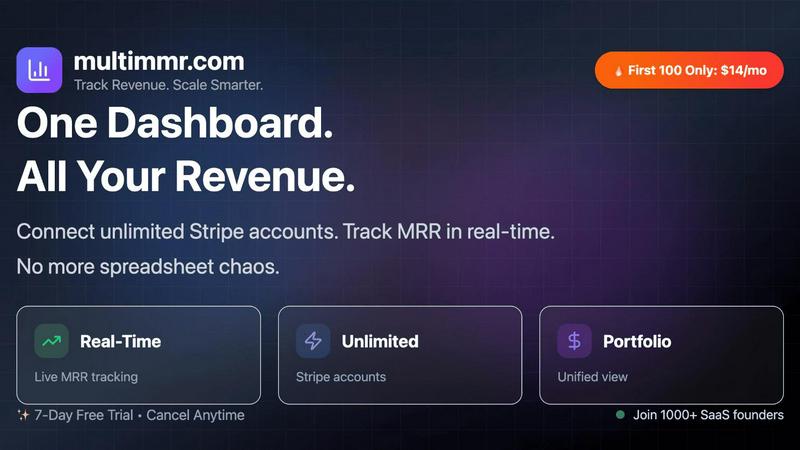
MultiMMR unifies your Stripe accounts for real-time SaaS metrics, eliminating spreadsheet chaos with actionable insig...

StatPecker
StatPecker delivers fast, secure AI-driven insights from your data, transforming them into stunning visuals for sharing.
Last updated: March 1, 2026
Visual Comparison
MultiMMR
StatPecker

Feature Comparison
MultiMMR
Real-Time Tracking
Real-time tracking allows users to monitor user activity and revenue metrics as they happen. This feature enhances decision-making capabilities by providing up-to-the-minute data, enabling businesses to react promptly to fluctuations in revenue streams.
All-in-One View
The all-in-one view consolidates analytics from multiple Stripe accounts into a single dashboard. This eliminates the chaos of switching between different tools and provides a comprehensive snapshot of financial health, making it easier for users to analyze their SaaS portfolio.
Actionable Insights
MultiMMR focuses on tracking the metrics that matter most for sustainable business growth. The platform generates actionable insights that help businesses identify trends, understand customer behavior, and optimize their strategies for maximizing revenue.
Smart Alerts
With the new Smart Alerts feature, users receive instant notifications when critical changes occur, such as drops in MRR, spikes in activity, or cancellations from high-value customers. This proactive approach enables businesses to address issues as they arise, ensuring better retention and revenue stability.
StatPecker
Ask Your Query
This feature allows users to obtain instant insights from validated sources using AI. By simply asking questions, users can bypass complex tools and receive accurate data visualizations tailored to their inquiries, streamlining the data analysis process.
Publish & Embed
StatPecker enables users to create interactive visuals that can be seamlessly integrated into blogs, articles, and websites. This feature enhances the reach and engagement of data presentations, making it easy to share compelling infographics with a wider audience.
Upload & Analyze CSVs
Users can upload local CSV files (up to 50MB) and extract key insights without the hassle of traditional spreadsheet tools. This functionality ensures that data analysis remains private and efficient, allowing users to explore their data with straightforward queries.
Download & Use Anywhere
StatPecker allows users to export their infographics as images, making them suitable for reports, presentations, and more. This feature ensures that users can utilize their visuals across various platforms without technical constraints.
Use Cases
MultiMMR
SaaS Revenue Management
SaaS companies can utilize MultiMMR to monitor their recurring revenue streams effectively. By syncing multiple Stripe accounts, they can gain a unified view of their financial performance and make quick adjustments to their strategies as needed.
Financial Reporting
Financial analysts and teams can leverage MultiMMR to simplify their reporting workflows. The comprehensive analytics provided by the platform allow for efficient report generation, reducing the time spent on data compilation and enhancing accuracy.
Goal Tracking
MultiMMR's goal tracking feature enables businesses to set specific MRR targets and monitor their progress towards these goals. Teams can visualize their growth metrics daily, ensuring they stay focused and aligned with their revenue objectives.
Customer Retention Strategies
Businesses can employ the Smart Alerts feature to develop proactive customer retention strategies. By getting instant notifications about significant customer activities, they can take timely actions to retain high-value clients and enhance overall customer satisfaction.
StatPecker
Content Creation for Blogs
Content creators can utilize StatPecker to generate visually appealing infographics that enhance their blog posts. The platform’s automated capabilities streamline the creation process, saving time and effort while ensuring high-quality visuals that engage readers.
Data Reporting for Businesses
Business professionals can leverage StatPecker to create insightful reports that communicate key metrics and trends. The ability to quickly generate visuals from data empowers teams to make informed decisions based on clear, visually represented information.
Educational Presentations
Educators and students can use StatPecker to produce informative infographics for presentations and projects. The platform's user-friendly interface allows users to focus on storytelling rather than on complex design processes, facilitating effective communication of ideas.
Journalism and Media
Journalists can benefit from StatPecker by quickly creating compelling visuals that enhance their articles and reports. The platform enables the transformation of complex data into easily digestible formats, making stories more impactful and engaging for readers.
Overview
About MultiMMR
MultiMMR is an advanced revenue management tool designed specifically for Software as a Service (SaaS) businesses that wish to consolidate their financial data across multiple Stripe accounts. The platform provides a unified financial overview that eliminates the need for cumbersome spreadsheets and frequent toggling between different accounts. By syncing all projects into one centralized dashboard, MultiMMR delivers enterprise-grade analytics that empower users to make data-driven decisions quickly. It is ideal for startups and established companies alike, offering features such as real-time tracking of Monthly Recurring Revenue (MRR), actionable insights, and performance monitoring. With MultiMMR, businesses can enhance their reporting workflows, focus on scaling, and achieve sustainable growth through informed strategies.
About StatPecker
StatPecker is an innovative AI-powered data visualization platform that aims to simplify the process of creating professional-grade infographics. Designed to address the common challenges associated with data communication, StatPecker significantly reduces the time, cost, and technical expertise typically required to convert raw data into visually compelling narratives. By automating the data storytelling process, it allows users—including content creators, journalists, data analysts, marketers, business professionals, educators, and students—to generate engaging infographics in mere seconds. The platform not only enhances the clarity and credibility of data-driven communication but also reduces production overhead. As highlighted on its official site, StatPecker provides "quick, credible answers you can publish, present, or share with your team," making it an indispensable tool for anyone looking to make data more understandable and persuasive.
Frequently Asked Questions
MultiMMR FAQ
What is MultiMMR?
MultiMMR is a revenue management platform designed for SaaS businesses. It provides a unified financial view by syncing multiple Stripe accounts and offers enterprise-grade analytics for informed decision-making.
How does MultiMMR ensure data security?
MultiMMR employs advanced security measures and strong encryption protocols to ensure that users' data is safe and secure. This commitment to security allows businesses to focus on growth without worrying about data breaches.
Can I integrate MultiMMR with my existing tools?
Yes, MultiMMR is designed to integrate seamlessly with existing financial systems, specifically Stripe accounts. This feature allows users to maintain their current workflows while benefiting from enhanced analytics and reporting capabilities.
What if I want to cancel my subscription?
MultiMMR offers flexible subscription plans with the option to cancel at any time. Users can choose the plan that best suits their needs and have the freedom to discontinue their subscription without any hidden fees.
StatPecker FAQ
What types of users can benefit from StatPecker?
StatPecker is designed for a diverse range of users, including content creators, journalists, data analysts, marketers, business professionals, educators, and students, all of whom can leverage the platform's capabilities to enhance data communication.
How does the Local SQL Agent feature work?
The Local SQL Agent feature allows users to upload local CSV files and perform on-device analysis without compromising data privacy. Users can ask questions about their data, and the platform generates visuals based on these queries, ensuring a seamless workflow.
Can I integrate StatPecker visuals into my existing website?
Yes, StatPecker allows users to publish and embed created visuals directly into blogs, articles, and websites, making it easy to share engaging infographics with a broader audience.
What is the pricing structure of StatPecker?
StatPecker offers a free tier with unlimited projects and embeds, alongside a paid lifetime access plan that includes all features, unlimited AI queries, and CSV uploads. Users can choose the plan that best fits their needs and budget.