Appkittie vs Master Metrics
Side-by-side comparison to help you choose the right product.

Appkittie
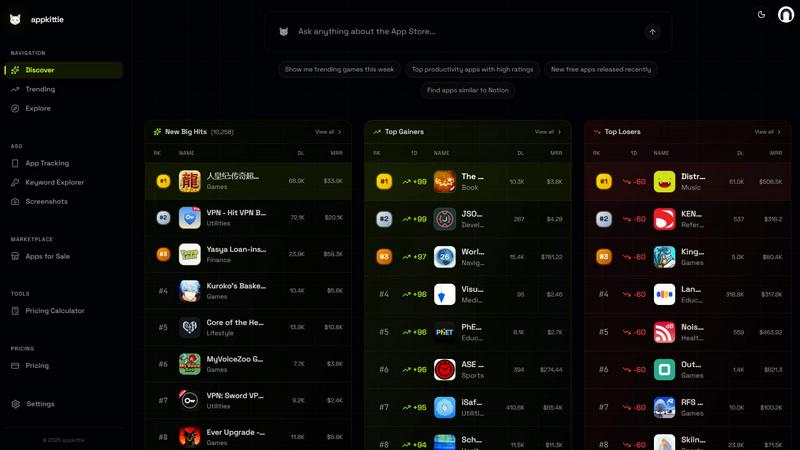
AppKittie provides data-driven insights on top-performing apps, their revenue, and marketing strategies to help developers build and grow successful.
Last updated: March 18, 2026

Master Metrics
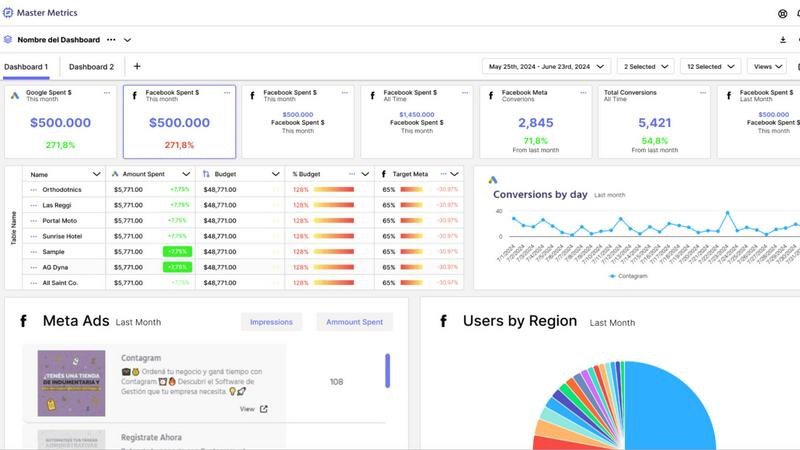
Master Metrics provides AI-powered dashboards and alerts to unify marketing data for smarter, data-driven decisions.
Last updated: February 28, 2026
Visual Comparison
Appkittie
Master Metrics
Feature Comparison
Appkittie
App Discovery & Filtering Engine
This core feature provides access to a massive database of mobile apps with filters for advanced market segmentation. Users can search and filter apps based on category, estimated revenue, download volume, country, and other key metrics to systematically identify high-income, validated app opportunities. This data-driven approach replaces guesswork, allowing for the discovery of proven niches and competitor analysis with precision.
Winning Ads & Creator Tracker
Appkittie offers a spy tool for visualizing active Meta ad campaigns and discovering the specific ad creatives that are driving user acquisition for successful apps. Furthermore, it tracks and reveals the UGC creators and influencers who are promoting these apps, providing invaluable insight into viral growth drivers and partnership opportunities for scalable marketing campaigns.
Keyword & ASO Intelligence
The platform includes a sophisticated Keyword Explorer and Tracker designed for App Store Optimization (ASO). It helps users find high-traffic, low-competition keywords specific to their niche. By providing personalized ASO suggestions, it empowers developers to optimize their metadata effectively to outrank competitors and improve organic discoverability on the app stores.
App Store Screenshot Generator
This integrated tool allows users to generate professional, high-converting app store screenshots without requiring any design skills. By leveraging proven templates and best practices observed from top-performing apps, this feature aims to directly boost an app's conversion rate, turning store visitors into installs more effectively.
Master Metrics
Unified Overview Control Panel
The Overview Control Panel acts as a mission-critical command center, allowing users to manage all client or campaign accounts from a single interface. Its customizable Overview Table enables teams to see key performance indicators (KPIs) across all data sources at a glance, identifying trends, outliers, and areas requiring immediate attention. Users can merge data using custom formulas and even add proprietary data directly into the table, creating a truly bespoke and comprehensive business intelligence snapshot that drives efficient daily operations and strategic reviews.
AI-Powered Reporting & Google Slides Generation
This feature revolutionizes client reporting by automating the creation of professional, editable Google Slides presentations. Users simply select their data sources, key metrics, goals, and a preferred design template. Master Metrics' AI then synthesizes the data and generates a complete presentation in just a few clicks. This not only saves countless hours of manual report building but also ensures consistency, accuracy, and a polished, data-driven narrative for client communications, directly translating complex analytics into understandable insights.
Proactive Custom Alerts & Budget Control
Master Metrics moves beyond passive dashboards with a powerful alert system that monitors business health in real-time. Users can set conditional alerts for any metric, such as campaign underperformance, declining sales, or CRM close rate drops. Crucially, the platform offers sophisticated budget pacing alerts, notifying teams when daily spend deviates from the trajectory needed to hit monthly targets. These alerts can be delivered via email, WhatsApp, or Slack, enabling proactive campaign management and preventing budget overruns or missed opportunities before they impact results.
Seamless Data Integration & Live Connectors
The platform eliminates manual data exports and spreadsheet headaches by offering live, automated connectors to popular data destinations. Users can seamlessly extract, transform, and merge data from all connected marketing sources directly into Google Sheets or Looker Studio (formerly Google Data Studio). This ensures reports and dashboards always reflect the most current data without manual intervention, fostering trust in data accuracy and freeing up analyst time for higher-value tasks like interpretation and strategy.
Use Cases
Appkittie
Validating a Startup or App Idea
Founders and indie hackers can use Appkittie to assess market demand before committing development resources. By analyzing apps with similar functionality, they can review actual revenue and download data to confirm a niche is profitable, thereby reducing the risk of building an app that nobody wants.
Conducting Competitive Analysis
Marketers and developers can perform deep-dive research on direct and indirect competitors. They can uncover the specific ad creatives, influencer partnerships, and keyword strategies these competitors are using to acquire users, allowing for the formulation of informed, counteractive marketing and product strategies.
Discovering Viral Trends and Niches
By monitoring global and regional market rankings within Appkittie, users can spot apps that are experiencing rapid growth in specific countries or categories. This enables them to identify viral trends early and be among the first to replicate or adapt a successful concept for a new market.
Optimizing User Acquisition Campaigns
Growth teams can use the platform to "spy" on winning ad creatives from top-grossing apps to inform their own paid advertising strategy on Meta and Apple Search Ads. This evidence-based approach helps in crafting compelling ads and allocating budget towards creative concepts that have already demonstrated performance.
Master Metrics
Digital Marketing Agency Client Reporting
Agencies can leverage Master Metrics to automate the entire client reporting lifecycle. By connecting all client ad accounts and social platforms, the platform aggregates data into unified dashboards and can generate AI-created Google Slides presentations for monthly reviews. This use case saves dozens of hours per client, improves report consistency and quality, and allows account managers to shift their focus from data compilation to strategic consultation and relationship management.
E-commerce Marketing Performance Monitoring
E-commerce teams use Master Metrics to gain a unified view of marketing performance across channels like Meta Ads, Google Ads, and TikTok, alongside sales data from platforms like Shopify. Custom alerts can monitor for sudden drops in conversion rate or ROAS, while budget control alerts ensure daily ad spend aligns with monthly targets. The Overview Table provides a daily snapshot of key metrics like customer acquisition cost (CAC) and lifetime value (LTV), enabling rapid, data-driven optimizations.
Multi-Account Portfolio Management for Franchises or Enterprises
Businesses managing multiple locations or brand accounts (e.g., franchise networks, multi-brand companies) utilize the Overview Control Panel to monitor the performance of all entities simultaneously. Executives can quickly compare performance across regions, identify top and bottom performers, and spot operational trends. Custom formulas allow for the calculation of region-specific KPIs, providing scalable oversight and ensuring local marketing efforts align with corporate goals.
Sales & Marketing Alignment via CRM Integration
By integrating CRM data with marketing performance metrics, sales and marketing leaders can use Master Metrics to track the full funnel. Teams can create dashboards that connect lead source cost from ads to opportunity value and close rate in the CRM. Alerts can be set for declining lead quality or changes in sales cycle length. This use case breaks down data silos, providing a shared source of truth that aligns both departments on metrics that truly impact revenue.
Pricing Comparison
Appkittie
Appkittie offers a simple, transparent pricing structure with a single "Pro" plan available on monthly or annual billing cycles. A 3-day free trial is offered for the Pro plan.
Monthly Plan: Priced at $49 per month with flexible monthly billing.
Yearly Plan: Priced at $169 per year, which equates to approximately $14.08 per month, representing a savings of 71% compared to the monthly option.
Both plans include all Pro features: unlimited app searches, full analytics, ad and UGC tracking, Keyword Explorer, the Screenshot Generator, access to an Apps for Sale database, historical data, export capabilities, priority support, and the ability to invite up to 5 team members.
Master Metrics
Master Metrics offers a tiered subscription model based on the number of accounts (data sources) you need to connect, with an option to try the platform free for 7 days. Plans scale from the Freelancer tier (15 accounts, starting at $30/month) to the Pro Plus 2 tier (250 accounts, at $439/month). Higher-tier plans include more accounts, access to more dashboards, and advanced features like the Looker and Sheets connectors, alerts, and the AI Slides functionality. All paid plans include free implementation support. The specific features, account limits, and monthly USD prices for each plan (Freelancer, Basic, Basic Plus, Intermediate, Intermediate Plus, Pro, Pro Plus 1, Pro Plus 2) are clearly detailed on the Master Metrics website, allowing businesses to choose the level that best matches their scale and needs.
Overview
About Appkittie
Appkittie is a comprehensive app intelligence platform engineered to de-risk the mobile app development and marketing process. It provides founders, indie hackers, and marketers with a data-driven methodology to discover, validate, and scale successful mobile applications. The platform's core value proposition lies in shifting strategy from intuition-based guessing to evidence-based decision-making. By granting access to a vast database of mobile apps, Appkittie reveals critical, real-world performance metrics such as estimated revenue and download figures, which serve as primary indicators of market validation and demand.
Beyond surface-level analytics, Appkittie delivers actionable competitive intelligence by uncovering the precise marketing mechanics behind an app's success. Users can dissect winning Meta ad creatives, identify key User-Generated Content (UGC) creators and influencers on platforms like TikTok, and analyze Apple Search Ads campaigns. This holistic view of user acquisition and growth strategies enables professionals to replicate proven tactics, identify low-competition opportunities in app store search (ASO), and spot emerging viral trends before they peak. Ultimately, Appkittie functions as an essential research partner, equipping its users with the insights necessary to build apps that resonate with the market and allocate resources toward strategies with demonstrable returns.
About Master Metrics
Master Metrics is a sophisticated, agency-focused analytics and reporting platform engineered to solve the core data challenges faced by modern marketing teams. Built by digital marketing veterans with firsthand agency experience, the platform is designed to consolidate, analyze, and visualize data from a vast array of sources, transforming fragmented metrics into actionable business intelligence. Its primary value proposition lies in dramatically enhancing productivity and decision-making speed by automating the most time-consuming aspects of data management: collection, unification, and report generation. By aggregating data from various ad networks, social platforms, and CRM systems into a centralized Overview Table, Master Metrics provides an immediate, holistic view of campaign and business performance. This empowers agencies and in-house marketing teams to move from reactive data gathering to proactive strategy, maximizing marketing ROI and sales outcomes. The platform's emphasis on seamless integration with ubiquitous tools like Google Sheets, Google Slides, and Looker Studio ensures it fits effortlessly into existing workflows, making advanced analytics accessible without a steep technical learning curve.
Frequently Asked Questions
Appkittie FAQ
What can I actually do with Appkittie?
Appkittie enables you to discover profitable mobile app ideas by analyzing real revenue and download data. You can track competitors' winning ad creatives on Meta and Apple Search Ads, identify the influencers promoting successful apps, find high-value keywords for ASO, generate professional app store screenshots, and monitor top apps across different global markets to spot trends.
Who is Appkittie built for?
The platform is specifically designed for mobile app founders, indie hackers, marketers, and developers. It is ideal for anyone involved in the app lifecycle—from ideation and validation to launch, marketing, and scaling—who seeks to make data-driven decisions rather than relying on intuition.
Is there a free trial, and can I cancel anytime?
Yes, Appkittie offers a 3-day free trial for its Pro plan. You can start the trial without charge and cancel your subscription at any time. The pricing model is transparent with no hidden fees, providing flexibility for users.
Can I export data or share access with my team?
Yes, Appkittie's Pro plan includes the ability to export data to CSV or JSON formats for further analysis. It also allows you to invite up to 5 team members, facilitating collaboration among founders, marketers, and developers within a single organization.
Master Metrics FAQ
What data sources does Master Metrics connect to?
Master Metrics is built to connect with a wide array of essential marketing and business platforms. This includes major ad networks like Google Ads and Meta Ads, social media platforms, analytics tools, and e-commerce systems. The platform also offers powerful connectors to Google Sheets and Looker Studio for further data manipulation and visualization. Specific source integrations are continually updated, and users should consult the official "Data Sources" page for the most current list of available connections.
How does the AI Google Slides presentation feature work?
The AI presentation feature is designed for efficiency. Users select the client or campaign, choose the specific data sources and metrics to include, and pick a visual design template. Master Metrics' AI engine then processes the selected data, identifies key trends and insights, and automatically populates a fully formatted Google Slides deck with charts, graphs, and summary narratives. The resulting presentation is editable, allowing for final customization before sharing with clients or stakeholders, streamlining a process that typically takes hours into minutes.
Can I control my advertising budget with Master Metrics?
Yes, proactive budget control is a core functionality. Master Metrics allows you to set a monthly budget for any campaign or account. The platform's alert system then calculates the required daily spend to meet that budget and monitors performance in real-time. You will receive notifications via your chosen channel (email, Slack, etc.) if the daily spend is significantly over or under the target percentage you define, enabling immediate adjustments to ensure optimal budget pacing and prevent overspending.
What is the difference between the Overview Table and a Dashboard?
The Overview Table is a centralized, customizable spreadsheet-like view within the Control Panel designed for at-a-glance monitoring and management of all accounts and key metrics. It's ideal for quick health checks and identifying outliers. Dashboards, conversely, are more comprehensive, visual data stories built for deeper analysis and reporting, often created in connected tools like Looker Studio using Master Metrics data. The Overview is for operational control, while dashboards are for analysis and presentation.
Alternatives
Appkittie Alternatives
Appkittie is a specialized app intelligence platform within the competitive intelligence and market research category. It provides data on mobile app performance, revenue, and user acquisition strategies, serving founders and marketers seeking validated business ideas. Users explore alternatives for various reasons, including budget constraints, specific feature requirements like deeper web app analytics or different geographic data coverage, and preferences for user interface design or integration capabilities with other tools. The need for a different pricing model or a free tier can also drive this search. When evaluating alternatives, key considerations should include the depth and accuracy of the data provided, the range of platforms covered (iOS, Android, web), the specificity of insights into marketing and monetization strategies, and the overall cost relative to the value delivered. The ideal platform aligns closely with your specific research goals and workflow.
Master Metrics Alternatives
Master Metrics is an AI-powered marketing analytics and reporting platform designed to help agencies and marketing teams streamline data management and decision-making. It falls into the category of marketing performance management and business intelligence tools, aggregating data from multiple ad networks into a centralized dashboard. Users often explore alternatives to Master Metrics for several common reasons. These can include budget constraints and pricing models, the need for different or more specialized feature sets, specific integration requirements with existing tech stacks, or a preference for a platform tailored to a different business size or industry vertical. The search for the right tool is a natural part of the software evaluation process. When evaluating an alternative, key considerations should include the platform's core data integration capabilities, the depth and customizability of its reporting and alerting features, its ease of use for team members, and the overall value relative to its cost. The goal is to find a solution that not only consolidates data but also translates it into actionable insights that align with your team's specific workflows and strategic objectives.