
LuxSign vs Refbox
Side-by-side comparison to help you choose the right product.

LuxSign enables secure and compliant electronic signatures for documents across the EU, streamlining your signing.
Last updated: February 27, 2026

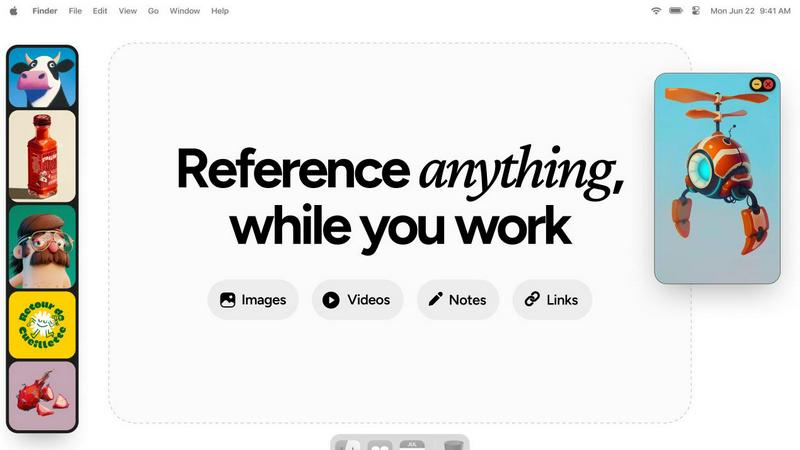
Refbox keeps your reference images, videos, and notes visible above any workspace for instant access and enhanced.
Last updated: February 28, 2026
Visual Comparison
LuxSign

Refbox
Feature Comparison
LuxSign
Multiple Signature Methods
LuxSign accommodates various signature methods, allowing users to draw their signature, type their name, or upload an image. This flexibility ensures that the signing process is quick and tailored to individual preferences, enhancing user experience.
Advanced Security
With industry-standard encryption protocols in place, LuxSign guarantees that documents are securely stored and transmitted. This robust security framework protects sensitive information from unauthorized access, ensuring compliance with EU data protection laws.
Collaboration Workspaces
LuxSign offers collaboration workspaces that enable teams to work together effectively. Users can organize documents into folders, manage member access, and collaborate on signing workflows, facilitating seamless communication and document management.
Complete Audit Trail
The platform provides detailed audit trails that log every action taken on a document, including timestamps and signer information. This feature is crucial for compliance and verification, as it ensures transparency and accountability in the signing process.
Refbox
Floating Reference Panel
Refbox features a unique floating reference panel that allows users to maintain constant visibility of their inspiration while working on other tasks. This minimizes distractions and helps creatives stay focused, thereby enhancing productivity.
Versatile Media Support
The application supports a wide range of media types, including images, GIFs, videos, and markdown notes. This versatility allows users to consolidate their references in one organized space, streamlining the creative process.
Multiple Viewing Modes
Users can choose from different viewing modes, such as a Masonry grid for quick access, independent frames on their desktops, or a full-screen gallery mode for secondary monitors. This flexibility caters to various working styles and preferences.
Seamless Integration and Shortcuts
Refbox allows for easy integration with other applications through the use of keyboard shortcuts. Users can quickly swap out references, minimize frames, and change collections with simple commands, significantly reducing friction in their workflow.
Use Cases
LuxSign
Real Estate Transactions
In the real estate sector, LuxSign simplifies the process of signing contracts and agreements. Agents can send documents to multiple parties for signature, ensuring a quick and legally valid transaction process that keeps all stakeholders informed.
Legal Agreements
Law firms can leverage LuxSign to manage legal documents securely. The platform's compliance with eIDAS allows for the electronic signing of contracts, which is essential for maintaining legal validity across EU jurisdictions.
Human Resources
HR departments can utilize LuxSign for onboarding documents, contracts, and policy agreements. The ability to automate notifications and track document status significantly reduces administrative burdens and speeds up the hiring process.
Financial Services
Financial institutions can enhance their client onboarding processes with LuxSign. By enabling digital signatures for loan agreements and service contracts, companies can streamline workflows while ensuring compliance with stringent regulatory standards.
Refbox
Graphic Design
Graphic designers can utilize Refbox to keep essential reference images and color palettes readily accessible while they work on projects. This aids in maintaining a cohesive design vision without the need to constantly switch tabs or applications.
Animation
Animators benefit from Refbox by having access to keyframes, reference videos, and notes that can remain visible throughout their animation process. This continuity helps maintain their creative flow and enhances the quality of their work.
UI/UX Development
UI/UX developers can use Refbox to pin user interface inspirations, color schemes, and user feedback notes in one location. This organized approach facilitates quicker iterations and enhances user experience design.
Concept Art Creation
Concept artists can leverage Refbox to gather and display various artistic influences, sketches, and notes that inspire their work. With everything in one place, they can easily reference materials and maintain their creative momentum.
Overview
About LuxSign
LuxSign is a secure, cloud-based electronic signature platform designed specifically for businesses that require high compliance with legal standards. Developed in Luxembourg, LuxSign ensures that all documents are encrypted end-to-end, providing peace of mind through the protection of sensitive information. The platform is hosted exclusively within Luxembourg, adhering strictly to GDPR regulations, which makes it an ideal choice for organizations operating within the European Union. LuxSign supports eIDAS Simple Electronic Signatures (SES), ensuring that the signatures are legally valid for contracts across all EU member states. Its user-friendly interface allows for features such as parallel or sequential signing workflows, drag-and-drop signature field placement, and automated email notifications to keep all parties informed. For businesses seeking additional functionality, advanced tiers include document templates, comprehensive audit trails, bulk signing capabilities, collaboration workspaces, custom branding options, and a fully equipped REST API for seamless system integrations. With LuxSign, organizations can streamline their document signing processes while maintaining compliance and security.
About Refbox
Refbox is a cutting-edge desktop application specifically designed to enhance the workflow of visual creatives by minimizing disruptions that arise from context switching. It serves as a persistent, floating reference panel that allows users to pin their sources of inspiration—such as images, GIFs, videos, and notes—into always-visible windows that stay on top of any application. This innovative design addresses the well-documented productivity costs associated with shifting attention between tasks, a phenomenon that can lead to significant declines in efficiency and increased cognitive load, as highlighted in research on interrupted work. By providing a centralized hub for reference materials, Refbox enables artists, designers, animators, and 3D modelers to sustain a deep focus or "flow," vital for producing high-quality creative output. With features that consolidate media from the web, local files, and the clipboard, users can easily access their visual references without navigating away from their main workspace. The application supports various viewing modes, including a Masonry grid, independent frames, and a full-screen gallery, ensuring that creative professionals can interact with their materials in the manner that best suits their workflow.
Frequently Asked Questions
LuxSign FAQ
What types of documents can I sign with LuxSign?
LuxSign supports various document formats, including PDF, DOC, and DOCX. Users can upload files up to 10MB, ensuring flexibility in document handling.
How does LuxSign ensure document security?
LuxSign employs end-to-end encryption during document upload, storage, and transmission. All documents are stored in secure servers located in Luxembourg, complying with GDPR and local data protection laws.
Can I integrate LuxSign with other software?
Yes, LuxSign offers a full REST API and embeddable SDK, allowing for seamless integration with existing systems and processes. This feature is particularly beneficial for enterprises looking to customize their document management workflows.
Is LuxSign compliant with EU regulations?
Absolutely. LuxSign is fully compliant with the eIDAS regulations, providing Simple Electronic Signatures (SES) that are legally valid across all EU member states, ensuring that your electronic signatures hold up in court.
Refbox FAQ
What platforms does Refbox support?
Refbox is designed for desktop use and is compatible with both Windows and macOS operating systems, ensuring a broad user base among visual creatives.
Can I customize the layout of my reference materials?
Yes, Refbox allows users to customize the layout of their reference materials through various viewing modes, including Masonry grid and independent frames, to suit individual preferences.
Is there a way to save my reference materials?
Absolutely. Users can save media items directly to Refbox or copy them to other applications, providing flexibility in managing their reference materials.
Does Refbox offer any collaboration features?
Currently, Refbox focuses on individual workflows, but users can share their reference collections by exporting them or through shared access to their machines, facilitating collaboration indirectly.
Alternatives
LuxSign Alternatives
LuxSign is an electronic signature platform based in Luxembourg, renowned for its compliance with eIDAS SES standards, ensuring legal validity for digital signatures across the European Union. It is designed for businesses that prioritize security and regulatory adherence, providing a cloud-based solution that encrypts documents end-to-end and stores them within the jurisdiction of Luxembourg, thereby meeting GDPR requirements. Users often seek alternatives to LuxSign due to various factors, including pricing structures, feature sets, and specific integration needs that may not be fully addressed by the platform. When exploring alternatives, it is crucial to consider aspects such as compliance standards, user experience, scalability, and the availability of essential functionalities that align with the unique requirements of your organization.
Refbox Alternatives
Refbox is a specialized desktop application designed for visual creatives, allowing them to keep reference images, videos, and notes visible above any workspace. As a productivity tool, it addresses the challenges posed by context switching, which can hinder efficiency and focus among artists, designers, animators, and 3D modelers. Users often seek alternatives to Refbox due to various factors, including pricing, specific feature requirements, or compatibility with different operating systems. When selecting an alternative, it's essential to consider factors such as the application’s ability to aggregate media from multiple sources, the customization options for visual organization, and the overall user experience. Additionally, evaluating how well the tool integrates into existing workflows can significantly affect productivity and creative output.