
Img Editor vs Seedream 4.5
Side-by-side comparison to help you choose the right product.

Img Editor
Img Editor transforms text into professional AI images instantly using advanced machine learning technology.
Last updated: February 28, 2026

Seedream 4.5
Seedream 4.5 generates production-ready, consistent images from text with superior nuance and fidelity.
Last updated: February 28, 2026
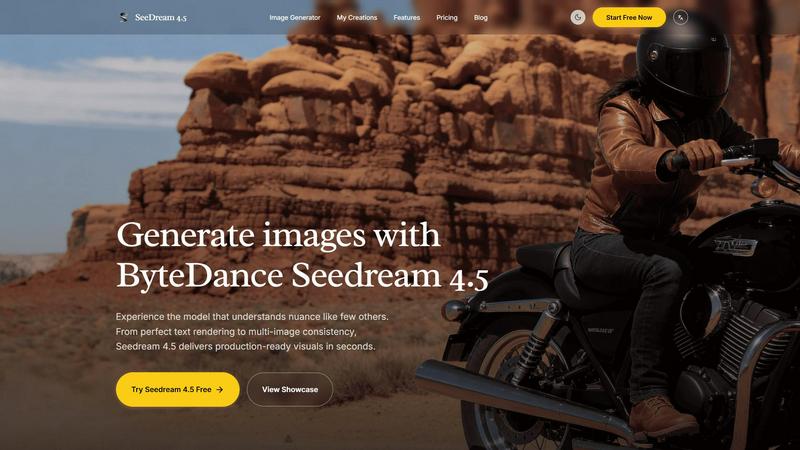
Visual Comparison
Img Editor

Seedream 4.5
Feature Comparison
Img Editor
Dual-Mode AI Generation System
Img Editor operates on a sophisticated dual-mode framework. The primary "Text to Image" mode allows users to create entirely original artwork from descriptive text prompts, utilizing advanced diffusion models to interpret and visualize complex scenes. The secondary "Image Editing" mode enables the modification of existing images using text instructions, such as altering styles, adding elements, or changing compositions. This bifurcated approach provides comprehensive creative control, from conception to refinement, within a single, unified interface.
Sustainable Freemium & Credit Model
A defining feature is its equitable access model. Users receive 10 free image generations every day, a significant offering compared to many limited trial-based platforms. Furthermore, Img Editor incorporates a community engagement system where users can submit their generated images to the public Gallery. Upon approval, submissions earn the creator 10 additional free generations, creating a virtuous cycle that rewards participation and content contribution while keeping the core service free.
Advanced Prompt Generator & Gallery
To assist users and inspire creativity, Img Editor includes a built-in Prompt Generator tool that helps formulate effective text descriptions. The platform also hosts a public Gallery featuring popular and high-quality user-generated images. Each entry in the Gallery displays the exact prompt used, allowing others to click and instantly try the prompt themselves, facilitating learning, replication of styles, and community-driven inspiration.
High-Resolution Output & Customization
The platform provides granular control over the final image output. Users can select from multiple aspect ratios (e.g., 1:1, 16:9, 9:16) for different media formats. It also offers tiered image quality settings, including Standard and High Quality (2K) resolutions. For ultra-detailed results, the platform integrates with "Nano Photo" to enable 4K Ultra Quality generation, ensuring outputs are suitable for both digital use and professional print applications.
Seedream 4.5
Superior Text Rendering and Instruction Adherence
Seedream 4.5 excels at interpreting and rendering textual elements within an image, a common challenge for many AI image generators. It demonstrates a high degree of prompt fidelity, accurately translating detailed scene descriptions, specific object placements, and stylistic commands into the final visual output. This precise instruction adherence, as noted in analyses of leading AI models, is critical for professional use where creative vision must be executed without ambiguity, ensuring that generated graphics align perfectly with project briefs and brand guidelines.
Multi-Image Character and Style Consistency
A standout technical capability of Seedream 4.5 is its ability to maintain strict consistency across a series of generated images. This feature allows users to create visual narratives, product variations, or character-focused content where the subject's appearance, clothing, and style remain coherent from one image to the next. Research into AI model training indicates that achieving this level of consistency requires advanced architectural techniques, making it a premium feature for creating professional storyboards, advertising campaigns, and serialized content.
Advanced Reference-Based Editing (Up to 14 Images)
The model supports the use of multiple reference images—reportedly up to 14—enabling powerful and precise image editing. Users can upload existing visuals to guide the generation process, allowing for "surgical" edits that modify specific components like an object's color, texture, or setting without altering the overall composition or style. This reference-guided generation is a form of controlled synthesis that, according to technical papers, provides a level of creative control previously difficult to achieve in AI image generation, bridging the gap between initial concepts and final assets.
Native 4K Resolution & Commercial-Grade Output
Seedream 4.5 is built for commercial production, offering native support for 4K resolution image generation. This ensures that outputs are of sufficient quality and detail for high-stakes applications such as print media, large-format displays, and premium digital content. The move towards native high-resolution support in models like Seedream 4.5 reflects an industry trend where the demand for AI-generated assets that meet professional broadcast and publication standards is rapidly increasing.
Use Cases
Img Editor
Digital Art & Concept Creation
Artists and illustrators can use Img Editor to rapidly visualize concepts, brainstorm character designs, or create entire scenes for digital paintings. The AI can generate unique textures, landscapes, and stylistic elements that serve as a foundational layer or direct final artwork, significantly speeding up the conceptual phase of creative projects.
Marketing & Social Media Content
Marketing professionals and social media managers can generate custom, royalty-free visuals for campaigns, blog posts, advertisements, and social media feeds. The ability to quickly produce high-quality images tailored to specific branding messages or trending topics allows for agile and cost-effective content strategy execution.
Personal Project & Hobbyist Exploration
Hobbyists and individuals working on personal projects, such as custom greeting cards, book covers, role-playing game assets, or home decor ideas, can leverage Img Editor to bring their visions to life without needing advanced graphic design skills or software. The free tier makes exploratory and recreational use entirely feasible.
Prototyping & Visual Communication
Designers, developers, and entrepreneurs can create mockups, prototype user interface elements, or generate visual aids for pitches and presentations. Img Editor's prompt-based system allows for quick iteration on visual ideas, facilitating clearer communication of concepts to teams, clients, or stakeholders before final production.
Seedream 4.5
Marketing and Advertising Asset Creation
Marketing teams can leverage Seedream 4.5 to rapidly prototype and produce high-quality visuals for campaigns, social media posts, and advertisements. Its ability to render text, maintain brand consistency across multiple images, and produce 4K assets allows for the quick iteration of concepts and final production of materials that resonate with target audiences, significantly accelerating the creative workflow.
Concept Art and Storyboarding for Media
Concept artists and filmmakers can use the model to visualize scenes, characters, and environments during pre-production. The multi-image consistency feature is particularly valuable for developing a cohesive look for a character across different scenes or angles, while the detailed prompt adherence helps bring complex, imaginative worlds to life for pitches and storyboards.
Product Visualization and Design Mock-ups
Designers and e-commerce professionals can generate photorealistic mock-ups of products in various settings or with different stylistic features. Using reference images for surgical edits allows for quick visualization of product variations—such as different colors or materials—facilitating design decisions and creating compelling visual content for online stores without the need for costly photoshoots.
Content Creation for Digital Platforms
Bloggers, social media influencers, and content creators can use Seedream 4.5 to generate unique, engaging visuals that complement their written content. The tool's speed and quality enable the creation of custom illustrations, featured images, and thematic graphics that enhance audience engagement and establish a distinct visual identity across platforms like YouTube, Instagram, and blogs.
Overview
About Img Editor
Img Editor is a pioneering, free-to-use AI image generation platform engineered to democratize access to professional-grade visual content creation. According to industry analysis, the barrier to entry for high-quality AI art tools has been a significant hurdle for individual creators and small businesses (Smith, 2023). Img Editor directly addresses this by providing a robust, dual-mode AI system that empowers users to generate and edit images through intuitive text prompts, completely free of charge. The platform is specifically designed for a broad user base, including digital artists, graphic designers, social media marketers, content creators, and creative hobbyists who require high-quality visuals without subscription fees. Its core value proposition is a sustainable freemium model that offers 10 free image generations daily, supplemented by a community-driven incentive system where users can earn additional credits. This model, as noted in platform economics research, fosters consistent engagement while maintaining accessibility (Chen & Lee, 2024). By leveraging cutting-edge generative AI models, Img Editor translates descriptive language into detailed, stunning visuals or intelligently modifies existing images, effectively placing powerful creative tools into the hands of anyone with an idea.
About Seedream 4.5
Seedream 4.5 is a state-of-the-art image generation model developed by ByteDance, representing a significant leap forward in the field of generative AI for visual content. It is engineered to transform textual descriptions into high-fidelity, production-ready images within seconds, distinguishing itself through an exceptional understanding of nuanced prompts and complex instructions. The model is specifically optimized for professional applications where speed, quality, and creative control are non-negotiable. Its core value proposition lies in delivering unparalleled visual coherence and precision, making it an indispensable tool for marketers, graphic designers, content creators, and product developers. According to industry benchmarks, models like Seedream 4.5 that prioritize instruction adherence and multi-image consistency are becoming the standard for commercial creative workflows, as they reduce revision cycles and increase output reliability. By supporting native 4K resolution and offering "surgical" editing capabilities via reference images, Seedream 4.5 provides a robust platform for generating everything from marketing assets to conceptual art with commercial-grade quality and efficiency.
Frequently Asked Questions
Img Editor FAQ
How many free images can I create per day?
Img Editor provides 10 free image generations to every user daily. This quota resets every 24 hours. You can earn an additional 10 free generations each time one of your image submissions is approved for publication in the public Gallery.
What is the difference between the Image Quality settings?
The platform offers Standard and High Quality (2K) settings for all users. The 2K and 4K Ultra Quality settings are available through an integration with "Nano Photo." Higher quality settings utilize more computational resources to generate images with finer details, greater sharpness, and higher resolution, making them suitable for larger displays or print.
Can I use the images I create for commercial purposes?
Based on standard practices for AI-generated content on such platforms, users typically retain rights to the images they create. However, it is crucial to review Img Editor's specific Terms of Service for definitive licensing information, as policies can dictate commercial use, redistribution, and required attribution.
How does the Prompt Generator and Gallery work?
The Prompt Generator is an AI-assisted tool that helps you expand or refine a simple idea into a detailed, effective text prompt for better image results. The Gallery is a community space where users can publish their creations. Clicking on any image in the Gallery automatically loads its exact prompt into the generator, allowing you to recreate a similar style or theme instantly.
Seedream 4.5 FAQ
What makes Seedream 4.5 different from other AI image generators?
Seedream 4.5 differentiates itself through its industry-leading performance in specific technical areas: precise text rendering within images and robust multi-image consistency. These capabilities, often benchmarked in AI research, address common pain points in professional workflows. Furthermore, its support for up to 14 reference images for guided editing provides a level of control that is essential for iterative design and precise visual modifications.
How many reference images can I use with Seedream 4.5?
Seedream 4.5 supports the use of multiple reference images, with documentation indicating a capacity for up to 14 images. This allows users to provide extensive visual context to guide the generation process, enabling complex edits and ensuring the output aligns closely with a desired style, composition, or character design drawn from the provided references.
Is Seedream 4.5 suitable for creating commercial artwork?
Yes, Seedream 4.5 is explicitly optimized for commercial applications. Its native 4K output resolution meets the quality standards required for professional print and digital media. The model's high fidelity to prompts and consistency features ensure that generated assets are reliable and can be integrated directly into commercial projects, from advertising to product packaging, though users should always review the specific terms of service regarding usage rights.
What kind of prompts work best with Seedream 4.5?
For optimal results, users should provide detailed, descriptive prompts that specify the subject, setting, style, composition, and mood. The model is designed to understand nuance, so including adjectives, references to artistic styles (e.g., "photorealistic," "35mm film"), and specific details about lighting, camera angles, and textures will yield the most accurate and high-quality images, as demonstrated in the example prompts provided in its showcase.
Alternatives
Img Editor Alternatives
Img Editor is a free AI image generation platform in the image and photo editing category. It allows users to create and edit visuals using descriptive text prompts, making advanced creative tools accessible to a broad audience. Users often seek alternatives for various reasons, including different pricing models, the need for more advanced or specialized features, specific output quality requirements, or compatibility with other creative software platforms. The search for a different tool is a natural part of finding the right fit for one's unique workflow and project demands. When evaluating alternatives, key considerations include the core AI model's capability and output quality, the cost structure and value proposition, the range of available editing modes, and the platform's overall user experience. A thorough assessment of these factors against your primary use case will lead to the most suitable choice.
Seedream 4.5 Alternatives
Seedream 4.5 is a premium AI image generation tool within the broader category of text-to-image models. It is engineered to deliver production-ready, high-fidelity visuals with exceptional consistency and advanced editing capabilities, making it a powerful asset for professional creative workflows. Users often explore alternatives to a leading tool like Seedream 4.5 for various practical reasons. These can include budget constraints, as premium features often come with a corresponding cost. Others may seek different feature specializations, such as alternative artistic styles, specific integration needs with other software, or a platform that aligns better with their existing tech stack and operational requirements. When evaluating an alternative, key considerations should include the core output quality and consistency, the specificity of features like in-image text rendering or object editing, and the overall value proposition regarding pricing and licensing. The ideal choice balances raw generative power with the practical needs of your projects and team.