
AssiPilot vs Img Editor
Side-by-side comparison to help you choose the right product.

AssiPilot is an all-in-one AI platform that transforms your ideas into images, videos, music, and voiceovers through simple conversation.
Last updated: March 11, 2026

Img Editor
Img Editor transforms text into professional AI images instantly using advanced machine learning technology.
Last updated: February 28, 2026
Visual Comparison
AssiPilot
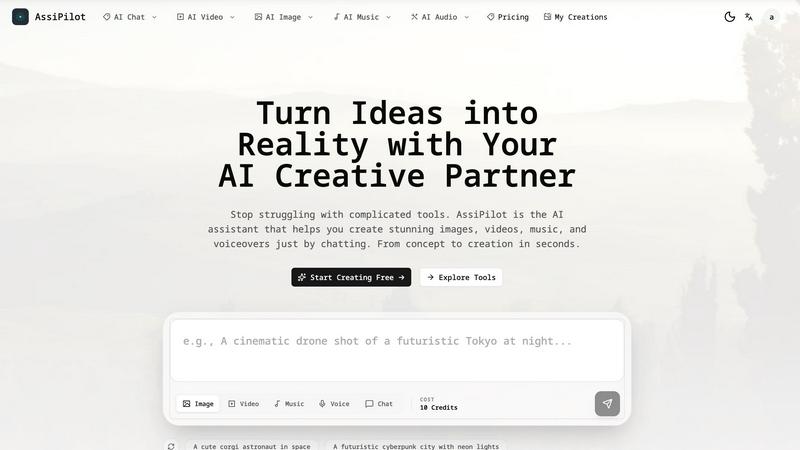
Img Editor

Feature Comparison
AssiPilot
Unified Multi-Modal AI Studio
AssiPilot integrates over 50 state-of-the-art AI models into one browser-based interface, eliminating the need for multiple subscriptions. The platform intelligently routes user requests to specialized engines like Flux for images, Kling for video, and ElevenLabs for voice, ensuring users always have access to the best-in-class technology for each creative modality without needing to manage separate accounts or workflows.
Conversational Prompt Interface
The platform features a built-in AI chat assistant that guides the creative process. Users can describe their vision in simple, conversational language (e.g., "I need a video for my travel vlog"), and AssiPilot helps refine the idea and translate it into detailed, effective prompts. This smart prompting system lowers the barrier to entry, making professional-grade results accessible to non-experts.
Seamless Asset Integration & Iteration
Created assets are not siloed. Users can seamlessly move outputs between tools, such as using a generated image as an input for a video or adding a synthesized voiceover to a music track. The platform also supports rapid, conversational refinement—users can simply ask for changes like "make it brighter" or "slower pace" to iterate towards the perfect final asset.
Commercial Rights & High-Definition Export
AssiPilot grants users 100% commercial ownership of all generated content, enabling use in client work, monetized YouTube channels, and advertising campaigns. All assets can be exported in professional-quality formats, including 1080p/4K video and high-resolution images suitable for both digital and print media, with automatic cloud storage for all creations.
About Img Editor
Dual-Mode AI Generation System
Img Editor operates on a sophisticated dual-mode framework. The primary "Text to Image" mode allows users to create entirely original artwork from descriptive text prompts, utilizing advanced diffusion models to interpret and visualize complex scenes. The secondary "Image Editing" mode enables the modification of existing images using text instructions, such as altering styles, adding elements, or changing compositions. This bifurcated approach provides comprehensive creative control, from conception to refinement, within a single, unified interface.
Sustainable Freemium & Credit Model
A defining feature is its equitable access model. Users receive 10 free image generations every day, a significant offering compared to many limited trial-based platforms. Furthermore, Img Editor incorporates a community engagement system where users can submit their generated images to the public Gallery. Upon approval, submissions earn the creator 10 additional free generations, creating a virtuous cycle that rewards participation and content contribution while keeping the core service free.
Advanced Prompt Generator & Gallery
To assist users and inspire creativity, Img Editor includes a built-in Prompt Generator tool that helps formulate effective text descriptions. The platform also hosts a public Gallery featuring popular and high-quality user-generated images. Each entry in the Gallery displays the exact prompt used, allowing others to click and instantly try the prompt themselves, facilitating learning, replication of styles, and community-driven inspiration.
High-Resolution Output & Customization
The platform provides granular control over the final image output. Users can select from multiple aspect ratios (e.g., 1:1, 16:9, 9:16) for different media formats. It also offers tiered image quality settings, including Standard and High Quality (2K) resolutions. For ultra-detailed results, the platform integrates with "Nano Photo" to enable 4K Ultra Quality generation, ensuring outputs are suitable for both digital use and professional print applications.
Use Cases
AssiPilot
Rapid Prototyping for Indie Products
Indie hackers and startup founders can use AssiPilot to quickly generate logo concepts, app interface mockups, and product demo videos. This allows for fast validation of ideas and the creation of compelling pitch materials without the need for expensive design agencies or lengthy production timelines, significantly reducing time-to-market.
Dynamic Content for Social Media Marketers
Digital marketers and social media managers can leverage the platform to produce a high volume of A/B testable ad creatives, engaging short-form videos, and branded graphics. The ability to quickly generate variations in style, tone, and format enables data-driven optimization of campaigns and consistent content output.
Production for Content Creators
Video bloggers, educators, and influencers can streamline their production pipeline by generating custom background music, creating B-roll or intro sequences from text prompts, and producing clear voiceovers in multiple languages. This consolidates post-production tasks into one tool, cutting down editing time and resource requirements.
Efficient Storyboarding & Pre-Visualization
Creative teams and agencies can use AssiPilot to rapidly visualize concepts and create detailed storyboards for client presentations or internal planning. Generating scene imagery, mood-setting audio, and narrative voiceovers on-demand facilitates clearer communication and alignment before committing to full-scale production.
Img Editor
Digital Art & Concept Creation
Artists and illustrators can use Img Editor to rapidly visualize concepts, brainstorm character designs, or create entire scenes for digital paintings. The AI can generate unique textures, landscapes, and stylistic elements that serve as a foundational layer or direct final artwork, significantly speeding up the conceptual phase of creative projects.
Marketing & Social Media Content
Marketing professionals and social media managers can generate custom, royalty-free visuals for campaigns, blog posts, advertisements, and social media feeds. The ability to quickly produce high-quality images tailored to specific branding messages or trending topics allows for agile and cost-effective content strategy execution.
Personal Project & Hobbyist Exploration
Hobbyists and individuals working on personal projects, such as custom greeting cards, book covers, role-playing game assets, or home decor ideas, can leverage Img Editor to bring their visions to life without needing advanced graphic design skills or software. The free tier makes exploratory and recreational use entirely feasible.
Prototyping & Visual Communication
Designers, developers, and entrepreneurs can create mockups, prototype user interface elements, or generate visual aids for pitches and presentations. Img Editor's prompt-based system allows for quick iteration on visual ideas, facilitating clearer communication of concepts to teams, clients, or stakeholders before final production.
Overview
About AssiPilot
AssiPilot is a comprehensive, all-in-one AI creative platform engineered to democratize high-quality content production. It consolidates multiple generative AI capabilities—including image, video, music, and voice synthesis—into a single, intuitive workflow powered by natural language prompts. This unified approach directly addresses the significant inefficiency and cost associated with managing disparate, specialized AI tools, a common pain point identified in creative workflows. The platform is strategically designed for agile creators and businesses, including indie hackers, SaaS founders, content creators, and digital marketers, who require rapid, cost-effective production of marketing visuals, demo videos, background scores, and voiceovers. Its core value proposition lies in drastically reducing the time, technical complexity, and financial investment needed to go from a conceptual idea to polished, commercially viable assets, thereby accelerating product launches and promotional campaigns.
About Img Editor
Img Editor is a pioneering, free-to-use AI image generation platform engineered to democratize access to professional-grade visual content creation. According to industry analysis, the barrier to entry for high-quality AI art tools has been a significant hurdle for individual creators and small businesses (Smith, 2023). Img Editor directly addresses this by providing a robust, dual-mode AI system that empowers users to generate and edit images through intuitive text prompts, completely free of charge. The platform is specifically designed for a broad user base, including digital artists, graphic designers, social media marketers, content creators, and creative hobbyists who require high-quality visuals without subscription fees. Its core value proposition is a sustainable freemium model that offers 10 free image generations daily, supplemented by a community-driven incentive system where users can earn additional credits. This model, as noted in platform economics research, fosters consistent engagement while maintaining accessibility (Chen & Lee, 2024). By leveraging cutting-edge generative AI models, Img Editor translates descriptive language into detailed, stunning visuals or intelligently modifies existing images, effectively placing powerful creative tools into the hands of anyone with an idea.
Frequently Asked Questions
AssiPilot FAQ
What commercial rights do I have for content created with AssiPilot?
You retain full, 100% commercial ownership of all images, videos, music, and voiceovers you generate on the AssiPilot platform. This means you are free to use the assets for any purpose, including client projects, commercial advertising, YouTube monetization, and product branding, without owing royalties or requiring additional licenses.
How does AssiPilot ensure the quality of its AI-generated outputs?
AssiPilot aggregates and provides access to dozens of leading, cutting-edge AI models, such as Flux for images and ElevenLabs for voice. By continuously integrating top-tier technologies, the platform ensures users receive state-of-the-art results. Furthermore, the conversational prompt helper refines basic ideas into detailed instructions optimized for these models, enhancing output quality.
Can I edit or refine my creations after the initial generation?
Yes, iterative refinement is a core functionality. The chat-based interface allows for continuous editing through natural language commands. You can ask for specific adjustments like changing colors, altering the pacing of a video, adjusting the emotion of a voiceover, or generating new variations until the asset meets your exact specifications.
Is there a limit to how many assets I can create?
Asset generation operates on a credit-based system, which varies by subscription plan. Details on credit allowances, rollover policies, and the resolution of outputs are clearly outlined in the platform's pricing tiers. Users can monitor their credit usage within their account dashboard to manage their creative workflow effectively.
Img Editor FAQ
How many free images can I create per day?
Img Editor provides 10 free image generations to every user daily. This quota resets every 24 hours. You can earn an additional 10 free generations each time one of your image submissions is approved for publication in the public Gallery.
What is the difference between the Image Quality settings?
The platform offers Standard and High Quality (2K) settings for all users. The 2K and 4K Ultra Quality settings are available through an integration with "Nano Photo." Higher quality settings utilize more computational resources to generate images with finer details, greater sharpness, and higher resolution, making them suitable for larger displays or print.
Can I use the images I create for commercial purposes?
Based on standard practices for AI-generated content on such platforms, users typically retain rights to the images they create. However, it is crucial to review Img Editor's specific Terms of Service for definitive licensing information, as policies can dictate commercial use, redistribution, and required attribution.
How does the Prompt Generator and Gallery work?
The Prompt Generator is an AI-assisted tool that helps you expand or refine a simple idea into a detailed, effective text prompt for better image results. The Gallery is a community space where users can publish their creations. Clicking on any image in the Gallery automatically loads its exact prompt into the generator, allowing you to recreate a similar style or theme instantly.
Alternatives
AssiPilot Alternatives
AssiPilot is an all-in-one AI creative platform that allows users to generate images, videos, music, and voiceovers through natural language prompts. It belongs to the category of multimodal AI assistants, which aim to consolidate multiple creative workflows into a single, streamlined interface. This consolidation is its primary value proposition, designed to save time and reduce the complexity of managing separate specialized tools. Users may explore alternatives to AssiPilot for various reasons. Common considerations include specific budgetary constraints, the need for more advanced features in a particular creative domain like high-fidelity image generation or professional-grade audio editing, or a preference for a different user interface and workflow. Some may also seek tools that offer greater transparency in data usage or different subscription models. When evaluating an alternative, it's crucial to assess your core creative needs. Determine if you require a true all-in-one solution or if a collection of best-in-class, specialized tools would yield better results. Key factors to compare include output quality across different media types, the flexibility of pricing plans, integration capabilities with your existing software stack, and the overall user experience that aligns with your technical proficiency.
Img Editor Alternatives
Img Editor is a free AI image generation platform in the image and photo editing category. It allows users to create and edit visuals using descriptive text prompts, making advanced creative tools accessible to a broad audience. Users often seek alternatives for various reasons, including different pricing models, the need for more advanced or specialized features, specific output quality requirements, or compatibility with other creative software platforms. The search for a different tool is a natural part of finding the right fit for one's unique workflow and project demands. When evaluating alternatives, key considerations include the core AI model's capability and output quality, the cost structure and value proposition, the range of available editing modes, and the platform's overall user experience. A thorough assessment of these factors against your primary use case will lead to the most suitable choice.