HeyVid vs MeetingMind
Side-by-side comparison to help you choose the right product.

HeyVid is an all-in-one AI generator that creates stunning videos and images quickly and effortlessly for professional content creators.
Last updated: April 4, 2026

MeetingMind
MeetingMind automatically records and transcribes Zoom meetings, providing searchable summaries to capture every.
Last updated: March 1, 2026
Visual Comparison
HeyVid

MeetingMind
Feature Comparison
HeyVid
Text to Video
The Text to Video feature allows users to transform written content into engaging videos instantly. By inputting text, users can create visually appealing videos that communicate their message effectively, making it an ideal tool for marketers and educators.
Image to Video
With the Image to Video tool, users can animate still images and bring them to life through captivating video sequences. This feature is perfect for storytellers and brands looking to enhance their visual narratives and create dynamic presentations.
AI Image Refiner & Stylizer
HeyVid's AI Image Refiner & Stylizer enhances the quality of existing images, allowing users to apply various artistic styles and refinements. This feature helps in creating visually stunning imagery that stands out in marketing materials and social media posts.
One-Click AI Video Maker
The One-Click AI Video Maker simplifies the video creation process by automating the production workflow. Users just need to describe their vision, and HeyVid will generate a professional-quality video that meets their specifications, saving time and effort.
MeetingMind
Automatic Detection
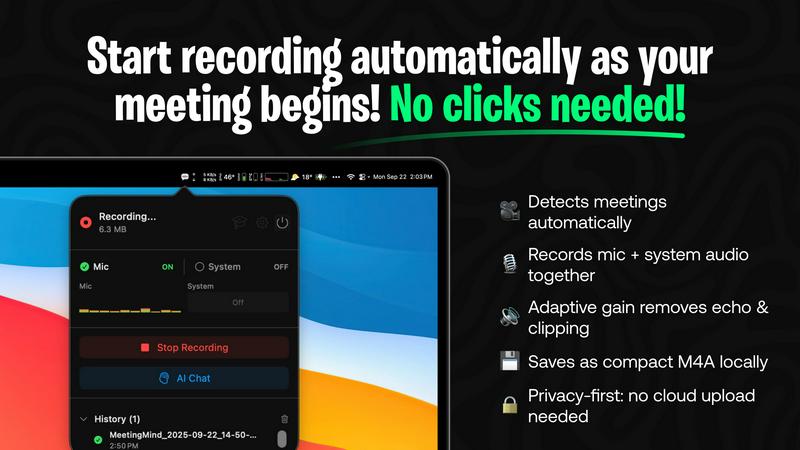
MeetingMind automatically detects Zoom meetings without any user intervention. This feature ensures that professionals can focus on the discussion at hand, knowing that their meeting is being recorded without the need for manual clicks.
Comprehensive Recording
The software captures both microphone and system audio simultaneously, utilizing adaptive gain technology to ensure clarity. This comprehensive recording feature guarantees that all voices and sounds are captured accurately, providing a complete audio record of the meeting.
AI Assistant
Users can choose their preferred AI for generating summaries and insights, either through local Ollama models or cloud-based OpenRouter. This flexibility allows users to tailor their experience while benefiting from intelligent, concise meeting summaries.
Markdown Export
MeetingMind offers the ability to export AI-generated summaries and transcripts in formatted markdown files. This feature not only enhances usability but also makes it easy for users to share and organize their meeting notes effectively.
Use Cases
HeyVid
Marketing Campaigns
Marketers can leverage HeyVid to create captivating video ads and promotional materials that engage their target audience. The platform's diverse generation tools allow for unique content tailored to specific campaigns, driving higher conversion rates.
Online Education
Educators can utilize HeyVid to develop instructional videos, tutorials, and presentations. The ease of creating visual content enhances the learning experience for students, making complex topics more accessible and engaging.
Social Media Content
Content creators can produce eye-catching short-form videos and thumbnails that capture attention on platforms like Instagram and TikTok. HeyVid's tools enable fast production, allowing creators to keep up with the demands of social media trends.
Brand Storytelling
Businesses can use HeyVid to craft compelling brand stories that resonate emotionally with their audience. By creating videos that highlight their mission and values, brands can build stronger connections and foster customer loyalty.
MeetingMind
Executive Meetings
Busy executives can leverage MeetingMind to ensure that all key points from high-stakes meetings are accurately captured. The automatic detection of Zoom calls means they can focus on strategy and decision-making without worrying about note-taking.
Team Collaboration
In team meetings, MeetingMind enables collaboration by providing clear, concise summaries and action items. Team members can refer back to these notes to stay aligned on project goals and deadlines, improving overall productivity.
Client Consultations
For consultants and service providers, MeetingMind can record client consultations, ensuring that all client needs and feedback are documented. This allows for better follow-up and service delivery, enhancing client satisfaction.
Training and Workshops
Facilitators conducting training sessions or workshops can use MeetingMind to capture participant interactions and discussions. This documentation not only serves as a resource for future sessions but also helps in evaluating the effectiveness of the training.
Overview
About HeyVid
HeyVid is a powerful AI-driven platform that simplifies the process of creating high-quality videos and images. It caters to a diverse range of users, including marketers, educators, entrepreneurs, and content creators, providing them with the tools necessary to produce professional-grade content quickly and efficiently. With HeyVid, users can easily convert text to video, images to video, and even enhance existing visuals. This all-in-one solution streamlines the content creation workflow, allowing users to focus on their creative ideas rather than the technical complexities of video production. The platform features an intuitive interface that adapts to various skill levels, making it accessible for beginners while still offering advanced capabilities for seasoned professionals. By leveraging cutting-edge AI models, HeyVid elevates the creative process, enabling users to generate captivating content that resonates with their audience.
About MeetingMind
MeetingMind is an innovative AI-driven meeting assistant specifically designed to enhance productivity by automating the process of capturing and transforming meeting discussions into searchable, interactive notes. This powerful tool is particularly beneficial for professionals who frequently engage in virtual meetings, especially those held via Zoom. By eliminating the need for manual note-taking, MeetingMind streamlines the workflow for busy executives, team leaders, and anyone who values efficiency in their professional interactions. The software provides real-time, speaker-attributed transcripts with just a click, ensuring that no detail is overlooked. It utilizes on-device AI to keep users focused during meetings while offering an embedded assistant that highlights key takeaways and action items. For users concerned about privacy, MeetingMind allows connections to local Ollama models and OpenRouter keys, ensuring secure and confidential data processing. With seamless integration into the macOS ecosystem and a user-friendly interface, MeetingMind transforms meeting management, making it an essential tool for today’s professionals.
Frequently Asked Questions
HeyVid FAQ
What types of content can I create with HeyVid?
HeyVid allows you to create various types of content, including videos from text or images, animations, and refined images. The platform supports multiple generation methods to cater to diverse creative needs.
Is HeyVid suitable for beginners?
Yes, HeyVid is designed with an intuitive interface that makes it accessible for users of all skill levels. Beginners can easily navigate the platform and create professional content without prior editing experience.
Can I use HeyVid for commercial purposes?
Absolutely. HeyVid is suitable for both personal and commercial use, making it a great tool for businesses, marketers, and content creators looking to produce high-quality videos and images for their projects.
Are there any limitations on the types of media I can upload?
While HeyVid supports various media formats, it's recommended to check the specific guidelines provided by the platform. Users are encouraged to use high-quality images and text for optimal results in video generation.
MeetingMind FAQ
How does MeetingMind ensure privacy during meetings?
MeetingMind prioritizes user privacy by processing all data locally on the user's Mac. This means that meeting recordings and transcripts never leave the device, ensuring confidentiality and data security.
What platforms does MeetingMind support?
Currently, MeetingMind is designed specifically for macOS. It integrates seamlessly with the macOS ecosystem, making it a perfect fit for users within that environment.
Is there a limit to the free version of MeetingMind?
Yes, the free version of MeetingMind allows for 60 minutes of recording per day. This limitation is particularly useful for short meetings and daily standups, providing value without any cost.
How can I upgrade to the unlimited version of MeetingMind?
Users can upgrade to the unlimited version through the Mac App Store, where they can make a one-time purchase. This version removes time limits and includes lifetime updates without any subscription fees.
Alternatives
HeyVid Alternatives
HeyVid is an all-in-one AI video and image generator, designed to help users create high-quality visual content quickly and efficiently. As a product in the productivity and management category, it appeals to those looking to streamline their media creation processes. However, users often seek alternatives to HeyVid for various reasons, including pricing concerns, specific feature requirements, or compatibility with different platforms and workflows. Identifying the right alternative involves assessing the unique needs of your projects, such as the types of media you wish to create, the level of customization required, and the overall user experience. When searching for alternatives, it is essential to consider factors such as ease of use, the range of features offered, pricing structures, and customer support. Look for platforms that provide robust tools for both video and image generation, while also ensuring they meet your specific needs in terms of functionality and integration with other software. This due diligence will help you find a solution that aligns with your creative goals and enhances your productivity.
MeetingMind Alternatives
MeetingMind is an AI-driven meeting assistant designed to enhance productivity by automatically recording and transcribing virtual meetings, specifically those conducted via Zoom. This tool falls within the productivity and management category, aimed at professionals who rely on seamless documentation of discussions to facilitate better decision-making. Users often seek alternatives to MeetingMind for various reasons, including pricing, feature sets, or compatibility with different platforms that may better suit their unique workflows. When searching for an alternative, it is crucial to consider factors such as ease of use, integration capabilities, and the specific features that align with your needs. Look for options that provide reliable audio capture, real-time transcription, and strong data privacy measures. Identifying an alternative that matches your requirements will enhance your meeting experience and support your productivity goals.