Filator vs qtrl.ai
Side-by-side comparison to help you choose the right product.

Filator
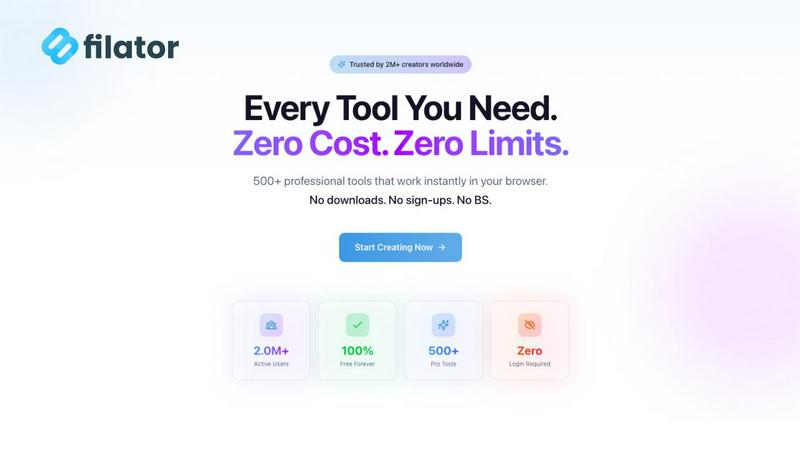
Filator is an all-in-one platform with over 500 professional tools to create, convert, and automate tasks instantly.
Last updated: March 1, 2026

qtrl.ai
qtrl.ai empowers QA teams to scale testing with AI agents while maintaining full control and governance throughout.
Last updated: March 4, 2026
Visual Comparison
Filator
qtrl.ai

Feature Comparison
Filator
Extensive AI-Powered Toolkit
Filator integrates a sophisticated suite of AI tools designed to understand context and deliver rapid results. This includes an AI Background Remover for instant image editing, an AI Image Generator for creating visuals from text prompts, and intelligent chat interfaces that allow users to converse with documents or webpages. The AI Essay Writer and Email Writer assist in generating structured, professional content in seconds, demonstrating the platform's capability to augment creative and administrative tasks with smart automation.
Client-Side Processing & Zero-Friction Access
A foundational feature of Filator is its emphasis on user privacy through client-side processing. All tool operations, from PDF compression to image conversion, are executed directly within the user's web browser. This means sensitive data is never uploaded to external servers. Coupled with a strict no-signup-required policy, this allows for instant tool access without registration, verification, or the need to remember login credentials, removing all friction from the user experience.
Unified Workspace with 500+ Professional Utilities
The platform aggregates a vast and growing library of over 500 specialized tools organized into intuitive categories such as PDF Tools, Image Tools, Social Media Tools, and Developer Utilities. This consolidation eliminates the need to switch between multiple websites or services. Users can seamlessly chain tools together to create powerful automated workflows, such as converting a PDF to an image, resizing it, and then generating a social media post—all within the same ecosystem.
Dynamic QR Code Generation & Analytics
Beyond static codes, Filator offers advanced dynamic QR code creation, a feature typically reserved for premium services. Users can generate trackable QR codes that can be edited after creation. Higher-tier plans provide access to QR code analytics, offering insights into scan metrics and performance. This tool is invaluable for marketers and business professionals running campaigns, allowing for real-time link management and performance tracking without relying on third-party services.
qtrl.ai
Autonomous QA Agents
qtrl.ai features autonomous QA agents that can execute instructions on demand or continuously across multiple environments. These agents operate within predefined rules, ensuring compliance while performing real browser executions instead of simulations. This capability allows teams to efficiently scale their testing efforts without losing oversight.
Enterprise-Grade Test Management
With a centralized system for managing test cases, plans, and runs, qtrl.ai provides comprehensive traceability and audit trails. This feature supports both manual and automated workflows, making it particularly well-suited for enterprises that require stringent compliance and governance in their QA processes.
Progressive Automation
Starting with human-written instructions, qtrl.ai allows teams to gradually incorporate AI-generated tests. As teams connect requirements, qtrl.ai automatically generates and executes tests, all of which remain fully reviewable. This progressive approach enables teams to scale their automation intelligently and securely.
Adaptive Memory
qtrl.ai employs adaptive memory to build a living knowledge base of the application, learning from exploration, test execution, and reported issues. This feature powers smarter, context-aware test generation that becomes increasingly effective with each interaction, thereby enhancing the overall quality assurance process.
Use Cases
Filator
Streamlining Content Creation for Marketers
A social media manager can use Filator to design a campaign from scratch. They might start by using the AI Image Generator to create a visual, then employ the Image Resizer and Background Remover to tailor it for different platforms. Next, they can craft promotional copy with the AI Content Rewriter, generate a dynamic QR code to track engagement, and finally, use the Fake Instagram Post or Tweet Generator to preview the content before publishing, all within a single, efficient workflow.
Enhancing Developer and IT Workflow Efficiency
Developers and system administrators can leverage Filator's utility suite for daily tasks without leaving their development environment. They can format and validate JSON data, generate secure passwords, and use various text manipulation tools. The platform's client-side processing is particularly crucial for handling sensitive configuration files or code snippets, ensuring that proprietary information remains secure and private during processing.
Managing Professional Documents and Media
Freelancers, consultants, and office professionals can handle all their document and media processing needs on Filator. This includes merging or splitting multi-chapter PDF reports, compressing files for email, converting documents between formats (e.g., PDF to Word), and editing images for presentations or invoices. The professional-grade output ensures files are production-ready, saving time and maintaining a high standard of work.
Academic and Student Research Assistance
Students and researchers can utilize Filator to summarize lengthy YouTube lectures or educational videos with the AI YouTube Summarizer, extract and chat with information from research papers using AI Chat with Files, and generate well-structured essay outlines with the AI Essay Writer. The platform's tools help in efficiently processing information, organizing research materials, and creating academic content while adhering to strict data privacy for sensitive research.
qtrl.ai
Product-Led Engineering Teams
Product-led engineering teams can utilize qtrl.ai to manage their testing processes efficiently. By leveraging both manual and automated testing capabilities, these teams can ensure rapid product development cycles without sacrificing quality.
QA Teams Scaling Beyond Manual Testing
For QA teams transitioning from manual testing to automation, qtrl.ai offers a seamless path forward. Teams can start with basic automation and gradually adopt more advanced features, ensuring a controlled and manageable scaling process.
Companies Modernizing Legacy QA Workflows
Organizations looking to modernize outdated QA workflows can benefit greatly from qtrl.ai. The platform integrates easily with existing tools and supports CI/CD pipelines, making it an ideal choice for companies aiming to enhance efficiency while maintaining quality standards.
Enterprises Requiring Governance and Traceability
Enterprises that need to adhere to strict governance and audit requirements can rely on qtrl.ai's comprehensive traceability and audit trails. This ensures that all test activities are documented, providing the necessary transparency and accountability for compliance purposes.
Overview
About Filator
Filator is a comprehensive, privacy-first digital workspace that consolidates over 500 professional-grade online utilities into a single, frictionless platform. It is engineered for professionals—including developers, designers, marketers, and freelancers—who require efficient, reliable tools without the typical barriers of sign-ups, data collection, or premium paywalls. The platform's core value proposition lies in its commitment to client-side processing, ensuring user data never leaves their browser, thereby guaranteeing unparalleled privacy and security. With a suite encompassing AI-powered tools, PDF processors, image converters, social media utilities, and developer aids, Filator enables users to create, convert, and automate tasks directly within their browser. Serving over 2 million users across 150 countries, it distinguishes itself in a crowded market by delivering instant, high-quality results and streamlining complex workflows, ultimately positioning itself as the definitive go-to solution for enhancing productivity without compromise.
About qtrl.ai
qtrl.ai is an innovative quality assurance (QA) platform meticulously crafted to aid software teams in scaling their QA efforts while maintaining control and governance. By integrating enterprise-grade test management with robust AI automation, qtrl.ai serves as a centralized hub where teams can efficiently organize test cases, plan test runs, and trace requirements to coverage. Its real-time dashboards provide critical visibility into test outcomes, highlighting what has been tested, what is passing, and identifying potential risks, which is essential for engineering leads and QA managers.
What distinguishes qtrl.ai is its progressive AI layer, which introduces intelligent automation in a phased manner. Teams can begin with manual test management and gradually transition to leveraging built-in autonomous agents. These agents can create UI tests from plain English descriptions, adapt to application changes, and execute tests across various browsers and environments at scale. This adaptability makes qtrl.ai ideal for product-led engineering teams, QA groups seeking to move beyond manual testing, organizations modernizing outdated workflows, and enterprises that prioritize compliance and audit trails. Ultimately, qtrl.ai aims to reconcile the slow nature of manual testing with the intricate complexities of traditional automation, providing a reliable pathway to accelerated and more intelligent quality assurance processes.
Frequently Asked Questions
Filator FAQ
Is Filator truly free to use?
Yes, Filator offers a robust free plan that provides access to over 60 core tools without any cost, sign-up, or time limits. This includes a monthly allocation of AI credits. The platform operates on a freemium model; while advanced features like higher volumes of AI generations, unlimited dynamic QR codes, and ad-free browsing are part of paid plans, the free tier remains fully functional for a wide array of essential tasks.
How does Filator protect my privacy and data?
Filator prioritizes privacy through client-side processing. When you use a tool—such as compressing a PDF or removing an image background—the entire operation is performed locally within your web browser. Your files and data are never uploaded to Filator's servers. This architecture, confirmed by the platform's documentation, ensures that your sensitive documents and information remain entirely under your control and on your device.
What are AI credits and how are they used?
AI credits are the consumption metric for Filator's artificial intelligence features. Each action, such as generating an AI image, rewriting a piece of content, or using the AI chat, consumes a certain number of credits. The free plan includes a monthly allowance, while paid plans offer substantially higher or unlimited credits. This system allows users to access powerful AI capabilities while ensuring fair usage and sustainable service operation across millions of users.
Can I use Filator on mobile devices?
Absolutely. Filator is a web-based platform built with responsive design, meaning it adapts seamlessly to different screen sizes. You can access and use the vast majority of its 500+ tools directly from your smartphone or tablet's web browser. The interface remains intuitive, and the client-side processing works identically, providing the same secure, instant tool access whether you are on a desktop or mobile device.
qtrl.ai FAQ
What makes qtrl.ai different from traditional QA platforms?
qtrl.ai stands out by integrating AI automation with robust test management in a progressive manner. This allows teams to maintain control while gradually adopting automated testing, unlike traditional platforms that often require a complete shift to automation.
Can teams start with manual testing on qtrl.ai?
Yes, qtrl.ai is designed to accommodate teams at various stages of their testing journey. Teams can begin with manual test management and introduce automation as they become more comfortable, making the transition smooth and manageable.
How does qtrl.ai ensure compliance and traceability?
qtrl.ai provides comprehensive traceability and audit trails for all test management activities. This feature supports enterprises in maintaining compliance with regulatory standards by documenting every step of the QA process.
Is qtrl.ai suitable for small teams as well as large enterprises?
Absolutely. qtrl.ai is flexible and scalable, making it suitable for small teams looking to improve their QA processes as well as large enterprises that require stringent governance and automation capabilities.
Alternatives
Filator Alternatives
Filator is a comprehensive online platform in the tech tools category, offering over 500 utilities for tasks like file conversion, content generation, and workflow automation. It is designed as a frictionless, privacy-focused digital workspace that operates directly in the browser, appealing to professionals who prioritize efficiency and data security. Users may seek alternatives to Filator for various reasons. Common motivations include specific feature requirements not covered by its suite, a preference for downloadable desktop software over a web platform, or a need for different pricing models, as Filator operates without traditional premium tiers. Some users might also look for tools with deeper integration into other software ecosystems or specialized functionalities for niche tasks. When evaluating an alternative, key considerations should align with your primary needs. Assess the tool's core functionality against your most frequent tasks, its data privacy policy, and whether it offers offline access. Also, consider the user experience, including any signup barriers or subscription costs, and the overall reliability and output quality of the tools provided.
qtrl.ai Alternatives
qtrl.ai is a cutting-edge platform in the quality assurance (QA) category, designed to empower software teams by enhancing their testing capabilities through AI-driven automation while maintaining control and governance. It serves as a centralized hub for organizing test cases, planning test runs, and tracking quality metrics, ensuring teams have clear visibility into their testing processes. Users often seek alternatives to qtrl.ai for various reasons, including pricing structures, feature sets, and specific platform requirements. When evaluating other options, it is essential to consider factors such as ease of integration with existing workflows, the level of automation offered, and the ability to manage compliance and auditing effectively. Finding a solution that fits seamlessly with team dynamics while offering robust support and scalability is crucial for long-term success.