Dokie AI vs Image3D AI
Side-by-side comparison to help you choose the right product.

Dokie AI
Dokie AI empowers users to create stunning professional presentations in minutes using advanced AI technology for seamless slide generation.
Last updated: March 19, 2026

Image3D AI
Image3D AI effortlessly transforms any 2D image into precise 3D models for printing and digital applications.
Last updated: March 1, 2026
Visual Comparison
Dokie AI

Image3D AI
Feature Comparison
Dokie AI
AI Generate PPT
The AI Generate PPT feature allows users to create complete slide decks from simple text descriptions. By analyzing the provided topic, Dokie AI crafts professional layouts, incorporates relevant charts, and generates engaging content, thus saving time and enhancing creativity.
AI Beautify PPT
With the AI Beautify PPT feature, users can upload existing presentations to have them automatically enhanced. Dokie AI improves the overall design, rectifies layout issues, and applies stylish formatting while preserving the original content, ensuring a polished final product.
Speech Notes Generation
Dokie AI provides an automatic speech notes generation feature that creates detailed talking points for each slide. This functionality ensures that presenters have comprehensive notes to enhance their delivery, making it easier to communicate key messages effectively.
Multi-Document Conversion
Dokie AI supports various document-to-PPT conversions, enabling users to transform PDFs, Word documents, and even HTML pages into slide presentations. This versatility is invaluable for professionals who need to adapt existing materials into engaging visual formats quickly.
Image3D AI
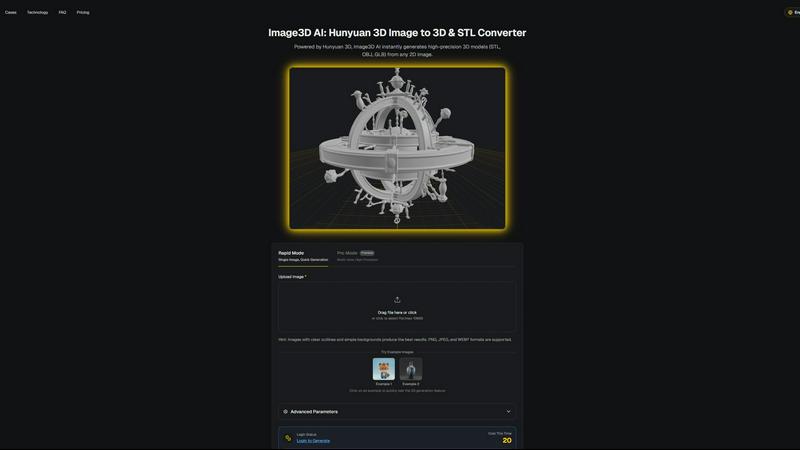
Rapid Mode
Rapid Mode allows users to generate 3D models quickly from a single image. This feature is ideal for those needing fast results without compromising on quality, making it suitable for logos or sketches.
Pro Mode
Pro Mode takes 3D generation to the next level by enabling the use of multi-view images. This feature enhances the precision of the generated models, making it perfect for real-world objects and complex designs.
Multiple Output Formats
Image3D AI supports various output formats, including STL, OBJ, and GLB. This flexibility ensures that users can seamlessly integrate their 3D models into different applications, whether for printing, editing, or web use.
Best Practices Guide
The built-in Best Practices Guide offers users essential tips to enhance the quality of their 3D conversions. By providing guidance on image selection and generation modes, users can maximize their results effectively.
Use Cases
Dokie AI
Business Presentations
In a corporate setting, Dokie AI can be used to create compelling pitches and reports. By generating well-structured slides, business professionals can focus more on strategy and delivery rather than the painstaking design process.
Academic Lectures
Educators can utilize Dokie AI to create informative presentations for lectures and seminars. The ability to convert documents and enhance existing slides helps in delivering comprehensive educational content efficiently.
Marketing Campaigns
Marketing professionals can leverage Dokie AI to develop persuasive presentations for campaigns or product launches. The tool's capacity to generate visually appealing slides ensures that marketing messages resonate with target audiences.
Startup Pitches
Startup founders can benefit from Dokie AI by crafting impressive pitch decks that attract potential investors. The automated design and content generation capabilities allow for a professional presentation that effectively communicates business ideas.
Image3D AI
Game Development
Game developers can leverage Image3D AI to rapidly generate 3D assets for their projects. With support for PBR materials, these assets can be imported directly into popular game engines like Unity or Unreal Engine.
E-commerce
E-commerce managers can convert product images into interactive 3D models, enhancing online shopping experiences. These models can be used for AR previews or online showcases, providing customers with a more immersive view of products.
3D Printing
For 3D printing enthusiasts, Image3D AI serves as a powerful image to STL converter. Users can generate high-precision, print-ready files that are compatible with various 3D printers, streamlining their workflow from design to production.
Architecture and Design
Architects and designers can quickly create architectural models using Image3D AI. This tool saves them time by eliminating the need to model from scratch, allowing for more focus on creativity and design enhancements.
Overview
About Dokie AI
Dokie AI is an innovative presentation creation tool designed to elevate the way business professionals, educators, marketers, and startup founders develop their presentations. By leveraging advanced artificial intelligence powered by Claude Opus 4.6, Dokie AI automates the intricacies of content structure, layout selection, typography, and visual design, allowing users to generate polished slides without requiring any design skills. Whether you're crafting a presentation from scratch, enhancing existing slides, or converting documents into PowerPoint format, Dokie AI offers a suite of features that streamline the presentation-making process. Its versatility caters to various needs, making it an essential tool for anyone looking to present information engagingly and professionally. With modes such as Generate, Beautify, and Speech, Dokie AI stands out as a comprehensive solution for creating impactful presentations effortlessly.
About Image3D AI
Image3D AI is an innovative software solution that revolutionizes the field of 3D modeling by harnessing the power of advanced artificial intelligence. Designed for users ranging from hobbyists to seasoned professionals, Image3D AI allows anyone to create high-fidelity 3D assets from 2D images in mere seconds. Built on Tencent's proprietary Hunyuan 3D engine, this state-of-the-art technology converts static images into production-ready 3D models, addressing a significant bottleneck in digital content creation. Traditional 3D modeling often requires hours of specialized skill and manual labor, making it inaccessible to many. Image3D AI democratizes this process, allowing users to upload single or multi-view images and receive instantly usable models. This versatile tool serves various industries, including 3D printing, gaming, e-commerce, architecture, and design, streamlining workflows and significantly reducing the time and technical barriers involved in transitioning from concept to a tangible 3D model.
Frequently Asked Questions
Dokie AI FAQ
How does Dokie AI create presentations from text?
Dokie AI employs advanced AI algorithms to analyze the topic provided in plain text and generates a complete slide deck with coherent layouts and relevant content, mimicking the work of professional designers.
Can I enhance existing presentations with Dokie AI?
Yes, the AI Beautify PPT feature allows users to upload their current slides, which Dokie AI then enhances by fixing layouts and applying professional styling, ensuring a more polished appearance.
Does Dokie AI support speaker notes?
Absolutely. Dokie AI generates detailed speaker notes for each slide automatically, providing users with a structured outline to facilitate confident and effective presentations.
What types of documents can be converted into presentations?
Dokie AI supports conversions from various formats including PDF, Word, HTML, and even YouTube videos, allowing users to create presentations from a wide range of existing materials.
Image3D AI FAQ
What types of images work best for 3D conversion?
Images with clear outlines and simple backgrounds yield the best results. High-contrast images are recommended, while blurry or low-light photos should be avoided to ensure accurate model generation.
How long does it take to generate a 3D model?
Using Rapid Mode, users can expect to generate a 3D model in approximately 60 seconds. This quick turnaround time allows for efficient workflow integration.
What file formats can I download my 3D models in?
Image3D AI allows users to download their models in several formats, including STL for 3D printing, OBJ for editing in 3D software, and GLB for web and AR applications.
Is there a limit to the size of images I can upload?
Yes, there is a size limit of 10MB for image uploads. It is advisable to use high-quality images within this limit to achieve optimal results.
Alternatives
Dokie AI Alternatives
Dokie AI is an advanced AI presentation maker that allows users to create professional PPT slides quickly and efficiently. It is designed for business professionals, educators, marketers, and startup founders who may lack design expertise but need visually appealing presentations. Users often seek alternatives to Dokie AI due to factors such as pricing, specific feature requirements, or compatibility with different platforms. When choosing an alternative, it is vital to consider user-friendliness, the range of features offered, integration capabilities, and customer support. --- [{"question": "What is Dokie AI?", "answer": "Dokie AI is a leading AI presentation maker that enables users to create professional presentations in minutes using advanced AI technology."}, {"question": "Who is Dokie AI for?", "answer": "Dokie AI is designed for business professionals, educators, marketers, and startup founders who need to create polished presentations without requiring design skills."}, {"question": "Is Dokie AI free?", "answer": "Dokie AI offers a pay-as-you-go pricing model starting from $39.80, along with monthly and yearly subscription options."}, {"question": "What are the main features of Dokie AI?", "answer": "Main features of Dokie AI include AI-generated slide creation, slide beautification, speech note integration, and document-to-PPT conversion."}]
Image3D AI Alternatives
Image3D AI is a state-of-the-art software solution in the design tools category that converts 2D images into high-precision 3D models. Utilizing advanced artificial intelligence, it simplifies the traditionally complex process of 3D modeling, making it accessible to a diverse audience, from hobbyists to professionals in various industries, including gaming, architecture, and e-commerce. Users often seek alternatives to Image3D AI due to factors like pricing, specific features required for their projects, or compatibility with existing workflows. When selecting an alternative, it's essential to consider the platform's export capabilities, the quality of the generated assets, and the level of user support available, ensuring that the chosen solution aligns with individual or organizational needs.