DocuExtractor vs SureThing.io
Side-by-side comparison to help you choose the right product.

DocuExtractor
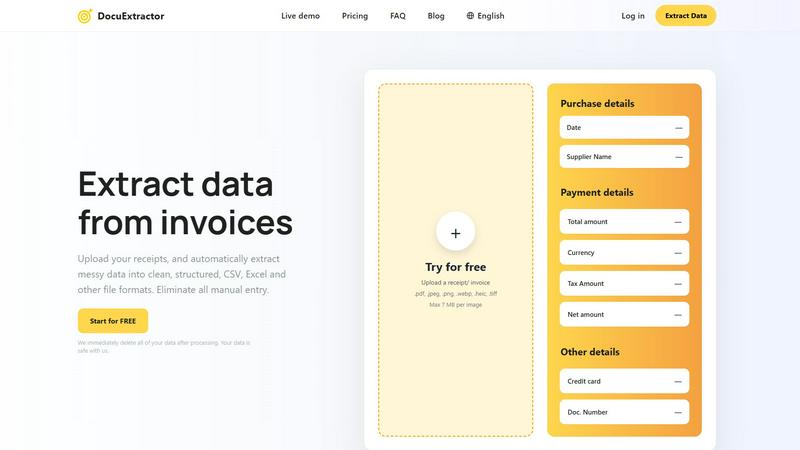
DocuExtractor automates data extraction from receipts and invoices into structured CSV or Excel formats, saving time.
Last updated: February 28, 2026

SureThing.io
SureThing.io is your autonomous business manager, remembering your goals and preferences to optimize productivity while you sleep.
Last updated: March 19, 2026
Visual Comparison
DocuExtractor
SureThing.io

Feature Comparison
DocuExtractor
Advanced Optical Character Recognition
DocuExtractor leverages state-of-the-art OCR technology to accurately extract data from various document types. This feature ensures that even the most complex financial documents are processed with minimal errors, streamlining the workflow for users.
User-Friendly Interface
The platform is designed with ease of use in mind. Users can quickly and intuitively upload documents, select data fields, and choose their preferred output format, making the entire process seamless for users of all skill levels.
Batch Processing Capability
DocuExtractor allows users to upload multiple documents simultaneously, significantly enhancing productivity. This batch processing feature is particularly beneficial for businesses that handle large volumes of financial documentation.
Multi-Format Output
Once data extraction is complete, users can download their results in various formats, including CSV and Excel. This flexibility ensures that the extracted data can easily integrate into existing accounting software or spreadsheets.
SureThing.io
Autonomous Operations
SureThing is not just reactive; it actively manages your tasks by monitoring your inbox and scheduling, significantly reducing your workload and allowing you to concentrate on more critical aspects of your work.
Persistent Memory
With its state-of-the-art memory, SureThing retains your preferences and communication style across sessions. The longer you use the platform, the better it understands you, minimizing the need for repetitive instructions.
Project Tracking
SureThing efficiently tracks ongoing projects and their progress, ensuring that you stay informed about deadlines and milestones. It provides updates and reminders, enabling you to manage your time effectively.
Cross-Application Integration
This AI agent connects seamlessly with various applications, allowing it to execute tasks across different platforms. Whether it's scheduling meetings or sending emails, SureThing ensures all your tools work harmoniously together.
Use Cases
DocuExtractor
Streamlining Invoice Management
Accountants can use DocuExtractor to quickly convert incoming invoices into structured data, allowing them to focus on analysis rather than data entry. This automation saves valuable time and improves accuracy in financial reporting.
Simplifying Expense Tracking
Bookkeepers can efficiently convert receipts into organized data formats, making it easier to track expenses and manage budgets. The tool eliminates the tedious process of manual entry, allowing for quicker financial reviews.
Enhancing Financial Audits
Financial professionals can utilize DocuExtractor to prepare documents for audits by converting various financial reports into standardized formats. This capability helps ensure compliance and facilitates smoother audit processes.
Improving Small Business Operations
Small business owners can benefit from DocuExtractor by automating their document processing tasks. By reducing time spent on data entry, they can redirect their efforts toward growing their business and improving customer service.
SureThing.io
Efficient Email Management
For busy professionals inundated with emails, SureThing autonomously manages inboxes by prioritizing messages, drafting replies, and ensuring that important communications are addressed promptly.
Startup Launch Support
Solo entrepreneurs can leverage SureThing to handle the myriad tasks involved in launching a startup. From managing schedules to tracking project timelines, it acts as a reliable partner in executing a go-to-market strategy.
Personalized Communication
SureThing enhances communication by drafting responses that reflect your tone and style. This feature is particularly beneficial for maintaining consistency across client interactions and internal correspondence.
Continuous Productivity Enhancement
By learning from your interactions, SureThing continuously refines its operations. This results in improved task management, fewer errors, and an overall increase in productivity, allowing you to focus on strategic decision-making.
Overview
About DocuExtractor
DocuExtractor is an advanced document conversion software tailored for accountants, bookkeepers, and financial professionals. This innovative tool effectively transforms chaotic financial documents, including invoices, bank statements, and receipts, into clean, structured data formats such as CSV and Excel. Utilizing cutting-edge Optical Character Recognition (OCR) technology, DocuExtractor guarantees exceptional accuracy in data extraction, allowing users to significantly reduce the time spent on labor-intensive manual data entry. With a simple, user-friendly interface, individuals can effortlessly upload their documents and receive instant conversions. This efficiency makes DocuExtractor an indispensable tool for anyone managing financial documentation. Prioritizing data security, all processed information is promptly deleted, ensuring user confidentiality and peace of mind.
About SureThing.io
SureThing.io is an advanced autonomous AI agent designed to operate seamlessly on your behalf, working tirelessly around the clock. Unlike conventional AI chatbots that await specific instructions, SureThing takes a proactive approach to managing your tasks. It intelligently monitors your email inbox, drafts responses in your unique voice, organizes your schedule, tracks your ongoing projects, and performs actions across connected applications, all while you focus on other priorities. With its state-of-the-art persistent memory, SureThing remembers your preferences, communication style, and objectives, ensuring it continuously adapts to your workflow. This capability not only reduces the need for repetitive explanations but also enhances your productivity by minimizing errors. Built with enterprise-level security in mind, SureThing is SOC 2 certified and Google CASA Tier 2 compliant, making it a reliable choice for professionals seeking an AI agent they can trust. Early adopters, including a technical director from OpenClaw, have praised SureThing as "the Mac of AI agents," highlighting its effectiveness in managing complex tasks, especially for solo founders launching comprehensive go-to-market strategies.
Frequently Asked Questions
DocuExtractor FAQ
How secure is my data with DocuExtractor?
DocuExtractor prioritizes data security by immediately deleting all processed documents after extraction. This ensures that your sensitive financial information remains confidential and protected.
What types of documents can I upload?
You can upload various document types, including PDF, JPEG, PNG, WebP, HEIC, and TIFF files. This versatility allows you to extract data from a wide range of financial documents.
Is there a limit to how many documents I can process?
While DocuExtractor allows batch processing of documents, there is a maximum file size limit of 7 MB per image. However, you can upload multiple files within this size limit for processing.
Can I use DocuExtractor on mobile devices?
Currently, DocuExtractor is optimized for desktop use, but you can access the platform through a web browser on mobile devices. However, for the best experience, it is recommended to use a desktop or laptop computer.
SureThing.io FAQ
How does SureThing remember my preferences?
SureThing utilizes an advanced memory system that records your preferences, patterns, and goals. This persistent memory allows it to adapt to your work style over time, minimizing the need to re-explain your needs.
Is SureThing secure for enterprise use?
Yes, SureThing is SOC 2 certified and compliant with Google CASA Tier 2 standards, ensuring that it meets high security and privacy requirements suitable for enterprise-level use.
Can SureThing integrate with other applications?
Absolutely. SureThing is designed to work across various applications, allowing it to execute tasks efficiently and streamline your workflow without requiring constant input.
Who can benefit from using SureThing?
SureThing is ideal for busy professionals, entrepreneurs, and technical directors who require a reliable assistant to manage tasks, enhance productivity, and maintain effective communication within their operations.
Alternatives
DocuExtractor Alternatives
DocuExtractor is an advanced document converter software designed for financial professionals such as accountants and bookkeepers. It automates the process of extracting data from financial documents like receipts and invoices, transforming them into structured formats such as CSV or Excel. Users often seek alternatives to DocuExtractor for various reasons, including cost considerations, specific feature requirements, or compatibility with their existing software ecosystems. When searching for alternatives, it is essential to evaluate the accuracy of data extraction methods, the user interface's intuitiveness, and the range of supported output formats. Additionally, consider the scalability of the solution for businesses with varying document processing needs and the level of customer support offered by the provider. Ensuring that any alternative meets your specific requirements can significantly enhance your operational efficiency.
SureThing.io Alternatives
SureThing.io is an autonomous AI agent designed for business management, operating in the productivity and management category. It functions continuously and proactively, monitoring tasks, managing schedules, and communicating on behalf of users to enhance efficiency and effectiveness across various applications. As businesses seek tools that align with their specific needs, users commonly explore alternatives to find solutions that offer better pricing, additional features, or compatibility with their existing platforms. When choosing an alternative, it is crucial to consider factors such as the software's adaptability to your work style, its reliability in handling tasks, and the level of security it provides. Additionally, evaluating user reviews and case studies can offer insights into how well the alternative performs in real-world scenarios, ultimately ensuring that the tool selected will meet your operational demands.