
DocuExtractor
DocuExtractor automates data extraction from receipts and invoices into structured CSV or Excel formats, saving time.
Visit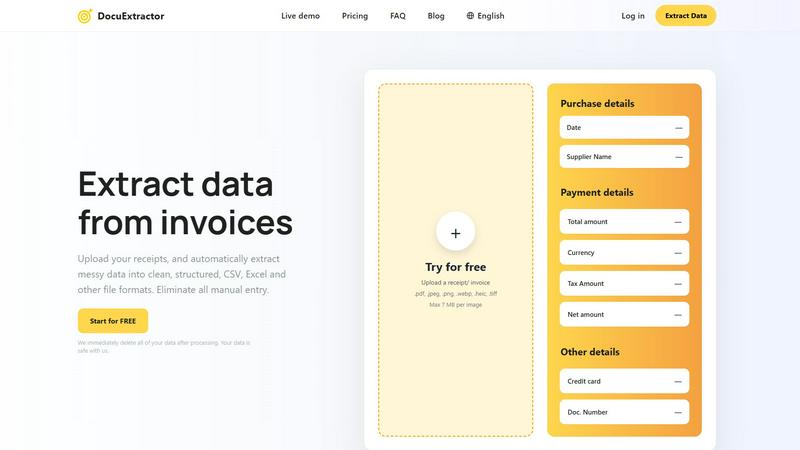
About DocuExtractor
DocuExtractor is an advanced document conversion software tailored for accountants, bookkeepers, and financial professionals. This innovative tool effectively transforms chaotic financial documents, including invoices, bank statements, and receipts, into clean, structured data formats such as CSV and Excel. Utilizing cutting-edge Optical Character Recognition (OCR) technology, DocuExtractor guarantees exceptional accuracy in data extraction, allowing users to significantly reduce the time spent on labor-intensive manual data entry. With a simple, user-friendly interface, individuals can effortlessly upload their documents and receive instant conversions. This efficiency makes DocuExtractor an indispensable tool for anyone managing financial documentation. Prioritizing data security, all processed information is promptly deleted, ensuring user confidentiality and peace of mind.
Features of DocuExtractor
Advanced Optical Character Recognition
DocuExtractor leverages state-of-the-art OCR technology to accurately extract data from various document types. This feature ensures that even the most complex financial documents are processed with minimal errors, streamlining the workflow for users.
User-Friendly Interface
The platform is designed with ease of use in mind. Users can quickly and intuitively upload documents, select data fields, and choose their preferred output format, making the entire process seamless for users of all skill levels.
Batch Processing Capability
DocuExtractor allows users to upload multiple documents simultaneously, significantly enhancing productivity. This batch processing feature is particularly beneficial for businesses that handle large volumes of financial documentation.
Multi-Format Output
Once data extraction is complete, users can download their results in various formats, including CSV and Excel. This flexibility ensures that the extracted data can easily integrate into existing accounting software or spreadsheets.
Use Cases of DocuExtractor
Streamlining Invoice Management
Accountants can use DocuExtractor to quickly convert incoming invoices into structured data, allowing them to focus on analysis rather than data entry. This automation saves valuable time and improves accuracy in financial reporting.
Simplifying Expense Tracking
Bookkeepers can efficiently convert receipts into organized data formats, making it easier to track expenses and manage budgets. The tool eliminates the tedious process of manual entry, allowing for quicker financial reviews.
Enhancing Financial Audits
Financial professionals can utilize DocuExtractor to prepare documents for audits by converting various financial reports into standardized formats. This capability helps ensure compliance and facilitates smoother audit processes.
Improving Small Business Operations
Small business owners can benefit from DocuExtractor by automating their document processing tasks. By reducing time spent on data entry, they can redirect their efforts toward growing their business and improving customer service.
Frequently Asked Questions
How secure is my data with DocuExtractor?
DocuExtractor prioritizes data security by immediately deleting all processed documents after extraction. This ensures that your sensitive financial information remains confidential and protected.
What types of documents can I upload?
You can upload various document types, including PDF, JPEG, PNG, WebP, HEIC, and TIFF files. This versatility allows you to extract data from a wide range of financial documents.
Is there a limit to how many documents I can process?
While DocuExtractor allows batch processing of documents, there is a maximum file size limit of 7 MB per image. However, you can upload multiple files within this size limit for processing.
Can I use DocuExtractor on mobile devices?
Currently, DocuExtractor is optimized for desktop use, but you can access the platform through a web browser on mobile devices. However, for the best experience, it is recommended to use a desktop or laptop computer.
Explore more in this category:
Similar to DocuExtractor

Free collection of online developer utilities, code formatters, and digital converters designed to streamline your daily workflow.

All-in-One POS, Inventory & Accounting Software for Bangladeshi Businesses

Online tally counter for tracking attendance, workouts, inventory, visitors, sports scores, habits, and everyday counting tasks.

The #1 Native Form Builder Plugin for Framer - No Code, No Embeds, No External Platforms.


