
Decode This Text vs MeetingMind
Side-by-side comparison to help you choose the right product.

Decode This Text
Decode This Text provides quick, human-like analyses of conversations in just 30 seconds for ultimate clarity and.
Last updated: February 28, 2026

MeetingMind
MeetingMind automatically records and transcribes Zoom meetings, providing searchable summaries to capture every.
Last updated: March 1, 2026
Visual Comparison
Decode This Text

MeetingMind
Feature Comparison
Decode This Text
Comprehensive Analysis
Decode This Text offers a thorough examination of messages, highlighting emotional tones, intentions, and contextual elements. This feature ensures that users grasp the nuances behind any communication, enabling them to respond appropriately.
Visual Input Capability
Users can conveniently upload screenshots of conversations, allowing the tool to analyze the text without requiring manual input. This feature simplifies the process for those who prefer visual communication, making it easier to decode complex interactions.
Emotional Tone Detection
This feature assesses the emotional temperature of messages, categorizing them as cold, sarcastic, or friendly. By understanding the emotional context, users can avoid misinterpretations and respond in a manner that aligns with the sender's mood.
Response Suggestions
For users unsure about how to reply, Decode This Text provides three tailored response options—calm, direct, or firm. This feature equips users with the confidence to engage in conversations effectively, regardless of the message's complexity.
MeetingMind
Automatic Detection
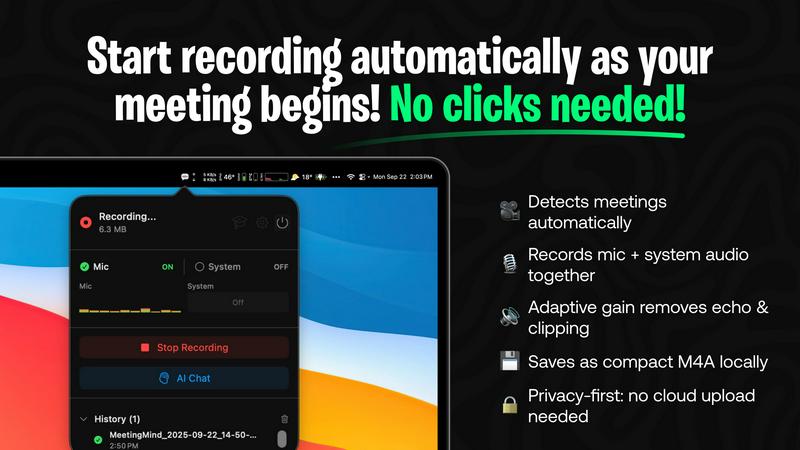
MeetingMind automatically detects Zoom meetings without any user intervention. This feature ensures that professionals can focus on the discussion at hand, knowing that their meeting is being recorded without the need for manual clicks.
Comprehensive Recording
The software captures both microphone and system audio simultaneously, utilizing adaptive gain technology to ensure clarity. This comprehensive recording feature guarantees that all voices and sounds are captured accurately, providing a complete audio record of the meeting.
AI Assistant
Users can choose their preferred AI for generating summaries and insights, either through local Ollama models or cloud-based OpenRouter. This flexibility allows users to tailor their experience while benefiting from intelligent, concise meeting summaries.
Markdown Export
MeetingMind offers the ability to export AI-generated summaries and transcripts in formatted markdown files. This feature not only enhances usability but also makes it easy for users to share and organize their meeting notes effectively.
Use Cases
Decode This Text
Navigating Ambiguous Texts
Decode This Text is invaluable when dealing with vague texts from friends or colleagues. By providing a clear interpretation, users can avoid unnecessary confusion and maintain healthy communication.
Professional Email Clarification
In the workplace, ambiguous emails can lead to miscommunication. This tool helps users decipher the true meaning behind brief or unclear messages, ensuring that responses are appropriate and informed.
Family Communication Enhancement
Family dynamics can be complicated by misunderstandings. Decode This Text assists users in interpreting family messages, promoting better understanding and reducing potential conflicts.
Relationship Insights
For those in romantic relationships, Decode This Text can help clarify intentions behind messages that may seem evasive or confusing. This insight fosters healthier conversations and strengthens connections.
MeetingMind
Executive Meetings
Busy executives can leverage MeetingMind to ensure that all key points from high-stakes meetings are accurately captured. The automatic detection of Zoom calls means they can focus on strategy and decision-making without worrying about note-taking.
Team Collaboration
In team meetings, MeetingMind enables collaboration by providing clear, concise summaries and action items. Team members can refer back to these notes to stay aligned on project goals and deadlines, improving overall productivity.
Client Consultations
For consultants and service providers, MeetingMind can record client consultations, ensuring that all client needs and feedback are documented. This allows for better follow-up and service delivery, enhancing client satisfaction.
Training and Workshops
Facilitators conducting training sessions or workshops can use MeetingMind to capture participant interactions and discussions. This documentation not only serves as a resource for future sessions but also helps in evaluating the effectiveness of the training.
Overview
About Decode This Text
Decode This Text is a cutting-edge communication tool designed to assist users in unraveling the often ambiguous meanings behind various messages. Whether you're struggling to interpret a cryptic email from your boss, a vague text from a friend, or a confusing message from a client, this innovative tool provides essential clarity. By simply pasting the text or describing the context, users receive an insightful analysis of the sender's underlying intentions, emotional tone, and appropriate response strategies. This tool is particularly beneficial for anyone looking to enhance their communication skills, foster better relationships, and eliminate misunderstandings. With a user-friendly interface and rapid analysis, Decode This Text empowers you to navigate your interactions confidently, alleviating the stress of overanalyzing every word.
About MeetingMind
MeetingMind is an innovative AI-driven meeting assistant specifically designed to enhance productivity by automating the process of capturing and transforming meeting discussions into searchable, interactive notes. This powerful tool is particularly beneficial for professionals who frequently engage in virtual meetings, especially those held via Zoom. By eliminating the need for manual note-taking, MeetingMind streamlines the workflow for busy executives, team leaders, and anyone who values efficiency in their professional interactions. The software provides real-time, speaker-attributed transcripts with just a click, ensuring that no detail is overlooked. It utilizes on-device AI to keep users focused during meetings while offering an embedded assistant that highlights key takeaways and action items. For users concerned about privacy, MeetingMind allows connections to local Ollama models and OpenRouter keys, ensuring secure and confidential data processing. With seamless integration into the macOS ecosystem and a user-friendly interface, MeetingMind transforms meeting management, making it an essential tool for today’s professionals.
Frequently Asked Questions
Decode This Text FAQ
How does Decode This Text ensure user privacy?
Decode This Text guarantees 100% anonymity. No human reads your texts, ensuring that your conversations remain private and secure.
What types of messages can I analyze with Decode This Text?
You can analyze any written communication, including text messages, emails, and social media messages. The tool is designed to handle a wide variety of contexts and formats.
How quickly can I expect to receive an analysis?
The tool typically provides a comprehensive analysis within 30 seconds, allowing users to gain clarity rapidly and respond in a timely manner.
Is there any limit to the number of messages I can decode?
Currently, there is no specified limit on the number of messages you can analyze. Users can decode as many conversations as they need to enhance their communication skills.
MeetingMind FAQ
How does MeetingMind ensure privacy during meetings?
MeetingMind prioritizes user privacy by processing all data locally on the user's Mac. This means that meeting recordings and transcripts never leave the device, ensuring confidentiality and data security.
What platforms does MeetingMind support?
Currently, MeetingMind is designed specifically for macOS. It integrates seamlessly with the macOS ecosystem, making it a perfect fit for users within that environment.
Is there a limit to the free version of MeetingMind?
Yes, the free version of MeetingMind allows for 60 minutes of recording per day. This limitation is particularly useful for short meetings and daily standups, providing value without any cost.
How can I upgrade to the unlimited version of MeetingMind?
Users can upgrade to the unlimited version through the Mac App Store, where they can make a one-time purchase. This version removes time limits and includes lifetime updates without any subscription fees.
Alternatives
Decode This Text Alternatives
Decode This Text is an innovative tool in the productivity and management category, designed to help users decipher the true meanings behind confusing conversations. By providing quick, human-like analyses of messages, it offers insights that can enhance understanding and communication. Users often seek alternatives to Decode This Text for various reasons, including pricing concerns, feature sets, specific platform compatibility, or personal preferences in user interface design. When selecting an alternative, it's essential to consider factors such as the depth of analysis provided, user-friendliness, response time, and whether the tool meets your specific communication needs. Additionally, evaluating customer support options and user reviews can offer insight into the effectiveness and reliability of the alternative tool, ensuring that it aligns with your expectations.
MeetingMind Alternatives
MeetingMind is an AI-driven meeting assistant designed to enhance productivity by automatically recording and transcribing virtual meetings, specifically those conducted via Zoom. This tool falls within the productivity and management category, aimed at professionals who rely on seamless documentation of discussions to facilitate better decision-making. Users often seek alternatives to MeetingMind for various reasons, including pricing, feature sets, or compatibility with different platforms that may better suit their unique workflows. When searching for an alternative, it is crucial to consider factors such as ease of use, integration capabilities, and the specific features that align with your needs. Look for options that provide reliable audio capture, real-time transcription, and strong data privacy measures. Identifying an alternative that matches your requirements will enhance your meeting experience and support your productivity goals.