
Cosy vs FilexHost
Side-by-side comparison to help you choose the right product.

Cosy automates member onboarding and introductions in Slack, boosting engagement while saving you valuable time.
Last updated: February 28, 2026

FilexHost
Effortlessly host and share files with instant URLs using FilexHost's simple drag-and-drop interface.
Last updated: February 27, 2026
Visual Comparison
Cosy
FilexHost

Feature Comparison
Cosy
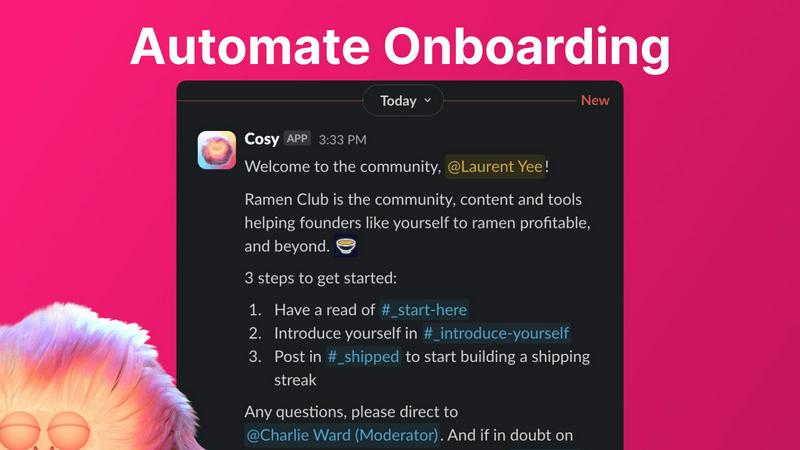
Automate Onboarding
Cosy allows you to create and automate up to 10 distinct onboarding welcome DM sequences. This feature ensures that new members receive a warm welcome either immediately or on a predetermined schedule. You can customize messages with names, links, and emojis, significantly reducing the time spent on individual welcomes and follow-ups.
Connect Your Members
Enhance community interaction by automatically introducing community members to each other via DMs. This feature allows opted-in members to be paired regularly based on a customizable schedule, fostering new connections and making it easier for members to engage with one another.
Member Directory
Cosy provides a searchable directory of all community members, enabling them to find one another without leaving Slack. Members can fill out custom profiles with relevant information, making it easy to search for individuals based on keywords or specific criteria, thereby increasing engagement and collaboration.
Content Highlights
Easily surface the most engaging posts in your community using quick slash commands. With features to identify the top 10 most engaged messages in specific channels or across all public channels, as well as unreplied messages, community leaders can ensure that important discussions do not go unnoticed.
FilexHost
Instant Subdomains
FileXHost provides users with instant subdomains (your-file.filex.host) upon uploading files, eliminating the need for complex setup processes. Users can immediately access their files through a clean, shareable URL, enabling swift distribution without delay or confusion.
Free SSL Encryption
Every link generated by FileXHost comes with free SSL encryption, ensuring that all shared files are secure and protected during transit. This automatic encryption enhances user confidence and maintains the integrity of sensitive information being shared.
Smart View Modes
FileXHost offers smart view modes that allow users to choose between direct rendering and download pages for their files. This flexibility enables optimal presentation of content, whether it is a live website, an interactive spreadsheet, or a downloadable media file, catering to different user preferences.
Optional Password Protection & Expiry Settings
Users can enhance the security of their hosted files by utilizing optional password protection and expiry settings. This feature allows for controlled access to files, enabling users to set specific time limits for availability, ranging from 24 hours to indefinite, thus maintaining privacy and exclusivity.
Use Cases
Cosy
Onboarding New Members
When a new member joins your Slack workspace, Cosy can automatically send them a series of welcome messages that guide them through the community's features. This ensures a smooth transition for newcomers and provides them with the necessary resources to engage effectively.
Fostering Connections
By utilizing the automated member introduction feature, community managers can regularly connect individuals who may not have otherwise met. This not only increases engagement but also fosters a sense of belonging among members, enhancing the community culture.
Streamlining Member Information
With the member directory, community leaders can easily maintain an up-to-date database of member profiles. This enables members to find others with specific skills or interests, facilitating collaboration and resource sharing within the community.
Highlighting Engagement
Community managers can use the content highlight feature to track and promote popular discussions. By surfacing the most engaged posts, they can encourage further interaction and participation, ensuring that members are always in the loop on trending topics.
FilexHost
Professional Reports Sharing
FileXHost is perfect for professionals who need to share client reports quickly and securely. With its drag-and-drop functionality and instant URL generation, users can deliver polished documents without worrying about email attachment limits or complex file transfer processes.
Developer Landing Pages
Developers can effectively utilize FileXHost to host landing pages or mock APIs. The platform allows them to upload their projects and share them with clients or stakeholders instantly, facilitating feedback and collaboration without the need for extensive server configurations.
Digital Product Distribution
Creators looking to distribute digital products can benefit from FileXHost’s capabilities. Whether it is eBooks, software, or multimedia content, the platform ensures a smooth delivery process with built-in viewers that enhance user experience without requiring additional downloads.
Static Site Hosting
FileXHost serves as an excellent solution for hosting static sites. Users can simply upload their website ZIP files, and FileXHost automatically renders the site, providing a professional presentation that is accessible via a dedicated subdomain, perfect for showcasing work or projects.
Overview
About Cosy
Cosy is an innovative Slack-native tool designed to enhance community engagement by transforming your Slack workspace into a vibrant hub of interaction. It automates essential community management tasks, allowing community leaders and managers to concentrate on fostering connections rather than getting bogged down with administrative responsibilities. With features such as automated onboarding sequences, member introductions, and a searchable member directory, Cosy simplifies the process of building and maintaining a cohesive community. This tool is ideal for organizations, clubs, and online communities striving to improve member interaction and streamline communication. By leveraging automation, Cosy saves valuable time while ensuring that no new member feels overlooked or isolated. Its seamless integration with Slack allows for easy engagement within the platform, making community management more efficient and effective.
About FilexHost
FileXHost is an innovative file hosting and sharing platform designed to simplify the process of managing and distributing files of various types. From documents and images to media and entire websites, FileXHost provides a seamless experience that caters to professionals, developers, and creators alike. The primary value proposition of FileXHost lies in its "Drop & Share" workflow, which allows users to upload files effortlessly, obtain instant secure URLs, and share them without the hassle of server management or complicated configurations. Recipients can access files without the need for logins, ensuring frictionless delivery. With robust features such as built-in viewers and smart rendering engines, FileXHost enhances the viewer experience by presenting files as intended. This makes it an ideal solution for anyone looking to share files quickly and securely.
Frequently Asked Questions
Cosy FAQ
How does Cosy automate onboarding for new members?
Cosy allows you to set up automated onboarding messages that can be sent to new members immediately upon joining or at a scheduled time. Each message can be customized to include personal touches that make new members feel welcomed.
Can I customize the member introduction messages?
Yes, Cosy provides a customizable template for member introduction messages. You can tailor the message to suit your community's tone and include relevant details to facilitate engaging conversations between newly introduced members.
Is the member directory easy to use for all members?
Absolutely. Members can easily create and edit their profiles within the member directory, which is searchable and user-friendly. The directory helps enhance interactions by allowing members to find others based on specific interests or keywords.
What are the commands for accessing content highlights?
You can access content highlights using specific slash commands in Slack. For example, use /most-engaged-messages for the top posts in a channel or /most-engaged-messages-all for the best posts across all public channels. This helps in keeping the community informed about popular discussions.
FilexHost FAQ
What is FileXHost?
FileXHost is a user-friendly file hosting platform that allows individuals and businesses to upload, share, and manage various types of files. It simplifies the sharing process with features like instant URLs and secure access options.
Is it really free?
Yes, FileXHost offers a free plan that allows users to host up to 1,000 files with a maximum size of 25MB each. This plan is ad-supported and comes with a 7-day expiry for hosted files, making it ideal for quick sharing.
What file types are supported?
FileXHost supports a wide array of file types, including documents (PDF, RTF), spreadsheets (XLSX, CSV), media files (MP4, MP3), images (JPG, PNG), archives (ZIP), and code files (JSON, plain text), ensuring versatile hosting options.
How do I update my site?
To update your site, simply upload a new version of your file or website ZIP to FileXHost. The platform will generate a new link, ensuring that your most recent content is always available to your audience without any complex update processes.
Alternatives
Cosy Alternatives
Cosy is a Slack-native tool that automates member onboarding and introductions, falling into the productivity and management category. It is designed to enhance community engagement by streamlining various community management tasks, allowing leaders to focus on fostering interaction rather than dealing with administrative burdens. Users often seek alternatives to Cosy for reasons such as pricing, specific feature sets, or compatibility with other platforms. When choosing an alternative, it is essential to consider factors like ease of use, integration capabilities, and the ability to customize functionalities to meet the unique needs of your community. A thorough evaluation of these aspects will ensure a suitable solution is identified.
FilexHost Alternatives
FilexHost is an innovative file hosting and sharing platform that allows users to effortlessly upload and share various types of files through a simple drag-and-drop interface. It belongs to the productivity and management category, catering to individuals and professionals who require quick and reliable file sharing solutions without the hassle of complex setups or configurations. Users often seek alternatives to FilexHost for various reasons, including pricing structures, additional features, or specific platform requirements that better align with their needs. When selecting an alternative, it is essential to consider factors such as ease of use, security measures, file size limits, and the overall user experience to ensure that the chosen platform meets your specific demands.