
AskFormulas vs LuxSign
Side-by-side comparison to help you choose the right product.

AskFormulas
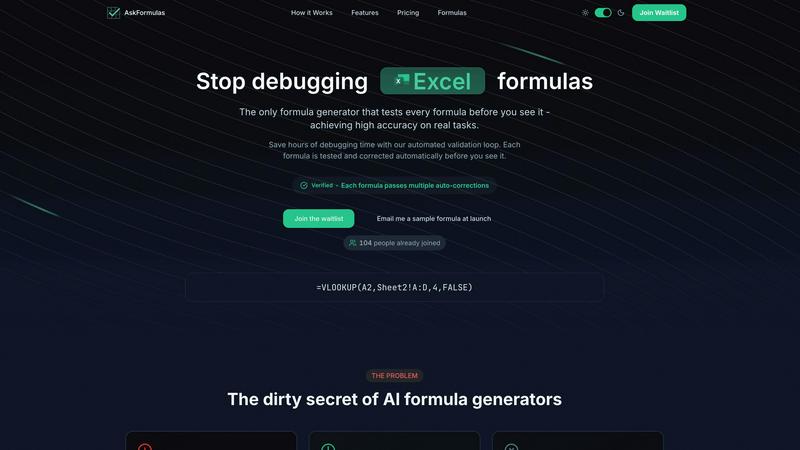
AskFormulas generates and validates Excel and Google Sheets formulas with automated testing for guaranteed accuracy.
Last updated: February 28, 2026

LuxSign enables secure and compliant electronic signatures for documents across the EU, streamlining your signing.
Last updated: February 27, 2026
Visual Comparison
AskFormulas
LuxSign

Feature Comparison
AskFormulas
Proprietary Validation Engine
At the core of AskFormulas is its unique validation engine, which subjects every AI-generated formula to a rigorous, three-step testing process. This involves parsing the user's natural language intent, executing the formula in a secure sandbox environment with synthetic test data, and performing iterative auto-corrections on any errors detected. This process, which other tools omit, is what guarantees the published accuracy rate of over 95%, effectively eliminating the 40-60% error rate common in conventional generators.
Natural Language to Formula Conversion
Users can bypass the need to memorize complex spreadsheet syntax entirely. By simply describing a calculation need in plain English (e.g., "Sum all values in column B where column A contains the word Sales"), AskFormulas' AI interprets the context and intent to generate the appropriate formula syntax. This dramatically lowers the barrier to entry for complex data operations, making advanced spreadsheet functionality accessible to users of all skill levels.
Cross-Platform Syntax Automation
The tool seamlessly supports both Microsoft Excel and Google Sheets with a simple one-click toggle. The system automatically adjusts the formula syntax to match the conventions and function names of the selected platform. This eliminates the need for users to manually translate formulas like VLOOKUP for Excel or ARRAYFORMULA for Sheets, ensuring correct, platform-specific output every time.
Smart Error Detection and Auto-Correction
Unlike basic generators that output formulas with errors, AskFormulas proactively identifies and fixes common spreadsheet errors. If a generated formula returns a #REF!, #VALUE!, or other error during its internal validation, the system's AI performs smart corrections, such as adjusting cell ranges or function arguments, and retests it. This loop continues until a fully functional, "Verified" formula is produced, saving the user from manual troubleshooting.
LuxSign
Multiple Signature Methods
LuxSign accommodates various signature methods, allowing users to draw their signature, type their name, or upload an image. This flexibility ensures that the signing process is quick and tailored to individual preferences, enhancing user experience.
Advanced Security
With industry-standard encryption protocols in place, LuxSign guarantees that documents are securely stored and transmitted. This robust security framework protects sensitive information from unauthorized access, ensuring compliance with EU data protection laws.
Collaboration Workspaces
LuxSign offers collaboration workspaces that enable teams to work together effectively. Users can organize documents into folders, manage member access, and collaborate on signing workflows, facilitating seamless communication and document management.
Complete Audit Trail
The platform provides detailed audit trails that log every action taken on a document, including timestamps and signer information. This feature is crucial for compliance and verification, as it ensures transparency and accountability in the signing process.
Use Cases
AskFormulas
Financial Reporting and Analysis
Financial analysts and accountants can use AskFormulas to quickly generate complex formulas for quarterly reports, profit & loss statements, and variance analyses. By describing logic like "calculate year-over-year growth percentage for column C," they receive a validated, error-free formula, ensuring the accuracy of critical financial data and saving hours otherwise spent debugging intricate nested functions.
Sales and Revenue Operations Management
Revenue operations managers and sales analysts can automate data consolidation from multiple sources. They can request formulas to "VLOOKUP the contract value from Sheet2 based on the client ID in column A" or "sum all sales in the Central region for Q1" and get a guaranteed-working formula. This accelerates the creation of accurate dashboards and forecasts, directly impacting strategic decision-making.
Small Business Bookkeeping and Inventory
Small business owners without dedicated finance teams can manage their books and inventory more efficiently. Describing tasks such as "total monthly expenses from this list" or "count how many items have inventory below the reorder threshold" yields ready-to-use formulas. This empowers them to maintain accurate records without needing to learn advanced spreadsheet programming.
Academic Research and Data Compilation
Researchers, students, and academics compiling data for papers or theses can use AskFormulas to perform statistical calculations and data transformations. Requesting a formula to "calculate the standard deviation for this data set" or "find the correlation between these two columns" provides a reliable result, allowing them to focus on analysis rather than formula syntax errors.
LuxSign
Real Estate Transactions
In the real estate sector, LuxSign simplifies the process of signing contracts and agreements. Agents can send documents to multiple parties for signature, ensuring a quick and legally valid transaction process that keeps all stakeholders informed.
Legal Agreements
Law firms can leverage LuxSign to manage legal documents securely. The platform's compliance with eIDAS allows for the electronic signing of contracts, which is essential for maintaining legal validity across EU jurisdictions.
Human Resources
HR departments can utilize LuxSign for onboarding documents, contracts, and policy agreements. The ability to automate notifications and track document status significantly reduces administrative burdens and speeds up the hiring process.
Financial Services
Financial institutions can enhance their client onboarding processes with LuxSign. By enabling digital signatures for loan agreements and service contracts, companies can streamline workflows while ensuring compliance with stringent regulatory standards.
Overview
About AskFormulas
AskFormulas is a revolutionary AI-powered tool engineered to solve the critical and widespread problem of broken spreadsheet formulas. While traditional AI formula generators are notorious for producing error rates between 40-60%, leaving users to manually debug complex syntax, AskFormulas introduces a paradigm shift with its proprietary validation engine. This system rigorously tests every single generated formula on real, synthetic data before it is ever presented to the user, ensuring an industry-leading accuracy rate of over 95% (AskFormulas, 2024). The tool operates on a simple yet powerful principle: users describe their calculation needs in plain English, and the AI not only generates the correct formula syntax for Excel or Google Sheets but also runs it through an automated validation loop. This loop identifies and auto-corrects common errors like #REF! and #VALUE! until a verified, working solution is achieved. Designed for professionals who depend on data integrity, such as financial analysts and revenue operations managers, as well as small business owners and individuals lacking deep technical expertise, AskFormulas delivers an unequivocal core value proposition. It transforms users from formula debuggers into productive data analysts by saving hours of weekly frustration and guaranteeing that every formula works upon receipt.
About LuxSign
LuxSign is a secure, cloud-based electronic signature platform designed specifically for businesses that require high compliance with legal standards. Developed in Luxembourg, LuxSign ensures that all documents are encrypted end-to-end, providing peace of mind through the protection of sensitive information. The platform is hosted exclusively within Luxembourg, adhering strictly to GDPR regulations, which makes it an ideal choice for organizations operating within the European Union. LuxSign supports eIDAS Simple Electronic Signatures (SES), ensuring that the signatures are legally valid for contracts across all EU member states. Its user-friendly interface allows for features such as parallel or sequential signing workflows, drag-and-drop signature field placement, and automated email notifications to keep all parties informed. For businesses seeking additional functionality, advanced tiers include document templates, comprehensive audit trails, bulk signing capabilities, collaboration workspaces, custom branding options, and a fully equipped REST API for seamless system integrations. With LuxSign, organizations can streamline their document signing processes while maintaining compliance and security.
Frequently Asked Questions
AskFormulas FAQ
How accurate are the generated formulas?
AskFormulas achieves an industry-leading accuracy rate of over 95% for formulas that work correctly on real tasks. This is made possible by our proprietary validation engine, which tests and auto-corrects every formula in a simulated spreadsheet environment before you see it. This contrasts sharply with conventional AI formula generators, which studies suggest have error rates between 40-60% due to a lack of validation.
Does it work with both Excel and Google Sheets?
Yes, AskFormulas provides full, seamless support for both Microsoft Excel and Google Sheets. A simple toggle within the interface allows you to switch between platforms. The AI automatically adjusts the formula syntax to use the correct function names and conventions for your selected spreadsheet software, whether it's Excel's XLOOKUP or Sheets' ARRAYFORMULA.
How does the validation loop work?
The validation loop is a 3-step automated process. First, your natural language request is parsed into formula intent. Second, the generated formula is executed in a secure sandbox with synthetic test data designed to mimic real-world scenarios. Third, if any errors (like #REF!) are found, the system performs smart auto-corrections and retests the formula. This loop continues until a "Verified" formula is produced.
What happens if my formula is complex and still fails validation?
The AskFormulas system is engineered to handle complexity through multiple iterative correction attempts. If a highly complex formula encounters a persistent issue during the automated validation, the system is designed to provide the most robust corrected version possible. For edge cases beyond full automation, the tool provides clear insights, and priority support is available for Pro and Team plan users to help resolve unique challenges.
LuxSign FAQ
What types of documents can I sign with LuxSign?
LuxSign supports various document formats, including PDF, DOC, and DOCX. Users can upload files up to 10MB, ensuring flexibility in document handling.
How does LuxSign ensure document security?
LuxSign employs end-to-end encryption during document upload, storage, and transmission. All documents are stored in secure servers located in Luxembourg, complying with GDPR and local data protection laws.
Can I integrate LuxSign with other software?
Yes, LuxSign offers a full REST API and embeddable SDK, allowing for seamless integration with existing systems and processes. This feature is particularly beneficial for enterprises looking to customize their document management workflows.
Is LuxSign compliant with EU regulations?
Absolutely. LuxSign is fully compliant with the eIDAS regulations, providing Simple Electronic Signatures (SES) that are legally valid across all EU member states, ensuring that your electronic signatures hold up in court.
Alternatives
AskFormulas Alternatives
AskFormulas is a specialized AI-powered tool in the productivity software category, designed to generate and validate Excel and Google Sheets formulas with a verified accuracy rate exceeding 95%. Its core innovation is an automated validation engine that tests formulas against real data, ensuring they work correctly before delivery. Users may seek alternatives for various reasons, including budget constraints, a need for different feature sets like integration with other platforms, or a preference for tools with broader AI capabilities beyond formula generation. The search often stems from a desire to find the optimal balance between cost, functionality, and ease of use. When evaluating alternatives, key considerations should include the tool's accuracy rate and validation methodology, compatibility with your spreadsheet platform, the depth of error detection and correction features, and overall value for the investment. The primary goal is to minimize manual debugging time while maximizing data reliability.
LuxSign Alternatives
LuxSign is an electronic signature platform based in Luxembourg, renowned for its compliance with eIDAS SES standards, ensuring legal validity for digital signatures across the European Union. It is designed for businesses that prioritize security and regulatory adherence, providing a cloud-based solution that encrypts documents end-to-end and stores them within the jurisdiction of Luxembourg, thereby meeting GDPR requirements. Users often seek alternatives to LuxSign due to various factors, including pricing structures, feature sets, and specific integration needs that may not be fully addressed by the platform. When exploring alternatives, it is crucial to consider aspects such as compliance standards, user experience, scalability, and the availability of essential functionalities that align with the unique requirements of your organization.