
AskFormulas
AskFormulas generates and validates Excel and Google Sheets formulas with automated testing for guaranteed accuracy.
Visit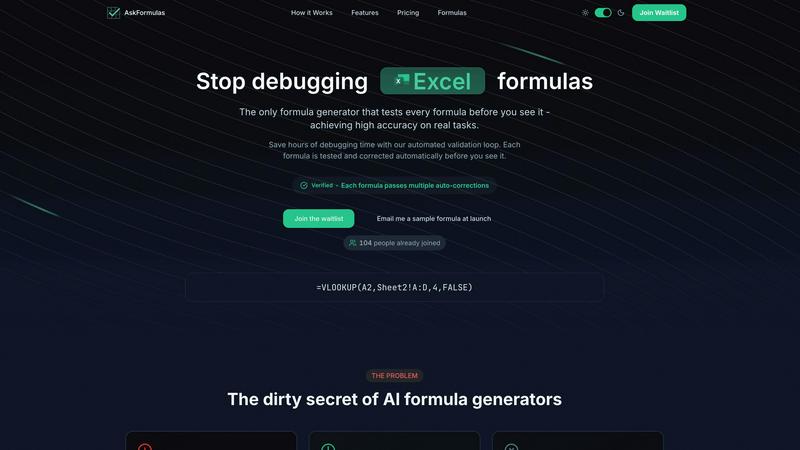
About AskFormulas
AskFormulas is a revolutionary AI-powered tool engineered to solve the critical and widespread problem of broken spreadsheet formulas. While traditional AI formula generators are notorious for producing error rates between 40-60%, leaving users to manually debug complex syntax, AskFormulas introduces a paradigm shift with its proprietary validation engine. This system rigorously tests every single generated formula on real, synthetic data before it is ever presented to the user, ensuring an industry-leading accuracy rate of over 95% (AskFormulas, 2024). The tool operates on a simple yet powerful principle: users describe their calculation needs in plain English, and the AI not only generates the correct formula syntax for Excel or Google Sheets but also runs it through an automated validation loop. This loop identifies and auto-corrects common errors like #REF! and #VALUE! until a verified, working solution is achieved. Designed for professionals who depend on data integrity, such as financial analysts and revenue operations managers, as well as small business owners and individuals lacking deep technical expertise, AskFormulas delivers an unequivocal core value proposition. It transforms users from formula debuggers into productive data analysts by saving hours of weekly frustration and guaranteeing that every formula works upon receipt.
Features of AskFormulas
Proprietary Validation Engine
At the core of AskFormulas is its unique validation engine, which subjects every AI-generated formula to a rigorous, three-step testing process. This involves parsing the user's natural language intent, executing the formula in a secure sandbox environment with synthetic test data, and performing iterative auto-corrections on any errors detected. This process, which other tools omit, is what guarantees the published accuracy rate of over 95%, effectively eliminating the 40-60% error rate common in conventional generators.
Natural Language to Formula Conversion
Users can bypass the need to memorize complex spreadsheet syntax entirely. By simply describing a calculation need in plain English (e.g., "Sum all values in column B where column A contains the word Sales"), AskFormulas' AI interprets the context and intent to generate the appropriate formula syntax. This dramatically lowers the barrier to entry for complex data operations, making advanced spreadsheet functionality accessible to users of all skill levels.
Cross-Platform Syntax Automation
The tool seamlessly supports both Microsoft Excel and Google Sheets with a simple one-click toggle. The system automatically adjusts the formula syntax to match the conventions and function names of the selected platform. This eliminates the need for users to manually translate formulas like VLOOKUP for Excel or ARRAYFORMULA for Sheets, ensuring correct, platform-specific output every time.
Smart Error Detection and Auto-Correction
Unlike basic generators that output formulas with errors, AskFormulas proactively identifies and fixes common spreadsheet errors. If a generated formula returns a #REF!, #VALUE!, or other error during its internal validation, the system's AI performs smart corrections, such as adjusting cell ranges or function arguments, and retests it. This loop continues until a fully functional, "Verified" formula is produced, saving the user from manual troubleshooting.
Use Cases of AskFormulas
Financial Reporting and Analysis
Financial analysts and accountants can use AskFormulas to quickly generate complex formulas for quarterly reports, profit & loss statements, and variance analyses. By describing logic like "calculate year-over-year growth percentage for column C," they receive a validated, error-free formula, ensuring the accuracy of critical financial data and saving hours otherwise spent debugging intricate nested functions.
Sales and Revenue Operations Management
Revenue operations managers and sales analysts can automate data consolidation from multiple sources. They can request formulas to "VLOOKUP the contract value from Sheet2 based on the client ID in column A" or "sum all sales in the Central region for Q1" and get a guaranteed-working formula. This accelerates the creation of accurate dashboards and forecasts, directly impacting strategic decision-making.
Small Business Bookkeeping and Inventory
Small business owners without dedicated finance teams can manage their books and inventory more efficiently. Describing tasks such as "total monthly expenses from this list" or "count how many items have inventory below the reorder threshold" yields ready-to-use formulas. This empowers them to maintain accurate records without needing to learn advanced spreadsheet programming.
Academic Research and Data Compilation
Researchers, students, and academics compiling data for papers or theses can use AskFormulas to perform statistical calculations and data transformations. Requesting a formula to "calculate the standard deviation for this data set" or "find the correlation between these two columns" provides a reliable result, allowing them to focus on analysis rather than formula syntax errors.
Frequently Asked Questions
How accurate are the generated formulas?
AskFormulas achieves an industry-leading accuracy rate of over 95% for formulas that work correctly on real tasks. This is made possible by our proprietary validation engine, which tests and auto-corrects every formula in a simulated spreadsheet environment before you see it. This contrasts sharply with conventional AI formula generators, which studies suggest have error rates between 40-60% due to a lack of validation.
Does it work with both Excel and Google Sheets?
Yes, AskFormulas provides full, seamless support for both Microsoft Excel and Google Sheets. A simple toggle within the interface allows you to switch between platforms. The AI automatically adjusts the formula syntax to use the correct function names and conventions for your selected spreadsheet software, whether it's Excel's XLOOKUP or Sheets' ARRAYFORMULA.
How does the validation loop work?
The validation loop is a 3-step automated process. First, your natural language request is parsed into formula intent. Second, the generated formula is executed in a secure sandbox with synthetic test data designed to mimic real-world scenarios. Third, if any errors (like #REF!) are found, the system performs smart auto-corrections and retests the formula. This loop continues until a "Verified" formula is produced.
What happens if my formula is complex and still fails validation?
The AskFormulas system is engineered to handle complexity through multiple iterative correction attempts. If a highly complex formula encounters a persistent issue during the automated validation, the system is designed to provide the most robust corrected version possible. For edge cases beyond full automation, the tool provides clear insights, and priority support is available for Pro and Team plan users to help resolve unique challenges.
Pricing of AskFormulas
AskFormulas offers simple, transparent pricing tiers to suit different user needs. All plans include access to the core validated formula generation technology.
Starter Plan ($9/month): Designed for individual users, this plan includes 500 formulas per month, access to all formula types, a formula history log, and standard email support.
Pro Plan ($19/month): For power users, this popular plan offers 2,000 formulas per month, priority support, advanced export features, and a place in the priority queue for system access.
Team Plan ($39/month): Built for small teams of up to 5 members, this plan provides 6,000 shared formulas monthly. It includes all Pro features plus a collaborative team workspace, administrative controls, and audit logs. Enterprise-level pricing is available for organizations with larger needs.
Explore more in this category:
Similar to AskFormulas

Free collection of online developer utilities, code formatters, and digital converters designed to streamline your daily workflow.

Online tally counter for tracking attendance, workouts, inventory, visitors, sports scores, habits, and everyday counting tasks.

The #1 Native Form Builder Plugin for Framer - No Code, No Embeds, No External Platforms.


PerPageFax lets you send a fax online from any browser for a flat $0.50 per page — no account, no subscription, no fax machine.

Track staff & time. Free trial. Cloud/on-prem.