AIPhotoTalk vs Tool.Video
Side-by-side comparison to help you choose the right product.

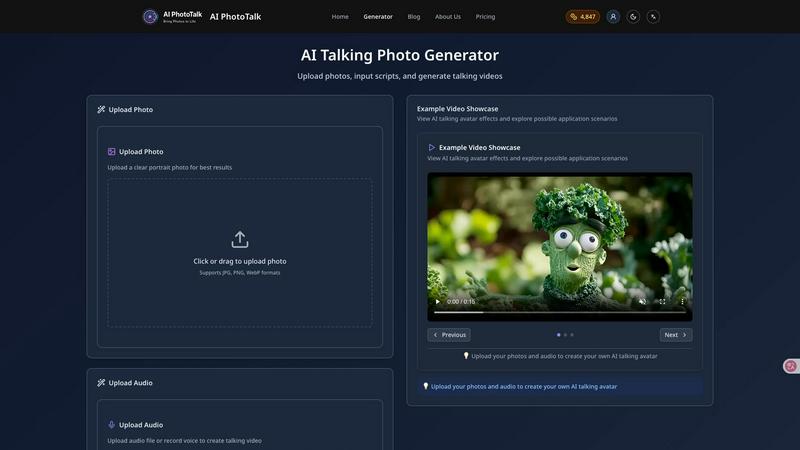
AI PhotoTalk transforms photos into realistic talking videos with perfect lip sync, multi-language support, and 4K quality in just 30 seconds.
Last updated: March 11, 2026

Tool.Video
Tool.Video is an all-in-one AI toolkit that effortlessly generates videos, images, and music from text inputs.
Last updated: March 1, 2026
Visual Comparison
AIPhotoTalk
Tool.Video

Feature Comparison
AIPhotoTalk
Professional Lip Sync Technology
AIPhotoTalk utilizes advanced algorithms powered by deep learning to ensure perfect lip synchronization. This feature allows for the creation of realistic photo animations that mimic natural facial expressions, making the final video appear lifelike and engaging.
Multi-language Voice Synthesis
The platform supports voice synthesis in over 30 languages, catering to a global audience. This feature enables users to create content that resonates with diverse demographics, making AIPhotoTalk an invaluable tool for international marketing and education.
4K Professional Video Output
AIPhotoTalk guarantees high-quality video production with its advanced rendering technology that produces professional-grade 4K videos. This feature is particularly beneficial for businesses and educators seeking to deliver polished presentations and marketing materials.
30-Second Generation Speed
The AI processing capabilities of AIPhotoTalk allow it to generate talking videos in under 30 seconds. This rapid production time is optimized for professional workflows, enabling users to create and share content quickly without sacrificing quality.
Tool.Video
Sora 2 Video Generation
Sora 2 is an advanced text-to-video AI model that allows users to create realistic videos from written prompts. It incorporates natural motion and stunning visuals, making it easy for users to bring their ideas to life without requiring extensive video editing skills.
Nano Banana Pro
Nano Banana Pro offers high-quality AI image generation capabilities, providing users with both text-to-image and image-to-image modes. This feature enables users to create unique and visually appealing content in seconds, enhancing the overall quality of their projects.
AI Music Generator (Suno 5)
Suno 5 is a professional-grade AI music generation tool that allows users to create songs complete with lyrics, melodies, and arrangements across various genres. This feature is particularly beneficial for video creators who need customized soundtracks to complement their visual content.
Video Thumbnail Generator
The Video Thumbnail Generator automatically creates engaging thumbnails for videos by extracting and optimizing frames from the content. This tool enhances viewer engagement by ensuring that each video has a visually appealing thumbnail that attracts clicks.
Use Cases
AIPhotoTalk
Talking Social Media Videos
AIPhotoTalk is perfect for creating engaging social media content. Users can transform their personal photos into captivating talking videos that attract attention and drive engagement on platforms like TikTok and Instagram.
AI Spokesperson Clips
Businesses can utilize AIPhotoTalk to create AI-generated spokesperson videos that deliver messages effectively. This use case is particularly useful for marketing campaigns where a human-like presence can enhance brand communication.
Educational Explainer Videos
Educators can leverage AIPhotoTalk to create dynamic explainer videos. By animating historical figures or educational content, teachers can make learning more interactive and appealing to students.
Animated Historical Characters
AIPhotoTalk allows for the creation of animated historical characters, making it an excellent tool for museums, educational institutions, and content creators interested in bringing history to life in an engaging format.
Tool.Video
Content Creation for Social Media
Marketers and content creators can use Tool.Video to generate captivating videos and images tailored for social media platforms. The ability to create engaging content quickly helps in maintaining a consistent online presence and boosts audience engagement.
Educational Video Production
Educators and trainers can leverage Tool.Video to produce instructional videos that incorporate visuals, music, and clear narratives. This feature is invaluable for creating engaging educational content that can enhance learning experiences.
Advertising and Marketing Campaigns
Businesses can utilize Tool.Video's AI-powered TVC Generator to create professional-quality advertisements in minutes. This streamlines the process of producing promotional content, allowing companies to focus on strategy rather than production logistics.
Personal Projects and Creative Exploration
Individuals looking to explore their creative potential can experiment with Tool.Video's various features to produce personal projects, such as travel vlogs or artistic expressions. The platform empowers users to create without the need for extensive technical knowledge or resources.
Overview
About AIPhotoTalk
AIPhotoTalk is an innovative AI-powered platform designed to transform static photos into realistic talking videos within seconds. By leveraging advanced artificial intelligence technology, users can upload portrait photos, type in scripts, and generate lip-synced videos effortlessly. The platform is ideal for a diverse range of users including creators, marketers, educators, and businesses looking to enhance their visual content. With its user-friendly interface and no requirement for video editing skills, AIPhotoTalk democratizes access to high-quality video production. Whether you are looking to engage your audience on social media, create compelling educational materials, or produce professional marketing videos, AIPhotoTalk offers a swift and effective solution. Its support for 30+ languages and 4K video output further solidifies its position as a leading tool in the realm of digital content creation.
About Tool.Video
Tool.Video is an all-in-one AI video generation platform that caters to a diverse range of users, including creators, marketers, and developers. This innovative tool simplifies the content creation process through an integrated suite of advanced AI applications. Users can leverage Sora 2 for video generation, Nano Banana Pro for image creation, and Suno 5 for music production, all within a single, user-friendly interface. The platform's primary value proposition lies in its ability to streamline AI-driven creativity, enabling users to craft realistic videos from text prompts, generate stunning images, and produce high-quality soundtracks seamlessly. With API integration, Tool.Video enhances productivity and empowers users to explore their creative potential without extensive technical knowledge, making it an ideal choice for both novices and professionals alike.
Frequently Asked Questions
AIPhotoTalk FAQ
How does AIPhotoTalk ensure realistic lip synchronization?
AIPhotoTalk employs advanced AI algorithms that utilize deep learning techniques to analyze facial movements and synchronize them with the spoken script, resulting in highly realistic animations.
Can I use AIPhotoTalk for commercial purposes?
Yes, AIPhotoTalk offers a commercial use license that allows businesses to utilize the platform for professional content production and marketing campaigns without restrictions.
What types of photos work best with AIPhotoTalk?
For optimal results, it is recommended to upload clear, high-quality portrait photos. The better the quality of the input image, the more realistic the generated video will be.
Is AIPhotoTalk accessible for beginners?
Absolutely. AIPhotoTalk features a beginner-friendly interface that simplifies the process of creating talking videos. No prior video editing experience is required, allowing anyone to produce professional-quality content easily.
Tool.Video FAQ
What types of media can I create with Tool.Video?
Tool.Video allows users to create videos, images, and music. The platform integrates AI tools for video generation, image creation, and music production, making it a comprehensive content creation suite.
Is Tool.Video suitable for beginners?
Yes, Tool.Video is designed to be user-friendly and accessible for users of all skill levels. The intuitive interface and guided processes enable beginners to create professional-quality content without prior experience in video production or editing.
Can I use Tool.Video for commercial projects?
Absolutely. Tool.Video provides tools that are suitable for both personal and commercial use, allowing users to create content for marketing, advertising, and other professional applications.
Does Tool.Video support API integration?
Yes, Tool.Video offers API integration, enabling developers to incorporate the platform's capabilities into their own applications or workflows. This feature enhances flexibility and allows for tailored solutions based on specific needs.
Alternatives
AIPhotoTalk Alternatives
AIPhotoTalk is an innovative tool designed to transform static photos into dynamic talking videos through the power of artificial intelligence. This platform falls within the realm of video creation tools, enabling users to produce engaging content quickly and easily. However, users often seek alternatives to AIPhotoTalk for various reasons, including pricing structures, specific feature requirements, or compatibility with different platforms. When searching for an alternative, it is essential to consider factors such as user interface design, rendering speed, the complexity of features offered, and the level of customer support. Additionally, understanding whether the tool caters to your specific needs—whether for marketing, education, or social media content—can significantly enhance your content creation process.
Tool.Video Alternatives
Tool.Video is an all-in-one AI video generation toolkit designed for creators, marketers, and developers. This platform offers a variety of advanced tools for generating videos, images, and music, simplifying the content creation process and allowing users to produce high-quality media with ease. Given its comprehensive capabilities, users often seek alternatives due to factors such as pricing, specific feature sets, or compatibility with their existing workflows and platforms. When exploring alternatives, users should consider several key aspects, including the range of features offered, user-friendliness, integration options with other tools, and overall cost. It is essential to evaluate how well an alternative meets specific creative needs and whether it enhances productivity without requiring extensive technical expertise.